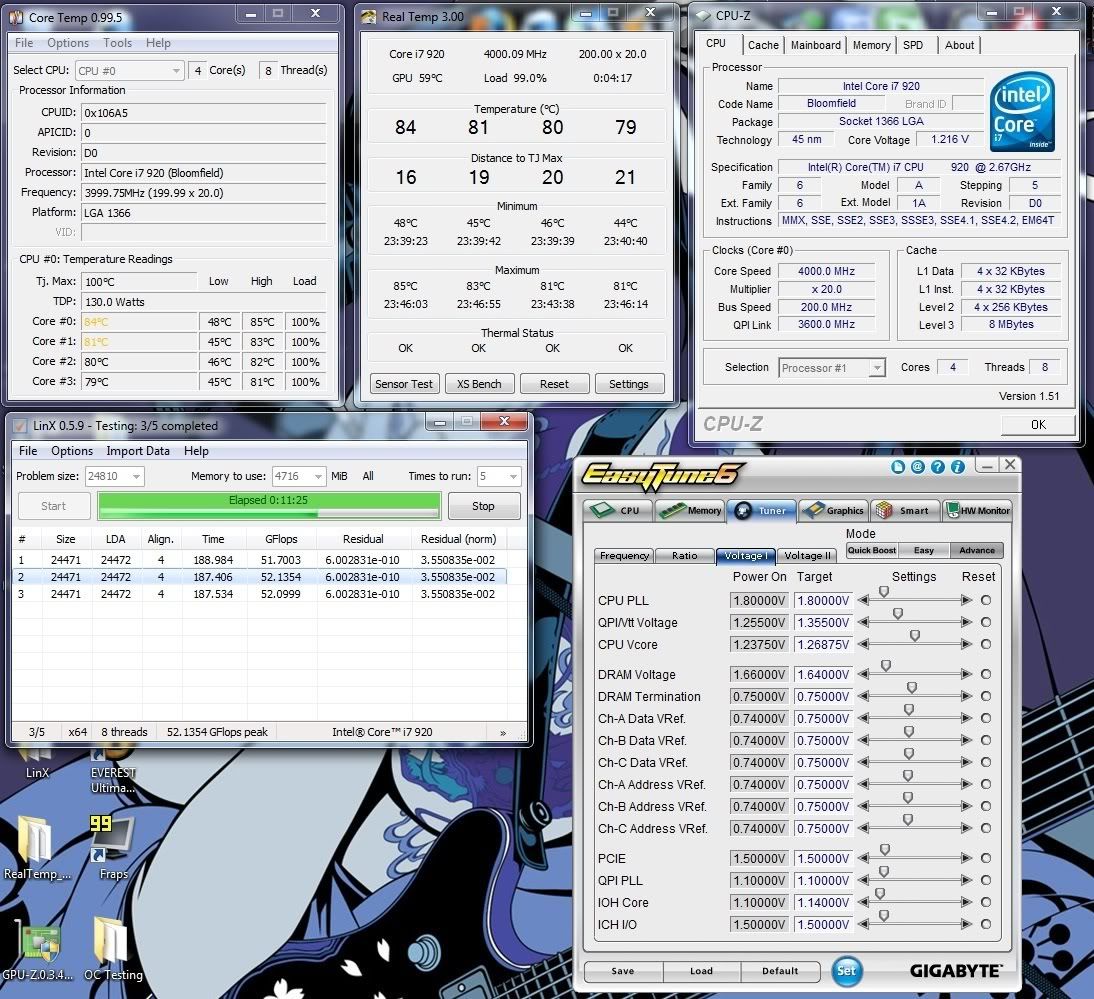
High i7 920 Noctua Temps

Associate
Joined
13 Jun 2009
Posts
45
I'll apologise in advance for adding to the numerous "are my temps too hot?!?" threads, but after googling around and trying other people's solutions I can't seem to get my temps lower.

Relevant Specs:

* Intel Quad Core i7 920 @ 3.5Ghz (175x20) (Vcore: 1.2125 QPI/Vtt: 1.215V)
* Gigabyte EX58-UD5
* Noctua NH-U12P SE1366
* 6GB Corsair Dominator DDR3 1600Mhz
* 2 x XFX HD 4890
* Corsair 850W TX PSU
* CM HAF 932

(HT = ON, Performance Enhance = Turbo)
Ambient temperature = 25-27*C

My (RealTemp) idle temps are currently:

49*C
47*C
46*C
45*C

..but will invariably creep to about 51-52 on the warmest core without really much exertion.

If I run Prime95 for an hour.. I'm looking at:

76*C
75*C
73*C
72*C

..which doesn't really worry me, but it's hotter than pretty much every other system I've seen at my clock/voltages without an obvious problem and if I'm only at 3.5Ghz and creeping up to 80*C then it doesn't look all too great.

On the subject of thermal paste, I've re-seated the heatsink 6 times using varying amounts of thermal paste, but with little difference in temperatures (usually around 2*C at best) and I've tried the Noctua NT-H1 that came with the heatsink and some Akasa 460 Pro that I bought, with negligible difference between them in terms of performance (1*C maybe, depending on application)

I've tried adding a little pressure on the heatsink incase there is poor contact between the heatsink and the CPU, but this doesn't make a difference, so I don't know if lapping would help, although I'd like to avoid it at all possible costs, as with the best will in the world I really don't know what I'm doing and I know I'll end up doing more damage than good.

Am I being too hasty with re-seating the heatsink.. I've done it maybe once every couple of days to see if I can get better results, so should I just wait for a "settling period" or something?

Any constructive input is appreciated.

Kind regards
 
Last edited:

My i7 920 d0 is the same, with the same heatsink. I am also too busy to bother reseating it at the moment.

However, what I found was that going from 3.6GHz to 3.9GHz barely made any difference temperature-wise (maybe 2-3 degrees) and I was also able to drop VCore a few steps from its default 1.25V - have you tried that?
 
The temps are not THAT bad considering the heat we are having at present. What is your case airflow like and does it make a difference if you take the side panel off? IF it does then you need better case cooling. Also how are you orienting the HSF? Ideally you want the air flow passing from the front of the fan through the heatsink and back out towards the exhuast fan on your case.

Remember that with thermal paste - less is more. I put a blob about the size of a grain of rice on the middle of the cpu, which is about right.

Have you got Turbo enabled in the BIOS if so your CPU is actually running at 3.675MHz when under load.
 
hmm

your temps are a wee bit high for your clock rating... the best method to apply thermal paste to an i7 920 is in a streight line with the arrow of the cpu (the one that tells you which way to place the cpu in) facing away from you. place the line right at the centre of the cpu (refer to the AC5 website) make sure the cpu and heatsink base are very clean before applying if your not using lint free cloth small microfibres of lint left behind can cause high temperatures (i recommend bun holders the round ones they lint free)... also what core voltage are you running for your current clock?... have u attached the fans in push pull configuration?? whats your case and how is your ventilation??
 
My i7 920 d0 is the same, with the same heatsink. I am also too busy to bother reseating it at the moment.

However, what I found was that going from 3.6GHz to 3.9GHz barely made any difference temperature-wise (maybe 2-3 degrees) and I was also able to drop VCore a few steps from its default 1.25V - have you tried that?
I'll try and take it up a bit and see how drastic the changes are after lunch and I'll report back and see where we are. Only drawback is that going from 3.5-3.6 last time was bluescreen heaven, even with stepping the voltage up a few notches after just a few minutes of prime95, so my temperatures got pretty toasty.

The temps are not THAT bad considering the heat we are having at present. What is your case airflow like and does it make a difference if you take the side panel off? IF it does then you need better case cooling. Also how are you orienting the HSF? Ideally you want the air flow passing from the front of the fan through the heatsink and back out towards the exhuast fan on your case.

Remember that with thermal paste - less is more. I put a blob about the size of a grain of rice on the middle of the cpu, which is about right.

Have you got Turbo enabled in the BIOS if so your CPU is actually running at 3.675MHz when under load.
Removing the side panel makes no difference to the temps. I've got the HS fan orientated vertically, with push-pull, so it's throwing the warmer air out of the back of the case. I'll probably re-seat the heatsink again, afterwards, as I find that I'm about 1*C overall hotter than I was earlier on (used less thermal paste than I would've liked) and if I'm going to try and crank it up further, I'll want to try and get as cool as I can.

---EDIT---

your temps are a wee bit high for your clock rating... the best method to apply thermal paste to an i7 920 is in a streight line with the arrow of the cpu (the one that tells you which way to place the cpu in) facing away from you. place the line right at the centre of the cpu (refer to the AC5 website) make sure the cpu and heatsink base are very clean before applying if your not using lint free cloth small microfibres of lint left behind can cause high temperatures (i recommend bun holders the round ones they lint free)... also what core voltage are you running for your current clock?... have u attached the fans in push pull configuration?? whats your case and how is your ventilation??
I'll re-apply the thermal paste this way afterwards and I'll make a note about ensuring there is absolutely no dust whatsoever there (use the cloth that came with my glossy black monitor?) My Vcore: 1.2125. Case is the Coolermaster HAF 932.. It's got a 4 big fans on it.. I've attached them all via the PSU to keep them on max (probably incorrect assumption).. There's nothing obstructing the airflow and I've done my best with cable management, but there's so many leads from the PSU that there's a little clutter inside, not a lot, though. The room is pretty warm, but I've got the window open. A cheap thermometer says 26*C.. could be wrong.

Cheers
 
Last edited:
Heres my temps from lastnights playing about.
Id expect them to drop off to low to mid 70's in normal weather.
So I would say your temps look about right considering the blistering heat atm.

4GhzOC-2.jpg
 
Just an update:

I've re-sat the heatsink using the line method, lost roughly 1*C overall at idle, though, I've only just started prime95 and my temps are looking pretty much the same as before. I honestly can't understand how people are getting such dramatically lower temperatures than I am with a similar (or even greater) overclock than mine (like 10*C!) .. This is a little dissappointing considering I'd sprung a few extra quid to go for the Noctua after reading such good reviews.

In 5 minutes Prime95 has reached 74*C max and will probably continue to climb :(

idle:

stufflvy.png
 
Some CPU's run hotter than others m8. I wouldn;t lose sleep over it. Aslong as it's a stable overclock temps mean nothing.
 
Some CPU's run hotter than others m8. I wouldn;t lose sleep over it. Aslong as it's a stable overclock temps mean nothing.
I suppose you're right. It's just a shame I spent the extra money to get poorer performance.

Edit.. I'm looking at my idle speeds hovering around the 50*C mark after closing prime95 10 minutes ago and this just isn't sitting right with me. Most people with my cooler are getting temps of like 35-40*C at idle, I can understand that some may be hotter than others, but not this much hotter.. I'm also about to run out of thermal paste and I've seated the fan twice today already.
 
Last edited:
My idle temps right now are between 45 and 50. I'm pretty sure it'll drop to ~40 when the ambient temperatures go down though. We're pretty much in the same situation and I doubt there's anything we can do about it. There's no benefit of continually reseating the HSF, I'm sure you're not doing it wrong every time. ;)

I am sitting here in just my shorts with a 40cm deskfan blowing at me and tis still too hot. :(
 
My idle temps right now are between 45 and 50. I'm pretty sure it'll drop to ~40 when the ambient temperatures go down though. We're pretty much in the same situation and I doubt there's anything we can do about it. There's no benefit of continually reseating the HSF, I'm sure you're not doing it wrong every time. ;)

I am sitting here in just my shorts with a 40cm deskfan blowing at me and tis still too hot. :(

Haha, what are your load temps like? I've just gone to 3.6 (stab testing now) and I'm at 77*C already (after 3 minutes) on large FFTs Prime95
 
I did notice while I was OCing my new system lastnight that the temps didnt realy increase all that much between 3.6 and 4Ghz.
Maybe 4 or 5c at most, whether thats worth anything at all I duno.
 
gksdfjghe98 said:
Haha, what are your load temps like? I've just gone to 3.6 (stab testing now) and I'm at 77*C already (after 3 minutes) on large FFTs Prime95

80-82 on large FFTs Prime95 but I'm at 3.9GHz (see sig). They were at 75 degrees at 3.6GHz but that was two days ago when it was a bit cooler so I'd say it's gone up by ~5 degrees from 3.6GHz to 3.9GHz.
 
Last edited:
80-82 on large FFTs Prime95 but I'm at 3.9GHz (see sig).

Id say those are perfectly acceptable temps given the weather atm.
Also you have to factor that no real world application or game is ever going to put as much strain on your cpu as LinX or Prime.
I wouldnt expect to see temps over 70c in normal use.
 
I bluescreened out of prime95 just then.. upped the voltages:

(180 x 20)
QPI/Vtt: 1.255
VCore: 1.250

Hovering around 80*C after 10 minutes

Idle was at 50-53*C (given I'd just run prime95 I'd probably say it'd be closer to 51*C avg)
 
Venares said:
Id say those are perfectly acceptable temps given the weather atm.
Also you have to factor that no real world application or game is ever going to put as much strain on your cpu as LinX or Prime.
I wouldnt expect to see temps over 70c in normal use.

Yeah I think you're right. I'm hoping to get to 4GHz with 190BCLK but I haven't tried that yet. I need to actually use my PC today so I'll have to wait. ;)

I found that although I could boot to Windows and use the PC with ~1.224V VCore, it froze and then shut down twice when idle (just using WMP, IE and Office) so I'm now running at ~1.232V VCore and it's been fine for 2 and a half hours, hopefully it'll stay that way! I'm planning to run a stress test overnight with Prime95 but I haven't decided whether to try it at 4GHz or just leave it at 3.9GHz for now.
 
Last edited:
Your temps seem fine. I've just been testing some thermal paste over the past week and the day before I reached 100 degrees on one core, at 4.0ghz during LinX. That was using some Gelid GC-2 thermal paste and my Noctua. On average though, the max temps I get currently when stress testing is 90 degrees.
 
Sorry to bump an old topic, but I'll just clarify that this was an error on my part. I'd set the fans up incorrectly, noticing that they weren't in a push pull config.. (I was holding my hand by the fan and couldn't feel air, thinking it was pulling, when in actual fact, it was just pushing out air, but there was very little of it as the other fan was doing the same thing!) I noticed the arrows on the underside of the fans earlier today and quickly changed them around.

My prime95 temps @ 3.6Ghz are 36-40*C at idle and hovering around 62-66*C at full load. Great improvement! :)
 
Back
Top Bottom