

You are using an out of date browser. It may not display this or other websites correctly.
You should upgrade or use an alternative browser.
You should upgrade or use an alternative browser.
How do you get into SAFE MODE?
- Thread starter yantorsen
- Start date
More options
Thread starter's posts
v1.4 RC | Installer | 2.45 MB
At the top.
Hows your other problems going as well?
well I managed to get everything installed ok on xp last night, except, the device manager wouldn't open to start with, and nor would IE after a while. But I got medieval 2 total war working fine for about an hour, but then it wouln't load any battles, kept saying there was an unknown error, and it seemed to be whenever there was an update availbable. I tryed to restore it but the restore tool was corrupted. So i could even restore it in safe mode. So I'm gonna have another go tonight with XP and SP2 slipstreamed after I've reformatted. And I'm gonna run memtest86, when I can make it boot from it.
How about Vista?
http://forums.overclockers.co.uk/showthread.php?t=17785127
I could run through with you on MSN if you like, im sure its just a minor problem.
http://forums.overclockers.co.uk/showthread.php?t=17785127
I could run through with you on MSN if you like, im sure its just a minor problem.
How about Vista?
http://forums.overclockers.co.uk/showthread.php?t=17785127
I could run through with you on MSN if you like, im sure its just a minor problem.
Well I'm more than happy to try vista again, It's just i thought it might have been the 64-bit issues with drivers that could have been causing problems.
I've got to do my paper round now, If I format my disk, and install vista, for when I come back, then you can help me from there? or do you think the problem could be to do with how I'm installing it or something?

- Joined
- 2 Aug 2005
- Posts
- 8,720
- Location
- Cleveland, Ohio, USA
I'm not sure if this was mentioned above but there's no command-line use necessary when using nlite to slipstream. It's all .net GUI-based and it's pretty self explanatory.
Well I'm more than happy to try vista again, It's just i thought it might have been the 64-bit issues with drivers that could have been causing problems.
I've got to do my paper round now, If I format my disk, and install vista, for when I come back, then you can help me from there? or do you think the problem could be to do with how I'm installing it or something?
If you dont mind, their's a few things i would just like to check with you just before installing Vista.
I'm not sure if this was mentioned above but there's no command-line use necessary when using nlite to slipstream. It's all .net GUI-based and it's pretty self explanatory.
Indeed. You can either use Nlite (Very simple program to use) or use the command-line way which is also very straight forward.
If you dont mind, their's a few things i would just like to check with you just before installing Vista.
okie dokie, wht would you like to check? I've only got ten minutes before I have to leave so if it will take a while then I'll have to do it when i get back.

Associate
- Joined
- 5 Jun 2005
- Posts
- 987
- Location
- Leicestershire
Hey vantorsen,
Sorry to hear you're still struggling. Have you considered trying to *underclock* your PC for a while, just to see if that improves stability/removes the corruption problems?
Your machine is exhibiting typical "instability" corruption problems, which can be caused by several things, including
1 buggy software,
2 buggy hardware,
3 overclocking or otherwise running hardware out of spec somehow, as well as
4 simple incompatibility between parts
5 broken/defective hardware
1 is a possibility, so try either stick with generic stuff that's known to work, or use the latest and hopefully most bugfree software available. This is particularly relevant w.r.t. motherboard/system & video drivers.
2 is fairly unlikely, and usually small hardware problems can be fixed with BIOS/driver updates anyway, so I don't think this is really your problem
3 Well you're not overclocking, and from what I can tell you're running everything at their rated speeds, so this should not be a problem. Might bet worth it to check all your kit for their rated specs (e.g. memory voltage again) and checking if everything checks out. This should include checking your PSU with a multimeter, including the video card PSU connectors. Also recheck and make sure that *all* the power cables are properly connected, including the CPU 12V rail and the 2x power connectors for the video card for those cards that have 2 (one is not enough, if it has 2, both need to be connected.)
4 From what I can tell there shoul be no incompatibility between your hardware. That said, if underclocking improves matters, that does suggest some sort of marginal incompatibility (since the components dont run stably at stock) hence why I asked if you've tried that.
5 This is always a possibilty, particularly if it's the RAM, but if so, then MemTest should find a problem. Running MemTest overnight is recommended. (I know you've run it for several hours already, suggesting that your RAM is fine, and by implication, your CPU, at least with respect to RAM intensive stuff.)
Anyway, good luck...
Sorry to hear you're still struggling. Have you considered trying to *underclock* your PC for a while, just to see if that improves stability/removes the corruption problems?
Your machine is exhibiting typical "instability" corruption problems, which can be caused by several things, including
1 buggy software,
2 buggy hardware,
3 overclocking or otherwise running hardware out of spec somehow, as well as
4 simple incompatibility between parts
5 broken/defective hardware
1 is a possibility, so try either stick with generic stuff that's known to work, or use the latest and hopefully most bugfree software available. This is particularly relevant w.r.t. motherboard/system & video drivers.
2 is fairly unlikely, and usually small hardware problems can be fixed with BIOS/driver updates anyway, so I don't think this is really your problem
3 Well you're not overclocking, and from what I can tell you're running everything at their rated speeds, so this should not be a problem. Might bet worth it to check all your kit for their rated specs (e.g. memory voltage again) and checking if everything checks out. This should include checking your PSU with a multimeter, including the video card PSU connectors. Also recheck and make sure that *all* the power cables are properly connected, including the CPU 12V rail and the 2x power connectors for the video card for those cards that have 2 (one is not enough, if it has 2, both need to be connected.)
4 From what I can tell there shoul be no incompatibility between your hardware. That said, if underclocking improves matters, that does suggest some sort of marginal incompatibility (since the components dont run stably at stock) hence why I asked if you've tried that.
5 This is always a possibilty, particularly if it's the RAM, but if so, then MemTest should find a problem. Running MemTest overnight is recommended. (I know you've run it for several hours already, suggesting that your RAM is fine, and by implication, your CPU, at least with respect to RAM intensive stuff.)
Anyway, good luck...
yantorsen said:okie dokie, wht would you like to check? I've only got ten minutes before I have to leave so if it will take a while then I'll have to do it when i get back.
Your hardware configuration in the BIOS (Mainly Memory side of things)
What sort of Memory have you got? If you bought it from overclockers, do you mind linking to it please.
Have you already maually set the manufacturers stated Memory frequency, Timmings and Voltages? (Extremely important)
Also have you touched any of the settings in the BIOS?
thanks bytejuggler
and stickroad, I didnt get my ram from ocuk, but they do sel it it's http://www.overclockers.co.uk/showproduct.php?prodid=MY-095-CS&groupid=701&catid=8&subcat=144
and I've set the bios to "optimized defaults" and upped the ram voltage to 1.9v, the ram is running at stock, and I asume the timings are, but i havn't checked those.
I've really got to go now but I'll be back in about an hour.
thanks for all you help guys so far.
and stickroad, I didnt get my ram from ocuk, but they do sel it it's http://www.overclockers.co.uk/showproduct.php?prodid=MY-095-CS&groupid=701&catid=8&subcat=144
and I've set the bios to "optimized defaults" and upped the ram voltage to 1.9v, the ram is running at stock, and I asume the timings are, but i havn't checked those.
I've really got to go now but I'll be back in about an hour.
thanks for all you help guys so far.
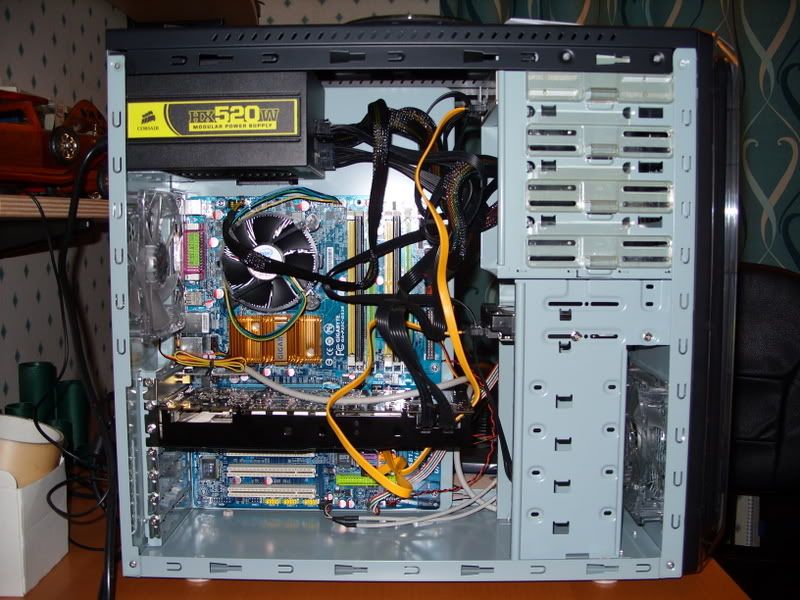
Associate
- Joined
- 5 Jun 2005
- Posts
- 987
- Location
- Leicestershire
Hmm, run a Video card stresstest next maybe (3Mark05/06) on continuous loop for as long as you can. I'm beginning to wonder if your video card is perhaps a culprit, given that your CPU passes apparently (Orthos/Prime) and your memory passes (MemTest) That kinda leave the mobo (seems unlikely but not impossible), the vid card, and the hdd's (also somewhat unlikely given the symptoms.)
Hmm, run a Video card stresstest next maybe (3Mark05/06) on continuous loop for as long as you can. I'm beginning to wonder if your video card is perhaps a culprit, given that your CPU passes apparently (Orthos/Prime) and your memory passes (MemTest) That kinda leave the mobo (seems unlikely but not impossible), the vid card, and the hdd's (also somewhat unlikely given the symptoms.)
rightio, i'll do that next, the techinical help guy from the retailer i got it from suggested, that I run orthos, 3dmark06, and pcmark06. So once i've just reinstalled vista for like the billionth time i'll have a go.
thanks
Yanto.
tyred to re-install windows, I've tryed it with the drives in all the ports, tryed different sata cables, I've tryed it with my ide drives, and I keep getting blue screens during installing windows. It still passes memtest86 and I havn't got a windows installation on it to work so i cannot try any other tests, WHAT CAN I DO?!?
Yanto
Yanto
I could not get and futuremark things to work
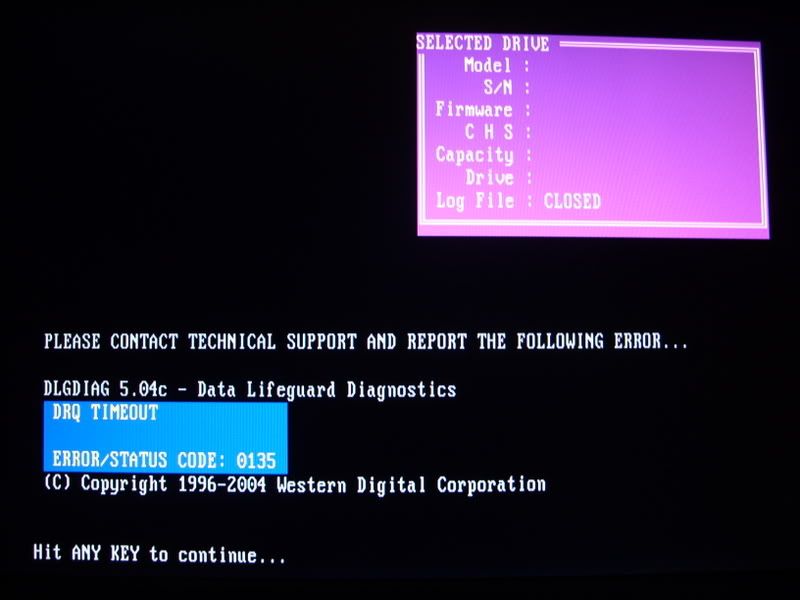
I've ran the wd hdd test and it passed, and i've passed memtest86.
I've ran all the tests on orthos and prime95 foro a few hours each, and had no erros, until i did this test....
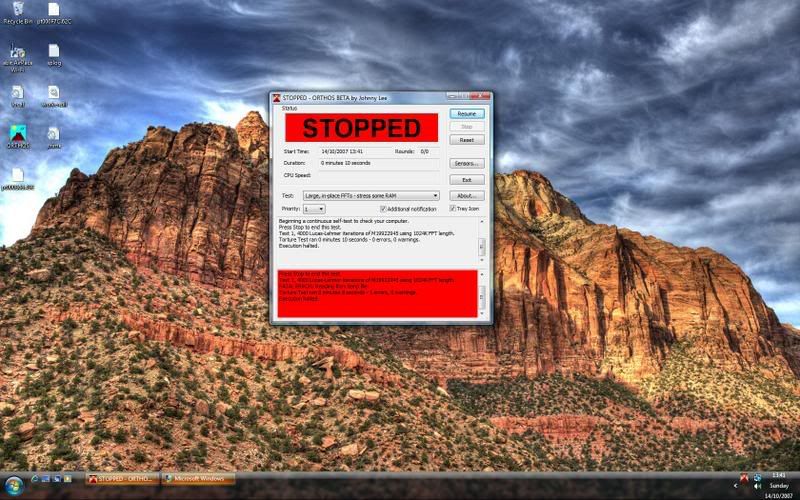
does this mean that the hdd is faulty or the ram?
Thanks
Yanto.
I've ran the wd hdd test and it passed, and i've passed memtest86.
I've ran all the tests on orthos and prime95 foro a few hours each, and had no erros, until i did this test....
does this mean that the hdd is faulty or the ram?
Thanks
Yanto.