

i7 4820k overclock

Kei

Kei

Soldato
Joined
24 Oct 2008
Posts
2,752
Location
South Wales
Presently got it running at 4.6GHz using a blk of 100 and a 46x multiplier. Vcore is offset by +0.075 which is measuring 1.280 in cpu-z. I've tried to boot at 4.8 by bumping up the voltage by +0.150 but hit a blue screen, not yet tried 4.7. I've tried using the 125 strap and it adversely affects stability. Does this suggest I've hit the linear limit, am I being too conservative with the volts or do other voltages need adjustment?

Ram is only 1600 Kingston hyperx which may be holding things back, though I am keeping it at xmp settings in order to keep it stable. Does tRFC have a big effect of stability, and how big an effect does pushing it up have. (I.e from 128 up to 208)

This is how it ran at 4.5GHz with 1.24V.
12123139586_28fc58335c_o.png
 
Last edited:
4.6 seems to be perfectly stable so far. Presently trying 4.7 with a +0.100V offset which is giving 1.3V but it seems to be on the edge as cinebench crashed with an error but windows hasn't blue screened on me. Is 1.3-1.35V a sensible long term voltage for every day use or should i stick with 4.6 using 1.25-1.28V?

I've been looking at the memory instead, as i've seen people manage to overclock hyperX genesis 1600 to 1866 ok before. Not having any luck though, posts ok but freezes at starting windows. I'm still wondering if the age difference may be the problem. The SPD information page in the bios suggests the older grey modules are "Abnormal" vs the new blue ones being "OK". (grey modules are 47/11 with XMP v1.2 vs the blue which are 02/14 with XMP v1.3) Here are the settings i tried for 1866. (EDIT: new bios seems to have fixed this, though system now seems less stable than before with ram no longer booting properly using xmp #1)
12143187225_da1c5ab241_o.jpg

12143586414_4db5cf3ff6_o.jpg

12143586374_49b7ca74ca_o.jpg
 
Last edited:
Nice one, if your thinking of changing memory go for TeamGroup Vulcan GOLD 8GB (2x4GB) DDR3 PC3-19200C11 2400MHz Dual Channel Kit x2, very good memory.

Air cooling do not go over 1.35v for 24/7 running and 1.40v water cooled, my 4820K is running at 4.6ghz my offset is 0.085v, as it varies with each CPU.

Just try leaving the Ram secondary+third timings on auto, noticed you have not set the ram voltage for (CHA CHB) + (CHC CHD) 1.65v for both will help stability.

The only Bios voltage's l have set manually are CPU Offsets and Ram the rest are on Auto.

In DIGI+POWER CONTROL try these settings to help with stability if you have not set them already-
CPU Load Line Calibration-high
CPU Current Capability-130%
VCCSA Load Line Calibration-regular or high
VCCSA Current Capability-110%
CPU Power Phase Control-optimized
DRAM-AB Current Capability-110%
DRAM-CD Current Capability-110%
DRAM-AB Power Phase Control-optimized
DRAM-CD Power Phase Control-optimized

There is one more l think it is INTERNAL PLL VOLTAGE to enabled helps with overclocking frequencies.

My New Asus x79 Deluxe Mobo With A i7 4820k Combo Review

http://forums.overclockers.co.uk/showthread.php?t=18571314
 
Nice one.

As OLDHARD said said above, on air do not try more than 1.3v. With closed water (eg H100i) you can go to 1.4 24/7. With custom water cooling, you can go to 1.42 if you want to push for more than 5Ghz.

And from your idle temps at 1.28v, I assume you are on air.
 
It is custom water cooled using two 240mm radiators a koolance 380 block, ek titan block and a d5 pump. I think temperatures suffer due to the cramped size of the 690-ii case.

I've got xmp working again now with the latest bios. Would be nice to get more out of the memory but I think it's unlikely with what I currently have. 4.6 seems like it might be a happy medium between performance, temperature and longevity.
 
Doesn't seem as stable as i thought. Getting occasional bluescreens. Had a PAGE_FAULT_IN_NONPAGED_AREA code 0x50 2 days ago and just had a IRQL_NOT_LESS_OR_EQUAL code 0x0a. Both of these point to memory/imc. The ram is presently set to xmp profile #1 which is 1600 @ 9-9-9-27-1T and the voltage is manually set at 1.65V. VTTCPU was at 1.0825.
 
Try upping your offset to 0.080v 0r 0.085v, try putting the memory settings stock manually as well and see what happens.

If it still occurs test your memory with memtest.
 
Last edited:
I had tried increasing vcore offset to 0.085V along with the ram up to 1.75V. Timings were also set manually and ref cycle time at 208. (vs 128) Presently running through mem test and so far its completed without any errors. I will leave it running tomorrow.
 
Hi, 2 passes is fine if there is a error it usually shows up 1st or 2nd pass.
Then use your PC as normal to see if the problem shows up again, if it does test each stick on its own with memtest.
 
Ram seems to be fine. (ignore the speed and timings as memtest seems to report them wrong) I've dropped the overclock back to 4.5GHz using a 0.05V offset which is what i was running previously when i used linx to test it. I'm Leaving prime running this time as it seemed quite sensitive to vcore being slightly too low. 0.03V offset had cores 2/3/4 fail with rounding errors within 30 mins whilst the rest were ok after 5 hours.
12260070636_9109d6bde5_o.jpg
 
Doesn't seem as stable as i thought. Getting occasional bluescreens. Had a PAGE_FAULT_IN_NONPAGED_AREA code 0x50 2 days ago and just had a IRQL_NOT_LESS_OR_EQUAL code 0x0a. Both of these point to memory/imc. The ram is presently set to xmp profile #1 which is 1600 @ 9-9-9-27-1T and the voltage is manually set at 1.65V. VTTCPU was at 1.0825.

Especially so with the 4820K (but something to keep in mind with X79) it seems that its quite sensitive to the delta between VCORE, VTT and IMC (VCSSA) - VTT and IMC should be fairly close or the same and neither of them more than 300mv (0.3v) less than the VCORE but in rare cases you can get BSODs if they are too close to each other as well (usually 124 BSOD).
 
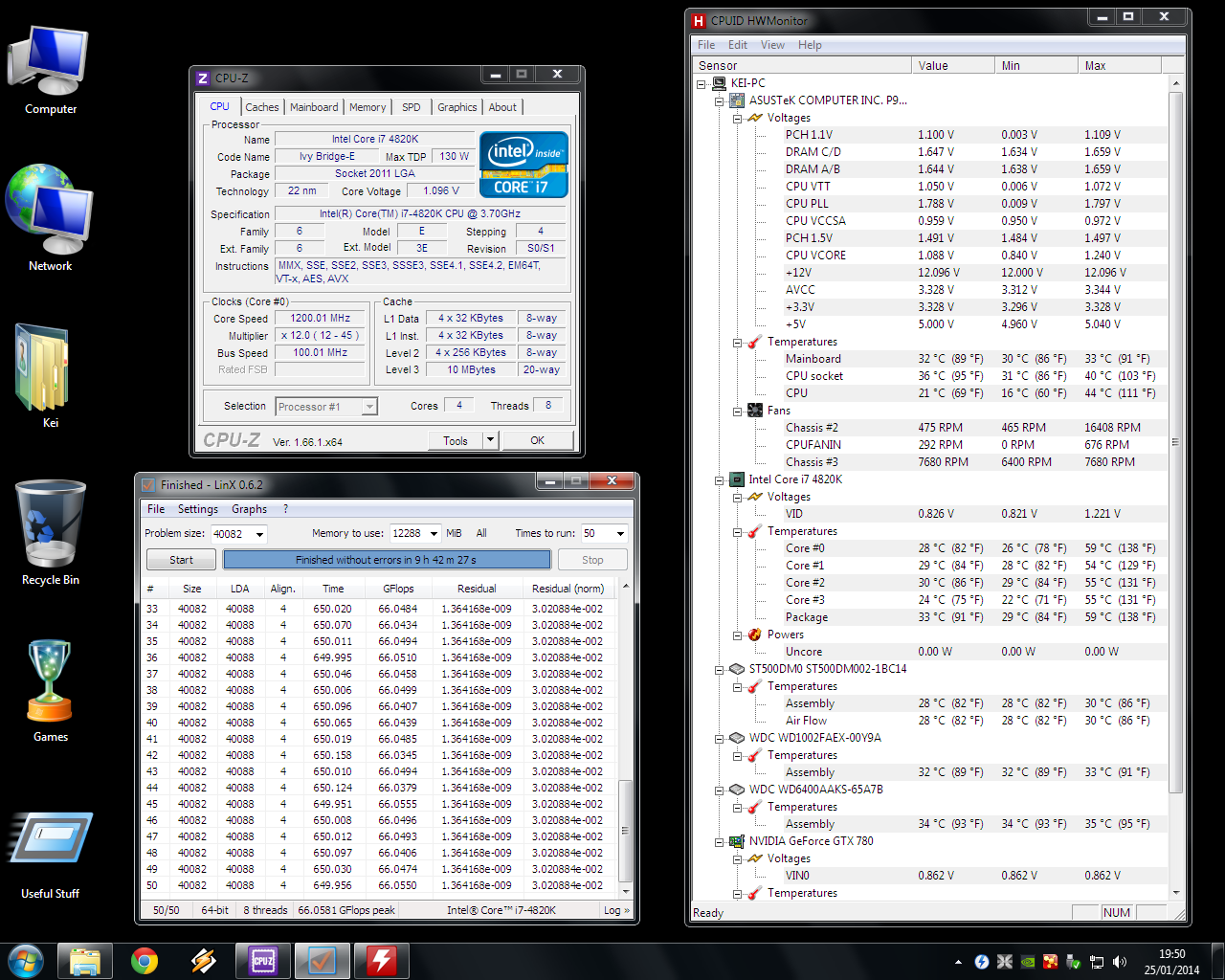
Try using a newer version of LinX or Prime95 for stability testing, LinX 0.6.2 is old and probably not stressing your CPU enough due to lack of optimizations.
 
Left it running prime last night (just under 10 hours in total) and 3 cores had failed. #6 failed after 2.5 hours, #3 failed after 8 hours and #4 failed just past 9 hours. This was a +0.05V offset for vcore, +0.01V offset for VCCSA and +0.01V for VTT.

I've tweaked vcore offset up to +0.065 and VCCSA up to +0.025V and left VTT alone. Testing with linX 0.6.5 at present. First thing i've noticed is that the temperatures are much higher (peaks 67 on the hottest core rest are <63) and it's gone from 66 GFlops to 114 GFlops.
 
Thanks, that looks like a very useful guide. I'm trying to find the comfortable minimum voltages required to run at 4.5 as it seems to be a nice middle ground for 24/7 operation. So far it's passed 5 passes of linX using all the ram and has been fine with the latest version of prime for over an hour.

I'm also considering moving to team xtreem LV frost 2400 modules once they come back into stock as they will suit the colour scheme of my build. Not sure whether the 2400C10 modules are preferred over the 2666C11 modules though. I'd be aiming for 2133 either way with tighter timings preferred.
 
Right your getting there, 5 passes are fine just use it know for normal 24/7 use, you'll sharp now if anything is wrong.

My Bios settings for 4.6ghz 46x100 24/7 use try them if you want to, keep a eye on your temps.-

Internal PLL Volts - Enabled
EPU Power Saving Mode - Enabled
EPU Setting - Auto

CPU Offset - 0.085v > CPU-Z:1.344v at 100% Load>Prime95
CPU VCCSA Manually set - 1.10v
CPU PLL - 1.80v
VTTCPU - 1.10v
PCH 1.1v - 1.10v
PCH 1.5v - 1.50v

CPU LLC - High
CPU Current Cap - 120%
VCCSA LLC - Regular
VCCSA Current Cap - 120%
CPU Power Phase Con - Optimized
Dram-AB Current Cap - 120%
Dram-AB Power Phase Con - Optimized
Dram-CD Current Cap - 120%
Dram-CD Power Phase Con - Optimized

Oldphart.:)
 
Pretty much the same settings as I use to get 4.6GHz stable on mine - probably similiar story for most people.
 
Back
Top Bottom





