i7 6700k Overclock

Associate
Joined
27 Dec 2009
Posts
764
Well I finally got everything together and started the overclock according to the Asus website. Couple of clicks and I'm in the process of running a stress test. Overclocked to 4.6 Ghz and at the moment (at %100 core usage and 15 minutes into the test), the temp is sitting at 52 degrees C and fans are only just reaching 950 to 1000 RPM ...
Looking good so far :D
Case: Phanteks Enthoo Primo
Mobo: Asus Maximus viii Extreme
CPU: i7 6700K
CPU Cooler: Corsair H110i GTX (push-pull fans in top of case)
Ram: 16gb (8x2) Team Group DDR4 3733mhz
GPU: Asus GTX 980ti Matrix
SSD: Samsung 1tb 850 Pro x 3
Soundcard: Asus Essence STX 2 7:1
Optical: Pioneer BDRW
Display: Asus Rog Swift PG279Q
OS: Win10 Pro 64

 
Very very similar to my setup mate. I'd push it to 1.36V at run 4.8GHZ mate. Temps should stay around 65max with the cooler.
 
Last edited:
yeah it all seems to be running very well. Don't think I need to push it further yet as there is nothing that seems to make it struggle at the moment but I agree I think it will stretch to 4.8 without too many issues. I think then that the cooler might struggle but I didn't want to go full water cooled.. so very happy with the build apart from the issues with the case ..
 
Edit: Was recording quite jumpy temperatures but it seems more stable this morning on cores but the 'CPU' temperature when idle seems to report quite jumpy... Any ideas? It will be sitting at say 29c then jump up 10c and back down.

Intel Skylake 6700k (4.0ghz)
Asus Z170 Deluxe Mobo
4 x 8GB Corsair Vengeance LPX DDR4 (3000Mhz) in Blue
Corsair HX1200i PSU
1 x EVGA Nvidia GTX 980Ti SC ACX 2.0

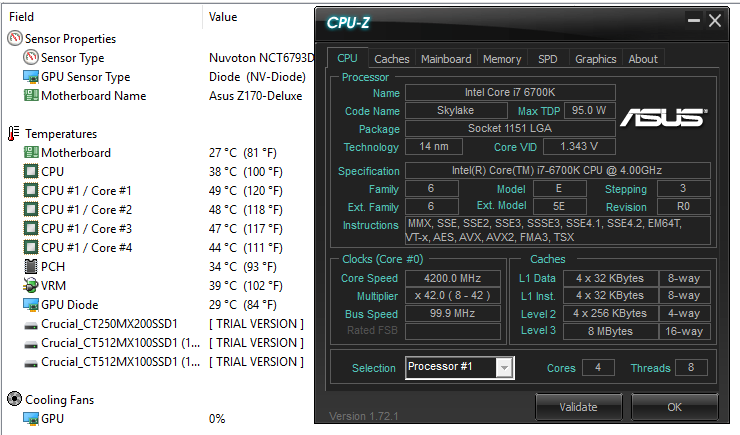
What is the most reliable program to burn in and monitor temps? I've just been using AIDA64 Extreme (Trial) and with the very slight initial overclock its looking decent, i've been focusing on clocking the GPU and plan to start stepping the CPU up next week. So far with my full custom loop temps look pretty low when doing a quick 20 min stress test they seem very stable, just a small OC of 200 to get going:

CPU_zpsncy3sq4k.png


Core 4 seems to remain pretty cool for some reason over and above the rest...?

When pretty idle the core temps hover around 20-24c. My only issue is that the ASUS software records the temperatures really jumpy which might cause issues with warnings from the bios, does anyone know what the cause is - i've updated bios to the latest version.
 
Last edited:
I think the temperature fluctuations coincide with the CPU usage. If I look at mine through CPUID the temperatures are up and down a few degrees constantly at idle as well as the core Mhz. If I look at the same temps and usage though OCCT the temps and usage are quite flat. Depends on the frequency the figures are looked at via the software. Are you using the overclock guide on the Asus ROG website? That's how I did mine (up to 4.6) and it was only a couple of clicks of the mouse in the bios ... fantastically simple even for me :D
 
I think the temperature fluctuations coincide with the CPU usage. If I look at mine through CPUID the temperatures are up and down a few degrees constantly at idle as well as the core Mhz. If I look at the same temps and usage though OCCT the temps and usage are quite flat. Depends on the frequency the figures are looked at via the software. Are you using the overclock guide on the Asus ROG website? That's how I did mine (up to 4.6) and it was only a couple of clicks of the mouse in the bios ... fantastically simple even for me :D

Yep, its the overall temp which spikes by around 10c that I was concerned about, though this is only at idle or low temps. I've not really done anything, focusing on the GPU overclock which seems good but i'll take a look at this guide as I think 4.6 should be achievable.

Right now i've dialed all my fans back to about 40% and its still in the 40's after 3 hours of high res gaming, but I do have 2 x 360mm rads cooling my loop :). Will you be pushing for 4.8?
 
Yeah mines the same .. if I take an average temperature then it's fine and cool .. but if I take a max it does get up to say 61 in that spike you were talking about .. but it is like a flash of 61 and then it's back down to the low/mid 50's ... I'm not really interested in going for 4.8 but I think mine will be fine at that overclock ..I haven't done anything else in bios other than what is stated in the Asus overclock video but I'm sure there are other tweaks that can be done to improve performance if you need it. I haven't really researched what the maximum temp is and what people are running at .. but for what I'm doing at the moment it's fine .. one thing I will say is that the spikes in temps set off the case fans (PWM) every so often which freaks me out as it sounds like a jet taking off .. don't know if the spikes are normal or what ... (more advice if people are reading) ... I also find a difference in temperature readings depending on what software you are using .. so be aware of that ..
 
Back
Top Bottom