i7 930 Temp advice?

Associate
Joined
15 Apr 2010
Posts
482
Location
Cheshire
Hi,


My CPU seems to be running a bit hotter than what most people seem to have posted. I havn't overclocked my i7 930 but I have got the turbo on. Currently using a H50 with two vipers and I have re-seated the CPU and cooler with MX-4 paste. Idle temps are around 40 degrees load between 65-75.

It seems pretty high on the idle side, what do you think?

I really need to OC my CPU to about 3.8 so I get make the use of my GPU, I'm just unsure how to do it.

 
There are a couple of settings that enable the CPU to save power and reduce idle temperatures in the BIOS. One will dynamically adjust Vcore and the other will dynamically adjust the multiplier ratio of the CPU, effectively running it at a lower clockspeed. If these are switched off you will always run at stock frequency and stock volts.

I can't recollect what these settings are called though so can't be of further help with this.

Use a neat little application called CPU-z to monitor your clockspeed and volts.
 
Thanks for that I have GPU-Z installed, I'll take a closer look. I think my weekend project is to try and OC. I need more frames in Witcher 2!!
 
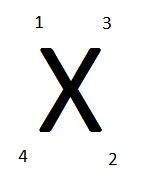
Hi, try just tighting the screws a touch more as the MX4 has had time to settle down, did you tight'n the screws up in the right order see diagram-

SCREWS.jpg


I take it you are using a PWM splitter cable to control the Vipers speed and bios is set to PWM[my mobo is the Gig X58-UD5]Check manual to see how to set up this function in the Bios.

PWM Cable-
http://www.overclockers.co.uk/showproduct.php?prodid=CB-031-AK&groupid=1929&catid=153&subcat=

Check Bios > which should look like these settings, which down clocks your CPU + Vcore, when at idle and ups it when needed.
Adavanced CPU Features.............[A = AUTO][E = ENABLED] [D = DISABLED]
CPU CLOCK RATIO....................[?X]Depends on your CPU setting > Stock or overclocked.
INTEL(R)TURBO BOOST...........[E]
CPU CORES E........................[ALL]
CPU MULTI THREADING...........[E]
CPU ENHANCED HALT (C1E).....[E]
C3/C6/C7 STATE SUPPORT......[D]
CPU THERMAL MONTIOR..........[E]
CPU EIST FUNCTION...............[E]
BI-DIRECTIONAL PROCHOT.......[E]

Have a look in your manual for Dymanic Vcore[DVID]this function lowers your CPU Vcore even further, but it does not lower your CPU speed, my Vcore is 1.290 inCPU-Z, DVID lowers it to 1.008Vcore. Google > Gigabyte > DVID to find out how to work it out as it does not tell you in the manual, its not hard to do.
 
Back
Top Bottom