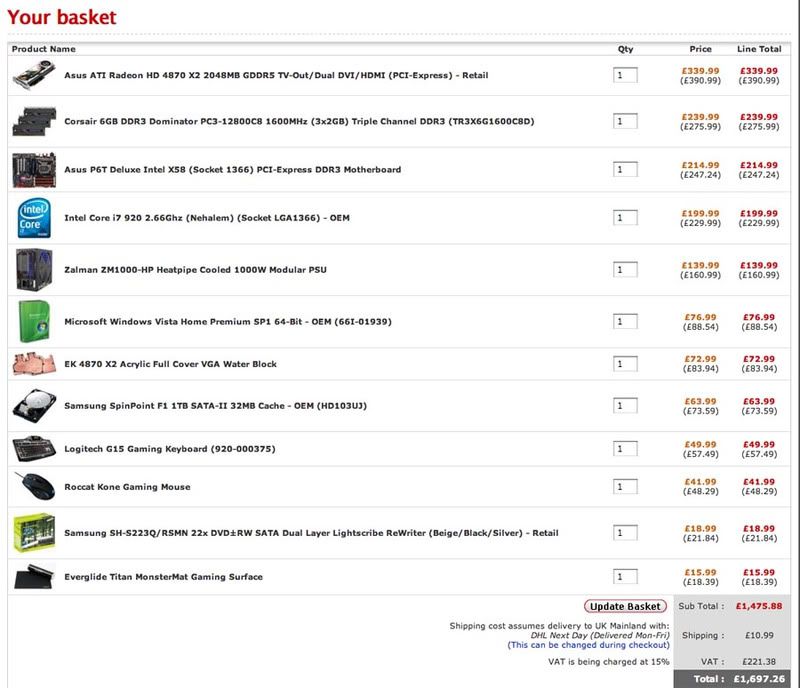
i7 spec check

Associate
Joined
21 Jan 2004
Posts
1,608
Location
South London, between hea
spec.jpg


well i was gonna wait to see how phenomIIs fair, and also the gtx295 but ive got the money to blow on i7 and dont see any point waiting.

monitor is benq 24", case is silverstone tj07, single loop watercooling with 120.3, (already have case and watercooling stuff including cpu block) will be overclocking

going for near silence, changed case stock fans for noctuas and nexus 92mms, (will be audio recording rig) zalman 1000w or 850w... hmm not a big price difference but will 850w see me through for 3ish years?
thoughts welcome, cheers!:)
 
any recommendations on mouse mat + mouse? would have loved to go wireless but hear no good in FPS's. leaning towards lachesis or copperhead on razer destructor or steelseries sx mat

that be quiet psu looks very good, seems to be more modular than zalman, but leaning towards ZMs 140mm fan over the be quiets 120mm, i like the idea of the 5v standby switch on the ZM too,
cheers guys
 
Last edited:
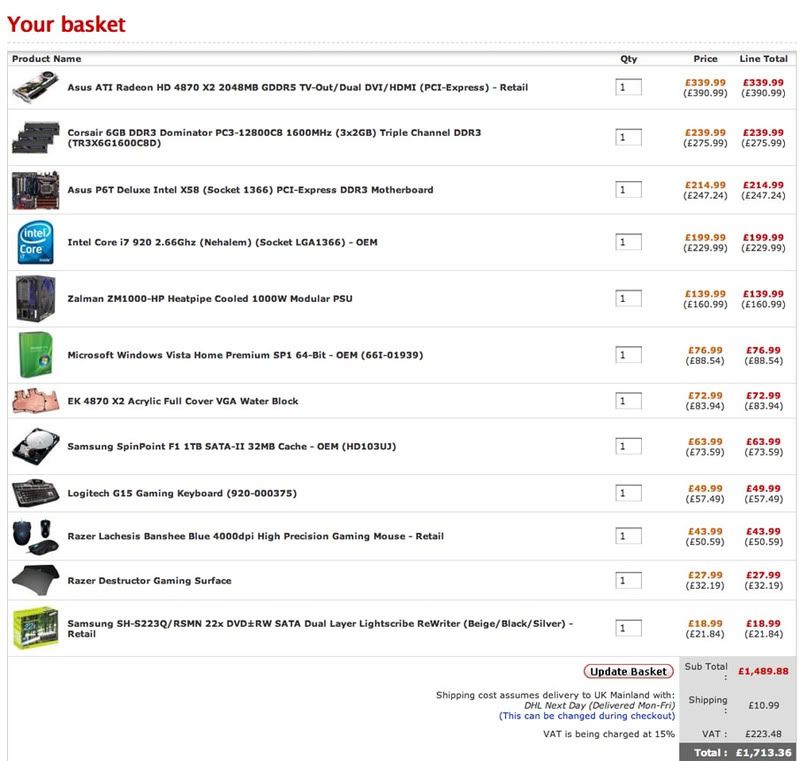
spec2.jpg

ok, revised spec, gone for lachesis mouse + destructor pad, ordering tomorrow!

already have:
silverstone tj07b windowed
sunbeam rheobus controlling:
intake: 2x92mm nexus real silents
exhaust: 2x120mm noctua p12s
lian li ex-33 hard drive bay w/ 120mm noctua p12 intake

watercooling:
PA120.3 w/ noctua p12s (rigged up to fan controller)
ddc ultra pump w/ dampening kit
ek supreme i7 block
double bay res
7/16" tubing over DangerDen fat boy 1/2" barbs

obviously want to test cpu works before lapping and watercooling, but if i get the OEM version, will it be safe to power up the system quickly with no heatsink attached to see if it posts? not sure what else i could do :confused:
 
Razer Lachesis mouse + Razer destructor pad
i got the mouse myself (ownage for fps games) will be getting that mousepad soon :)

you wont be disappointed trust me man ;)
 
Back
Top Bottom