


• Competitor rules

    Please remember that any mention of competitors, hinting at competitors or offering to provide details of competitors will result in an account suspension. The full rules can be found under the 'Terms and Rules' link in the bottom right corner of your screen. Just don't mention competitors in any way, shape or form and you'll be OK.

Interesting problem, think it's GPU related...

Associate
Joined
30 Apr 2009
Posts
688
'Ey up kiddos,

Rig =
C2Q6600@Stock
8Gb OCZGold PC8500@1066, 2.1V [as spec]
XFX 4850 XXX @ stock, with TRad2+Noctua NF-P12 120mm fan [was an NF-S12 but swapped as the P is better suited to this sort of load as I understand it]

Having an interesting problem with the card. I'll play something like FEAR2 @ 60FPS with everything maxxed for about a half hour, and the machine will die. Which points me to the GPU.

But when it comes back up, it will sometimes give me a BEEEEEEP BEEP BEEP BEEP which is AM Bios code for "your HighMem is screwed".

Which is what led me to upping the voltage to the recommended levels as suggested by OCZ, rathe than letting the mobo set it automagically.

But I still get this problem - although it is better now that I have removed the inline resistor from the fan on the GPU to have it running it full whack.

Idles about 40, under load - as it has been for the last half hour running FurMark stress test, my temps are
GPU DISPIO = 60-60.5 stable
GPU MEMIO = 66.5-67.5 stable
GPU SHADERCORE = 62 stable


CPU is floating about 50-55 but given the case temps are up a bit that's no shock.

That's running at 1280x1024 with 8X MSAA with Furmark set to the 'kill my GPU' setting basically. It's fair hammering it, case temp is up to 45 degrees, highest I have seen it for ages. Note that I normally have my fans on nice and low as I, as Depeche Mode would put it, Enjoy The Silence.

I'm going to stick it on at 1080p windowed in a bit and keep logging, but do those temperatures look OK? As it's a third party cooler, is there something I am likely to have left off which is overheating? VRMs or something?

I remembered my old school computing education that anything out of lowmem is high mem - so the MEMORY FAIL bios beeps are probably referring to the VRAM yes?

Suggestions welcome - I don't mind pulling the card out and pulling off the HSF to show off the VRAMsinks if anyone wants to see that.

I have shifted the fan over to the left a bit to cool the RAMsinks a bit better - as I say, it's not an NF-S12 fan any more, it's a P12, excuse that, these piccies are from when I first joined and someone was after info on the TRad - I was just installing it so took a few snaps.
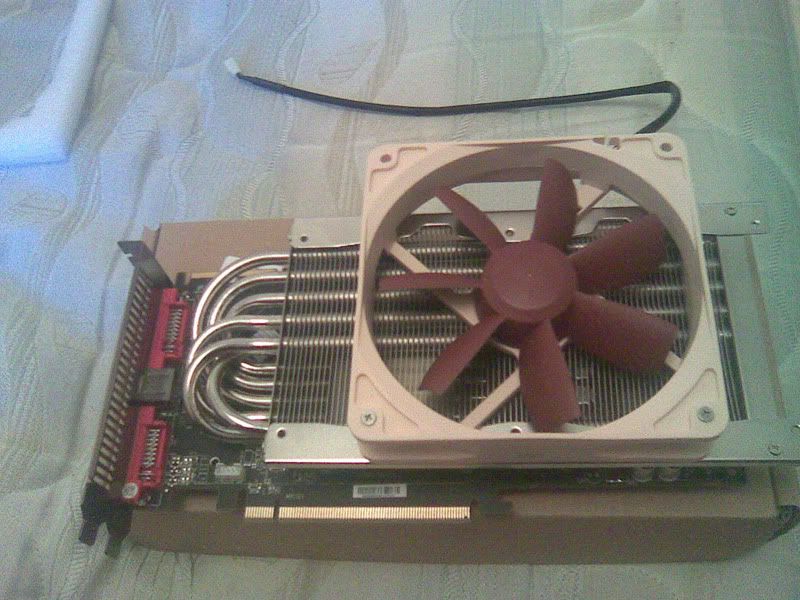
02052009resize.jpg


the only 'dodgy' RAMsink I have - not enough clearance for a full one. Possible cause of the problem?

02052009_004resizeed.jpg


Thanks in advance...
 
Last edited:

Cheeky bump - 20 mins of Furmark-GPU-KILL-LOL@1920x1080+8XMSAA = same temps as above. No crashes, system temp holding steady at 45, Realtemp [with adjusted TJMAX set to 90, as per spec for the G0 Q6600 I beleive] = 45deg@Approx 20% load, which is fine by me.

Anyone thought of how I could have screwed this up yet? :)
 
It's nothing fancy - Antec Basiqs 550W - and I'm not running a massive amount of gear on it; DVDRW, single 3.5"HDD, three 120mm case fans, one 120mm CPU fan. Nothing else.

I do have the GPU on the main, fixed power cable though [IE not the same socket as the HDD/DVDRW etc - but the same one as the mobo hookups] - is it worth hunting around the boxes for a Molex-PCIE adaptoi and sticking it on it's own rail?

Incidentally, there is a RED modular output for a secondary PCIE card, but it only mentions using that fo secondary cards.

This is a 4850 running at 650/1050 with DDR3 RAM here, not a HOLY CR*P edition 4890XFXFXFXF or a 295 GTXXX edition or anything mental - do you think that would make a difference?

I'm doubtful due to that RAM FAIL bios beep - it sometimes takes a few minutes of powering off to make it go away, which makes me think VRAM, seeing as IntelBunTest using all available memory gives me no problems, and Memtest 86+ tested all 8gb overnight and found no problems....but they don't test VRAM, do they...;)
 
No other suggestions?

Currently more concerned about the fact that I have completely b0rked my Ubuntu install [Karmic doesn't like HD4850+FGLRX drivers it seems] so back to Win7 for the meantime, but I'd be interested to hear more ideas.
 
Is it an audible *tic* when the machine turns off? If so, try and see where the tic is coming from.

I'd have initially said it was the PSU but your antec would be more than up to the job of powering that rig.

The error message says memory, yet an audible noise says (to me at least) power issue. If not PSU could it be a multi plug adapter that can't cope with what it has plugged into it? If it isn't already try plugging the PSU directly into a wall socket.

You mention your RAM has given you issues. Try either running memtest or using your PC with just a single stick to test each one individually.

Your temps seem fine.
 
Memtest86+ on all 8gb was fine for four runs overnight. Get the same problem with 4gb of RAM as well; I can't get it to overclock well with 8gb RAM, but that's a fairly common issue with the P5Q as I understand it. It's running stock bar the RAM [[email protected] dual channel] anyway.

Apologies for misleading, but me saying that it goes *tic*, its dead, was me writing floridly - it doesn't actually make a noise, just dies. My bad :$ I'll edit the original post in case anyone else gets confused!

Localised heat build up on the GPu seems the most likely culprit, but I'm buggered if I can think what it is. I'll whip the TRad off tonight [once I have bought food and seen if I can find any 35mm SLRs for sale in town..] and get some snaps of it with a decent camera [my DSLR - 35mm is for fun :) ] and see if anyone can show me if I have knackered up the install.
 
Memtest86+ on all 8gb was fine for four runs overnight. Get the same problem with 4gb of RAM as well; I can't get it to overclock well with 8gb RAM, but that's a fairly common issue with the P5Q as I understand it. It's running stock bar the RAM [[email protected] dual channel] anyway.

Apologies for misleading, but me saying that it goes *tic*, its dead, was me writing floridly - it doesn't actually make a noise, just dies. My bad :$ I'll edit the original post in case anyone else gets confused!

Localised heat build up on the GPu seems the most likely culprit, but I'm buggered if I can think what it is. I'll whip the TRad off tonight [once I have bought food and seen if I can find any 35mm SLRs for sale in town..] and get some snaps of it with a decent camera [my DSLR - 35mm is for fun :) ] and see if anyone can show me if I have knackered up the install.

Ah, that's OK, I just used to have a dodgy multi adapter that'd tic and then die every now and again.

Your T-rad install seems fine from the pics, that vRAM sink could be an issue though. However, my old 8800gt had nothing on the memory, just a fan for the GPU core and that ran fine.

I've also just seen that this 4850 http://www.overclockers.co.uk/showproduct.php?prodid=GX-168-AS&groupid=701&catid=56&subcat=938 has nothing on the memory either.

I'm stumped.
 
Could it be a VRM glitch? The old heatsink had a pad over [what I assume] is the VRM, but I don't have one. Doesn't seem to get hot though, might have just been to give even weight spread.

I found a mini RAMsink that I will try to apply to it later on when I take it out to photograph it...

Intersting with that 4850, you'd think that would be suicide really. Either that or the RAM doesn't get that hot on it by design.

Other potential is a driver issue I suppose...and it IS win7 7077 I am running - another potential cause I suppose.
 
7077? Get on the RC!

Don't the Betas (not RC) get deactivated soon anyway so you'd have to switch?

Don't quote me on that, I'm not 100%.

Could be a VRM issue, see how your update goes with it.
 
If I put on 7100 I'd have to do a format - upgrading is a pig apparently.

And while I have screwed my Ubuntu install, I need to ensure I don't break any more of my OSs ;)

Getting a quad boot going was tricky [well, annoying as opposed to mentally taxing] enough as it is :D

Gonna get some food [haven't gone yet - oopsy] and give this a crack, and see how it goes.
 
Have you tried running the card below stock (gpu and memory) via ATi CCC @ 500 and 750 respectively, and tested to see if it replicates the same problems in FEAR II?

If it didn’t/doesn’t you could then increase, incrementally, either the GPU or memory back to default (and vice versa) and see which one blinks first.

Unfortunately, the card may turn out to be really neurotic and so may require you to try differing combinations of both settings until it buckles.

Of course, you may have tried all of this already in which case feel free to have a glazed look while reading the above.
 
Last edited:
Nice idea, but the XFX 4850 XXX's catalysts won't let you drop the MHZ below 650/1050.

could use Rivatuner, but frankly, I',m just too bloody lazy. More practically, while utterly, utterly drunk last night, I took the PC apart to reset the CMOS [COU overclock fail before work yesterday morning...90% of hte time the machine is NOT OC though, just playing with it...] and I remembered about putting that wee RAMsink on the thingummyjig I was talking about earlier. I got as far as removing the TRad, and then my memory goes a bit hazy. Still, the computer is working today...mustn't grumble ;)

Waiting for the postie to bring me my X360 , once I get that I'll try some more benchmarking and FEAR II and see how I go :)
 
I noticed you replied to the other 4850 thread - link - i replied but it's probably best kept in here as that thread is getting confusing/complicated:

When your computer crashes/freezes do you sometimes have a screen displaying vertical lines/banding of 2 differing shades of the same colour?

If you do, in this particular instance, the perverse furry doughnut, that is 'Furmark' is the app you should be running just to eliminate it from being the same fault as described in this thread.

It's a quick easy test and is the one app that consistently seems to freak out the 4850 XXX edition if it has this particular problem.

Additional and showing total disregard to your problem: Any progress with the NAS? - i noticed those mean 'spec me up type bods' didn't throw you a bone - which is a b*tch for both of us as i was looking forward to your progress/success.

JonJ678, has kindly written out the 'numnuts guide' to getting ubuntu up and running for me so i'm hoping to find the time to get that installed soon and then i'll have a play with the 'openfiler' that you suggested.

I have no intention of leaving the 'MS dark side' (i get the software free) - but i'm enjoying the feedom and speed that even the livedisk offers...
 
Last edited:
Just to sidestep the GPU for a second, and go to the NAS stuff, OpenFiler is abare metal install, like VMWare ESX or, Windows - that is, you install it as the operating system - it's a cut down Linux system with no GUI, everything is done through a web interface. Best bet is to try it in Virtaulbox first with bridged networking so you can acces it and play with it.

It's pretty in depth [full on iSCSI server, webdav, FTP, SAMBA, etc system support] so it's worth checking out the forum for it!

It's worth playing with Ubuntu though - providing you get no funny hardware issues [ATI cards and video playback wuith the desktop 3d effects are annoying me...] then it's way better than Windows for day to day usage, better memory management, better administrative control, high stability, etc etc.

No updates on that front as it stands though, I decided to get an X360 recently so that's my 'fun' budget blown for a couple of months...

Anyway, back to the GPU, I did see that other thread, aye, and I think I will have a crack with a fullscreen 1080p furmark test later on tonight when I have had a couple of drinks [I always work best when fully lubricated, as it were ;)] - I don't play that much in teh way of games, so it's not essential. Besides, as I say, the warranty is a bit screwed on it so no point freaking out, it's just be interesting to get the fault confirmed and learn to work around it. Or replace it with a cheap, heavily clcoked reference 275...go for about £170 these days, those things, and are as quick as a 285 at the best of times...which is above 4890 speeds by a small margin AFAIK.

can't say I noticed the banding [I get something like that when I test overclocks through CCC though - Esc gets rid of it...] but I'll keep tabs on it and see. didn't notice at the time. Furmakr normally runs fine thoguh, although I tend tyo run it windowed so I can keep tabs on the GPU with Rivatuner.

Oh dear, look at me blabbering, must have a coffee, shake off this hangover and head to the offy. :)
 
was the mem a 8gb pack, or 2 4gb packs. Either way I'd try a little more juice, also more juice to your northbridge as remember, more memory puts more load and pressure on the memory controller, with a Q6600 that mem controller is on the northy. I'd also consider dropping the memory timings, IE 4,4,4,18 ratings to 5,5,5,25 or something along those lines.

THeres a possibility its the memory sinks but frankly those sinks, even the bigger ones are fairly rough, memory doesn't get that hot and the airflow still cools the memory those sinks have very little extra surface area anyway. But it is marginally possibly the cause but frankly almost any gpu problems I find appear quickly under any real load, gaming or benchmark. something after a long time for me is usually system memory.
 
Back
Top Bottom


