

-
Competitor rules
Please remember that any mention of competitors, hinting at competitors or offering to provide details of competitors will result in an account suspension. The full rules can be found under the 'Terms and Rules' link in the bottom right corner of your screen. Just don't mention competitors in any way, shape or form and you'll be OK.
You are using an out of date browser. It may not display this or other websites correctly.
You should upgrade or use an alternative browser.
You should upgrade or use an alternative browser.
Is this a worthy upgrade?
- Thread starter buchtis
- Start date
More options
Thread starter's posts

Caporegime
- Joined
- 18 Sep 2009
- Posts
- 30,541
- Location
- Dormanstown.
Depending on resolution that dual core won't bottleneck it TOO much, say 1920x1080.

Soldato
- Joined
- 6 Feb 2010
- Posts
- 14,583
Yes definitely..should be by a huge margin too.will I see a good increase in performance?
Yes definitely..should be by a huge margin too.
I've got a 20" Dell at 1680 x 1050 and am not planning to upgrade any time soon as this screen is fine an so is the quality. Will DDR2 RAM work on it too, i've seen on the spec page that it supports DDR3 so i'm hoping it's backwards compatible.
Thanks for your help lads.
Thanks for your help lads.

CPU bottlenecking is mainly game and resolution dependent.
But yes - if a few games, especially newer ones and ports from the PS3 and 360, the dual core CPU will hold you back.
I just went from an Athlon X2 5000+ Black Edition @ 3GHz to and Athlon X2 5000+ 45nm @ Phenom FX-5000 x4 3.3GHz (had to earn the unlock though), along with a motherboard upgrade. Everything else in the system is the same.
Huge difference in Ghostbusters going to quad core, which is optimised for multi-cores. Not a lot of difference in most older games but they ran fine anyway.
But yes - if a few games, especially newer ones and ports from the PS3 and 360, the dual core CPU will hold you back.
I just went from an Athlon X2 5000+ Black Edition @ 3GHz to and Athlon X2 5000+ 45nm @ Phenom FX-5000 x4 3.3GHz (had to earn the unlock though), along with a motherboard upgrade. Everything else in the system is the same.
Huge difference in Ghostbusters going to quad core, which is optimised for multi-cores. Not a lot of difference in most older games but they ran fine anyway.
need urgent help please. just installed the x4 945 it recodnises it but then gets stuck at veryfing dmi pool data. ive updated uhe bios to f10 but it just wont go past this screen. sorry for any dodgy spelling doing this off my ps3. mobo is ga-ma69vm-s2
Last edited:
UPDATE:
Took the CMOS batter out waited a wee while put it back in and it started fine. Just a quick pic, hope everything is as it should be:
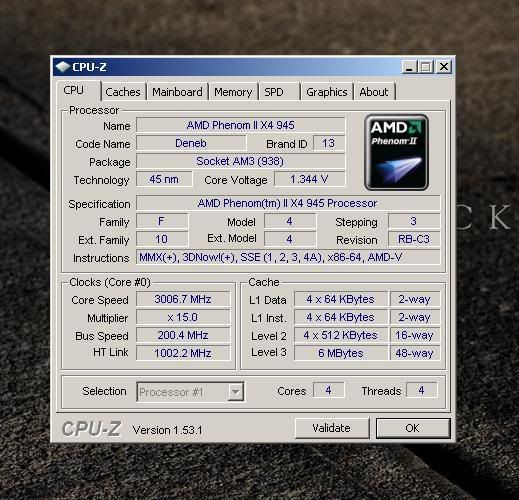
One thing that worries me is the RAM, it says it's 'unganged', wtf does that mean?
Took the CMOS batter out waited a wee while put it back in and it started fine. Just a quick pic, hope everything is as it should be:
One thing that worries me is the RAM, it says it's 'unganged', wtf does that mean?
Ganged means the RAM runs on a single 128 bit channel. Unganged runs on two 64 bit chanels.
Ganged might let you clock the CPU a bit higher and run single threaded apps a bit faster. Unganged is better for running multithreaded apps and for giving your GPU direct access to the system RAM (so newer games are generally better with unganged).
Ganged might let you clock the CPU a bit higher and run single threaded apps a bit faster. Unganged is better for running multithreaded apps and for giving your GPU direct access to the system RAM (so newer games are generally better with unganged).
I would leave it unganged if I were you. If you must change it it will probably be in the BIOS memory settings.
Edit: CPUz shot looks fine. Is your motherboard AM2 or AM2+. If it's AM2+ you can set the HT link speed higher (default for your CPU on AM2+ is 2000). If it's AM2 1000 is fine.
Edit: CPUz shot looks fine. Is your motherboard AM2 or AM2+. If it's AM2+ you can set the HT link speed higher (default for your CPU on AM2+ is 2000). If it's AM2 1000 is fine.
Last edited:
It's this motherboard so i'm not sure:
http://www.gigabyte.com.tw/Support/Motherboard/CPUSupport_Model.aspx?ProductID=2500#anchor_os
I do a lot of gaming and video rendering so whatever is best performance wise (I would have thought unganged as you mentioned). I'm running x64 XP and Use x64 Vegas Pro 9.
Cheers for your help.
http://www.gigabyte.com.tw/Support/Motherboard/CPUSupport_Model.aspx?ProductID=2500#anchor_os
I do a lot of gaming and video rendering so whatever is best performance wise (I would have thought unganged as you mentioned). I'm running x64 XP and Use x64 Vegas Pro 9.
Cheers for your help.
It's an AM2 board so HT is probably maxed out. I think older games will be better ganged but newer ones (and ports from 360 / ps3) will be better with unganged.
Vegas pro 9 is also optimised for multithreading so I think that unganged will be better for the most part there too.
Vegas pro 9 is also optimised for multithreading so I think that unganged will be better for the most part there too.

Associate
- Joined
- 16 Feb 2010
- Posts
- 305
- Location
- Southend-On-Sea, Essex
Unganged yes leave it how it is and have fun with your new system planning on oc that cpu?