


Laptop cooling issue??

Associate
Joined
4 Aug 2008
Posts
1,778
Location
Waterlooville
OK ive just received a new laptop its a own branned Avantek laptop, it seems to have good parts in it and i was impressed as its speed

but ive been having a few issues the last two days (had it since thurs) the screen has been known to just phase through into lots of colours like a white fades over the screen then all you see that it then fades to purple then red :confused:

ive bee watching on speed fan and core temp and they display the cores as completely differenet temps and the load between the cores is huge!

So what do you make of this then? shold i be returning it? or did i manage to do this myself? ive also had it bsod once. :confused:
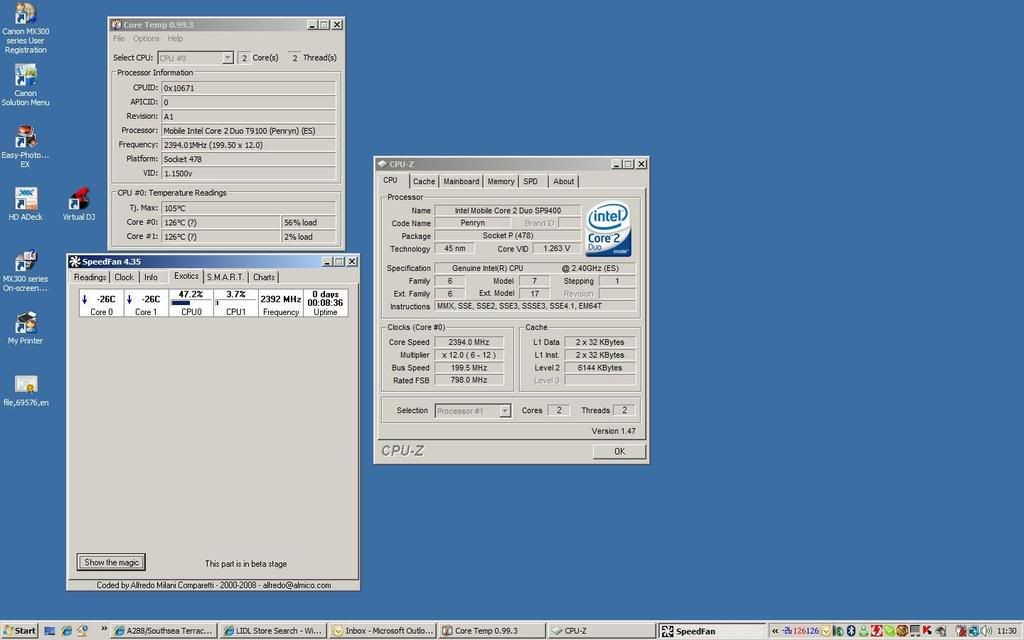

temps.jpg
 
Hmm, interesting. You appear to be running an ES (Engineering sample) CPU. Didn't realise these were released as part of retail units?

I know cpu z and core temp had problems correctly displaying the temps of the new penryn cores but thought that had been resolved now with the newer versions.

What process is causing the load on core 0?

You may need to flash to latest BIOS for full penyn support, although that would be very poor as you have only recently purchased it...
 
to be honest i dont think i can even do that i got it free from the DSA for uni

its a very locked down bios and is a own brand laptop im not sure what support i can get.

how can i tell what processor has the load? ive looked in task manager under processes but most things are cpu 00 and some are 03,04,05 and upwards?

how would i have managed to get an ES if it isnt realsed for retail?

Thanks
 
It appears this is a gost cpu which intel no long support and never launched ill be on the phone to the supplyer on monday and find out how they can make it more stable or if they will replace it as its bsod'ing and locking up once the screensavers on :S
 
Not sure where you got the ghost cpu thing from as Intel lists it here.

In terms of determining process causing the load you need to open the Task Manager (CTRL+SHIFT+ESC) and click the processes tab.

View->Update Speed->slow

This will show the % usage in the cpu tab against the corresponding process. Let us know the offending process, is it on constant load or does it fluctuate?
 
Back
Top Bottom
