


macbook pro, opening it up

Soldato
Joined
13 Jun 2007
Posts
13,949
Location
Chesterfield
Hello

Someone decided to launch my Macbook, now it isn't working...when i turn it on its just a grey screen with a a question mark in middle of screen

Sooo, how do i open this thing up?

Here's a picture, the red circled ones are what ive already unscrewed,the green circled ones are needing a star ended screw driver, which im trying to find.....Where else will there be screws as it still feels well screwed together.....Will there be screws under 4 pad things?
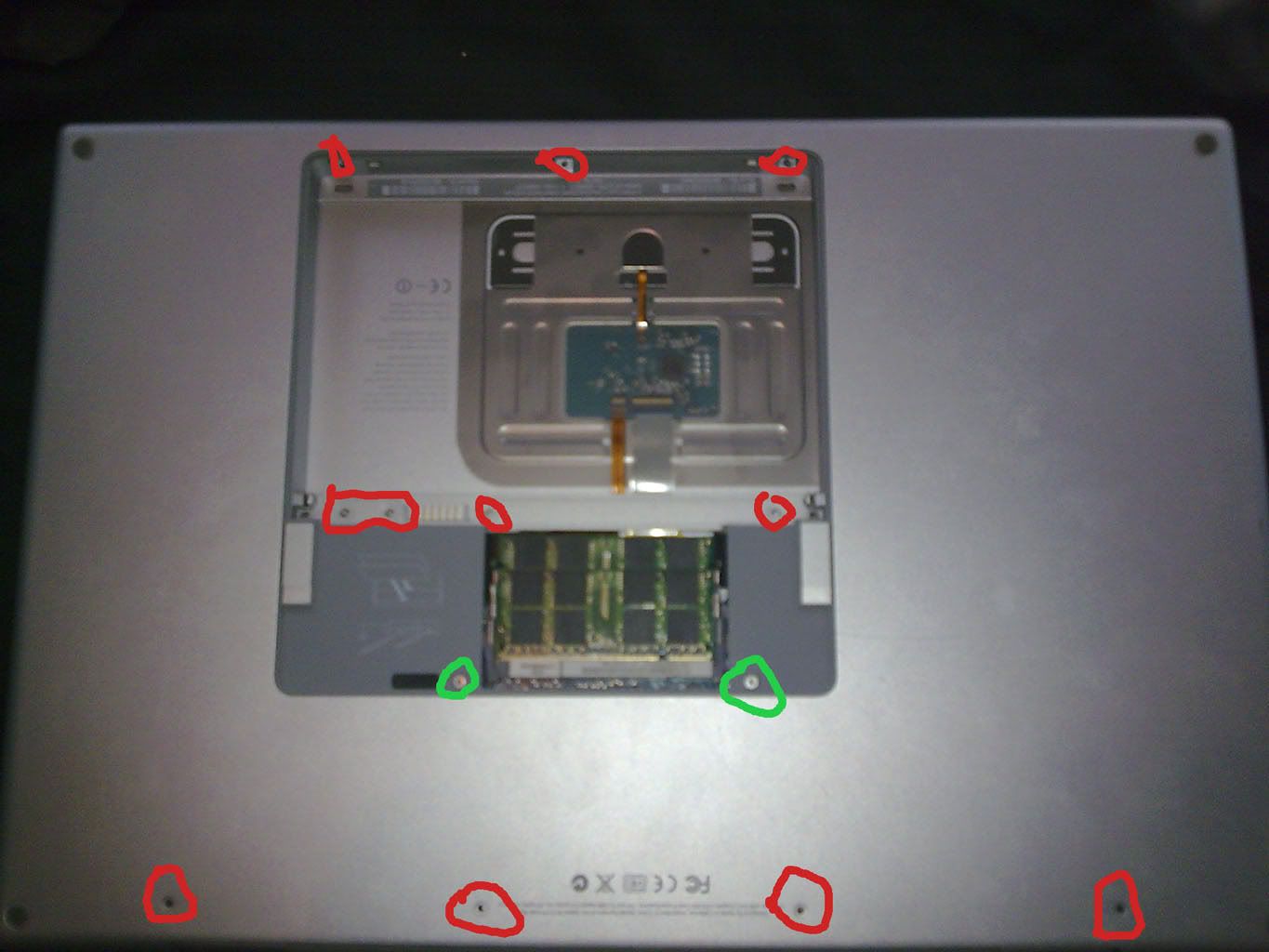
Image0209.jpg


cheers
 
o dear ive had a **** moment didn't realize there was about a thousand screws around sides haha
 
Have you tried the ifixit site? Not sure if I can link to it because they appear to sell stuff but they have loads of disassembly guides on there.
 
im saying with me trying to open it up ill end up having to bin it by time ive finished with it
 
hmmm any ideas anyone on why it wont boot? im inside it now but to be fair i havent clue where to start

cheers
 
Grey screen with a question mark on it means that it can't find the System folder, sounds like the hard drive has died.
 
Have you tried launching from the OS X disk? If not then try that first. Also if you're willing to risk ruining a MacBook Pro for the sake of opening it up then you don't strike me as somebody who's tight with money so why don't you just spend £40 on a new SATA drive in case that does happen to be the problem?

Or even better, before you dismantle it just take it to an Apple store.
 
cheers for the replies

i have opened it up to see if she has knocked the hard drive or something out of place, everything seems to be connected though... a friend of a friend told me earlier to keep my finger on the power button and see what happens and it gave me 1 long beep, forgot to take his number though

do any of you know what this means?

my guess is also the hard drive, still haven't got round to getting a Torx Screwdriver though. will do this tomorrow

any one of these hard drives will be fine won't they?: http://www.overclockers.co.uk/productlist.php?&groupid=701&catid=14&subid=304&sortby=priceAsc

thanks
 
cheers for the replies

i have opened it up to see if she has knocked the hard drive or something out of place, everything seems to be connected though... a friend of a friend told me earlier to keep my finger on the power button and see what happens and it gave me 1 long beep, forgot to take his number though

do any of you know what this means?

my guess is also the hard drive, still haven't got round to getting a Torx Screwdriver though. will do this tomorrow

any one of these hard drives will be fine won't they?: http://www.overclockers.co.uk/productlist.php?&groupid=701&catid=14&subid=304&sortby=priceAsc

thanks

Any 2.5' SATA drive will do you. :)
 
cheers for the replies

i have opened it up to see if she has knocked the hard drive or something out of place

I want to know what happened? Did you **** your GF off and she threw your Mac? If that's true then :eek: If my wife did that she'd get a divorce.

Anyway fit a SSD seeing as the current drive is toast.
 
I wouldn't spend money on an SSD just yet because the OP is not 100% on wether the hard drive is a problem. He still hasn't clarified wether he's tried booting up using the installation disks, so therefore this could still be software related. If he does have his heart set on buying new hardware though I'd still recommend a SATA drive to him first, if he drops a larger sum of cash on an SSD and then finds out that it wasn't the hard drive that was at fault then that's quite a waste of money.
 
Any 2.5' SATA drive will do you. :)

Yes your right. Thanks dude.

I want to know what happened? Did you **** your GF off and she threw your Mac? If that's true then :eek: If my wife did that she'd get a divorce.

Anyway fit a SSD seeing as the current drive is toast.

She missed thankfully/unfortunately

Whats the difference between SSD HD's and the normal 2.5 Sata HD's? besides the prices.

Thanks

edit: just seen your reply K1LLSW1TCH, thanks a lot dude i will try boot disk now and report back

Edit 2: Nope it does nothing. Can hear the disk spinning like its trying to do something though, but still the grey screen with the flashing question folder.
 
Last edited:
Yes your right. Thanks dude.


She missed thankfully/unfortunately

Whats the difference between SSD HD's and the normal 2.5 Sata HD's? besides the prices.

Thanks

edit: just seen your reply K1LLSW1TCH, thanks a lot dude i will try boot disk now and report back

Edit 2: Nope it does nothing. Can hear the disk spinning like its trying to do something though, but still the grey screen with the flashing question folder.

If that doesn't work then I'd go with getting a new SATA drive. The difference between SATA and SSD's is speed. Although as we don't know yet if a new drive will fix your problem it's better to go with the considerably cheaper SATA drive for now and see if that fixes the issue. Otherwise a decent SSD is going to cost you £100's and your MBP may still not work, which would leave you £150+ out of pocket.

:)
 
Last edited:
Took it to the friend of a friend and he managed to get the boot disk working and to start putting a fresh install of OSX on but it got stuck at about 75% and wouldn't budge.

So must be the hard drive, will order a new one later on.

Cheers.
 
Back
Top Bottom


