Memtest: Failed test #7

Associate
Joined
16 Nov 2005
Posts
695
Location
West Midlands, UK.
Currently running memtest86 to test my overclock and it ran for over 2hours error free when it started to slowly show errors in test #7.

I've tried to find out(google wasn't my friend in this instance :( )what the most probable cause for it to fail in test #7, but I haven't been able to find anything.

I know it could be a case of relax my memory timings, up vdimm and/or vcore or lower my HTT, but I'd appreciate some guidance as to what it's most likely to be. Or is it something specific that'll cure it?

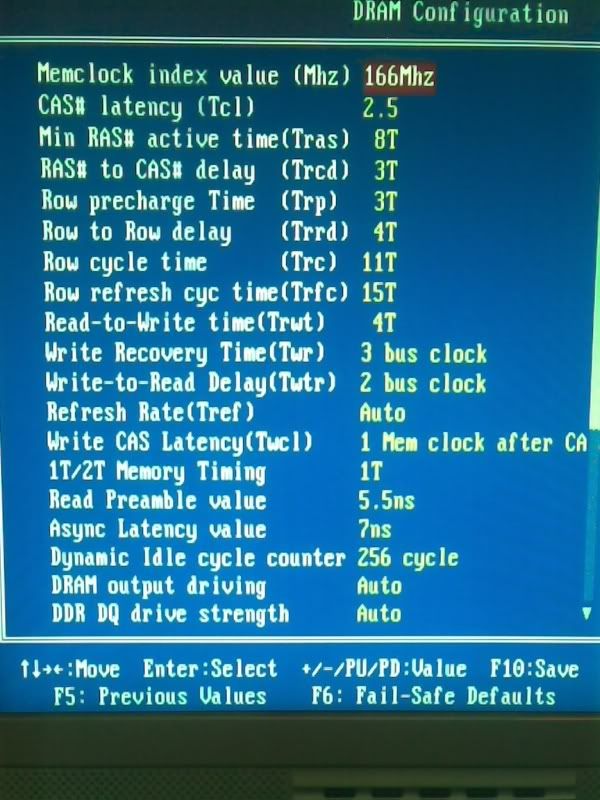
System as per sig, running at 2.7GHz on 1.35v. Memory on a 166 divider(so running at 225MHz)with 2.7v. Detailed memory timings, as below:

Memory.jpg


TIA, dagwoood.
 
mglover070588, thanks for the advice; I'd given up hope of anyone posting any suggestions :)

I've been running numerous tests for the best part of a day now and I'm still getting fails in #7 :confused: I started with changing memory timings and that didn't have any effect; both with tighter timings and looser timings. Changed the command rate(didn't think that was the problem though as it's normally tests 4 and 8 that indicate command rate problems)and it wasn't that. I've lowered the overclock so it's running at 2.4GHz and on a 166 divider so the memory's running at it's rated speed, still no go.

I've upped the vcore/vdimm and that didn't do it either. I hadn't considered trying undervolting my memory and have read sometimes that does work, so I'll give that a try.

I don't think my RAM's overheating though as I've had the side open straight after running some tests and it was only slightly warm to the touch. To rule out overheating I've ran it at 2.8v to see if the test crashed sooner, but it didn't.

As to my memory not running at a higher speed, with my old board I had it running at 227MHz without any problems, but as you say, DFI boards can be picky with regards to memory. As an example, if I leave all my memory timings on auto and my CPU is at stock speed, memtest won't even run.

I just can't get my head around it's just test 7 it fails. If my memory was bad I'd expect problems in test 5 and 8 as these are supposed to be the most severe tests in memtest and it's normally these that cause problems with suspect RAM.

As you say, it's probably just a timing issue but it's proving a sod to track it down.

Again, thanks for the advice :cool: ,and I'll post back if I get to the bottom of it, dagwoood.
 
Thanks for all the suggestions guys! :cool:

ernysmuntz said:
MAIN POINT

DON'T RUN A FULL RUN OF MEMTEST!!!!

Your just wasting your time...

Run TEST 5 *ONLY* on a loop.
Is that a typo ernysmuntz, because I'm only getting errors in test #7?

It's a case of "great minds think alike" anyway ernysmuntz because after reading mglover070588's comment about undervolting, I immediately tried running test 7 on a loop, but with a vdimm of 2.6 and I lowering my overclock to 2.6GHz. I let if run for 4 passes(just over an hour)and didn't get any errors. Problem solved I thought.

So I ran the full tests again this morning, and yet again, I got a single error on the third pass in test #7 :confused:

Ok I thought, change the CAS to 3. Started the full tests but I got lots of errors in the first pass in #7 :confused: :confused:


OC_A64 said:
Also, as noted above tests 5 & 8 are the ones you want to look at. If you get ~ 30 mins of looped test 5 clean boot to windows and run windows memtest. The DOS based on is ok, but doesn't always pick up errors where windows tends to be a little more harsh
I've never had any errors so in tests 5 and 8. I've done some stability testing in windows, mainly to see if my CPU overclock was stable, and haven't had failures. I've ran 4MB Super Pi(2 instances), Aquamark to check if single core apps are ok, 3Dmark06 as this uses 2 cores(in parts)and run 2 instances of Prime torture test, using the custom mode so it uses as much RAM as possible. I've only run Prime for about 10-15 minutes, just to make sure it doesn't fall over straight away.

OC_A64, is windows memory test a good indicator of memory health? From what I've read, Memtest is the be all and end all with regards to memory testing and other memory tests seem to be frowned upon.


So to summarize, I can loop test #7 and I don't get any errors with the default timings for DDR400, but when I run the full tests with the same timings, I get one or two errors on the third pass of the test. When I changed the CAS only, I got more errors and sooner.

Every time I've run the complete tests, I've had errors in test #7 only; I haven't had any errors in any of the other tests, even when I've changed vcore/vdimm and the HT value(ie, how far I've pushed the overclock).

What little stress testing I have done within windows hasn't thrown up any errors.

In view of all the above, instead of investing a lot of time/effort in trying to cure this one anomaly in test 7, would it be more productive to run a stress test from within windows over night, and if it's error free in the morning not go looking for a solution to get test 7 to pass?

TIA, dagwoood.

 
Well, to cut a long story short, it looks like a stick of my Corsair ram is borked :(

I ran memtest86+ test #5 and looped it for 30 passes(took just under an hour)and there were no errors. So I booted into windows and ran 2 instances of windows memtest and it'd only got to 30% when one test produced and error!

So I loosened the memory timings and started it off and watched until it got over 100% then went to bed. Woke up this morning and one instance had failed after 300% but the other test had carried on without any errors.

Now I'm really confused, so, going back to basics I thought I'd try the RAM in different slots(again)and when I took one stick out I noticed that at one end the heat spreader wasn't flush, ie it looked like it'd lifted up a little.

So I applied some slight pressure and it looked "flush", so I put it back in, booted into windows, started windows memtest and voilà, completed 1000%.

So, it looks like it has been a heat issue(kudos to mglover070588 and locutus12 :) )but I think it may have caused some permanent damage as it still wont pass test #7 in memtest86+, but I've just ran the complete tests with 2 sticks of Crucial value ram at the same speed(running at 217MHz)and it's not produced any errors at all!!

So a big thank you guys for all the help/advice. At least now I know it's not a timing issue but it's purely a hardware problem.

Thanks again, dagwoood.
 
Cyber-Mav said:
test 7 is a timings related problem, test 8 is a command rate related error.

i suspect the problem is that your running the ram too fast at 225mhz. try with timings of 3-3-3 and see if that resolves the problem. if not then you will have to use a lower divider. if you got a good board you may have access to the 150 divider if not then drop to the 133 divider and take things from there.

Hi Cyber-Mav. I tried lots of different timings and they all failed test #7 and they failed on the first pass of memtest86+. Running with the default timings it always took until the third pass for it to show errors.

As to not being able to run at 225MHz, the Corsair didn't have any problems in my old board(same as yours, an Asrock DS)running at 228MHz at 2.5-3-3-7. For the recent tests I'd clocked it back to 2.6GHz anyway to take the CPU out of the equation, so they were only running at 216MHz.

As per my earlier post, I'm positive they're heat damaged. I've raised an RMA request with Corsair and hopefully they'll replicate the problem and I'll get some replacements; fingers crossed :)
 
Back
Top Bottom