Monitor or HDTV.

Soldato
Joined
18 Oct 2002
Posts
19,595
Location
Somewhere in the middle.
I currently own an old HPw2207 monitor, Ive always found it fine but Im upgrading my PC in January so I will no doubt want Higher resolution.

I also watch a lot of films etc so Im planning on buying my first HDTV at some point too.

How do TVs fare as a permanent option. Are 1080p screens any good for gaming or will a better monitor be more suited. Ill be playing LOTRO and L4D mainly. and Battlefield Bad Company 2 in the new year.

 
i game on my 46" 3d tv without issues, looks great, tbh the black level is very very good, better than my Iiyama ProLite 27" monitor...

but be aware some tv's have very bad input lag....
 
I'm trying to decide the same thing. A 1080p LED screen that is nice and thin for around £350 or a second hand Dell U2711 / 3007 / something similar.

I'm edging towards an LED backlit Samsung 32" - Maybe the UEB32C5100 for £352. I really wouldnt like not having a warranty if I bought a second hand monitor

This tv is suppose to be really good for the money awell - philips 32pfl5605
 
On my 40" screen everything looks too big at 1920x1080. As a monitor I wouldnt want anything bigger than a 30" i doubt and even then it would need to be at a decent resolution as 30" monitors are. I guess gaming would be ok on a TV but you dont really have a lot of screen space considering the size of the screen.
 
Thanks for replies.

I think I may buy a TV for watching films through my PC, but keep my 22 inch monitor for games and general use. I have quite a small room and I wanna get back into gaming with a headset etc, get more immersed in things. I imagine its less immersive when the screen is huge and your sat way back.

however that goes against my resolution idea because my monitor is maxed out already :(
 
Would someone be able to take a pic or 2 of what 1080p looks like on a 32" in general stuff like desktop, forums, a program or a game.

I don't really want to be messing around looking a my Dell 22" crunched up in the corner whilst also having a 32" tv as my main screen
 
Would someone be able to take a pic or 2 of what 1080p looks like on a 32" in general stuff like desktop, forums, a program or a game.

I don't really want to be messing around looking a my Dell 22" crunched up in the corner whilst also having a 32" tv as my main screen

The trouble is, making a TV perform well as a general-purpose PC monitor is rarely a case of just plugging it in.

The low resolution for the size may or may not be a problem depending on the intended use, and you may be able to get 1:1 pixel mapping without under/overscan, but all too often you'll be stuck with some kind of non-defeatable image "enhancement" which may work well for its intended purpose but is likely to be a PITA for PC use. Also, many (seemingly most these days) TVs perform chroma subsampling on all the HDMI inputs - you'll want one that can take a 4:4:4 chroma signal from a PC and display it without downsampling, or you'll get blurred/fringed/discoloured text and fine detail, even with 1:1 pixel mapping.

These things aren't typically documented in the manufacturer's bumf, so you end up having to trawl through AV forums trying to find out if your chosen model will do what you want, further complicated by the fact that TVs in different regions often have different specs for the same model. And that's before you even get started on the various panel lotteries which seem endemic to most of the popular TV brands.

My own preference would be to use the right tool for the right job - a monitor for PC use and a TV for... well, TV use. I'm not saying that it can't be made to work OK (again, depending on your own expectations and what you're trying to achieve), but it's by no means a straightforward process and often involves luck as much as judgement. :)
 
Thanks crash
I had a think last night and my dad recently bought a Samsung UE32C5800 32-inch. When I go home next week i'm going to get him to bring it here to test on my pc using HDMI - HDMI. I will leave my Dell 2209WA connected next to it and compare.

I think it will be great for movies, tv shows and if there is a 'gaming' mode on it then good in games too. However I think the general colours will be enhanced with all that rubbish as you say so the desktop and picture in general will look strange.

I remember on the game Farcry, you could add colour settings, a cartoon setting, pastel effects and the like. A tv probably does the same sort of thing to make things look
better / brighter / more coloulful...
 
I would always use a monitor for my PC, yeah connect your TV as a second monitor and watch films in it.

The problem is TV's compared to decent monitors just arent as good, have low resolution and ghosting/slow pixel response. Its your Choice in the end but a decent TV just doesnt compare to a Decent monitor for gaming.
 
Its your Choice in the end but a decent TV just doesnt compare to a Decent monitor for gaming.

I hardly ever play games. Though I have been playing a bit of new NFS hot persuit at moment. Its the best NFS since 2SE in my opinion.

Just making a new thread now showing 32" compared to 19"...
 
Thanks crash
I had a think last night and my dad recently bought a Samsung UE32C5800 32-inch. When I go home next week i'm going to get him to bring it here to test on my pc using HDMI - HDMI. I will leave my Dell 2209WA connected next to it and compare.I think it will be great for movies, tv shows and if there is a 'gaming' mode on it then good in games too. However I think the general colours will be enhanced with all that rubbish as you say so the desktop and picture in general will look strange.

I remember on the game Farcry, you could add colour settings, a cartoon setting, pastel effects and the like. A tv probably does the same sort of thing to make things look
better / brighter / more coloulful...
Hey just wanted to ask, did you manage to check out the UE32C8500? Is it any good? As am thinking of getting one.
 
Tv will generally be better for movies, but monitor better for games/apps.

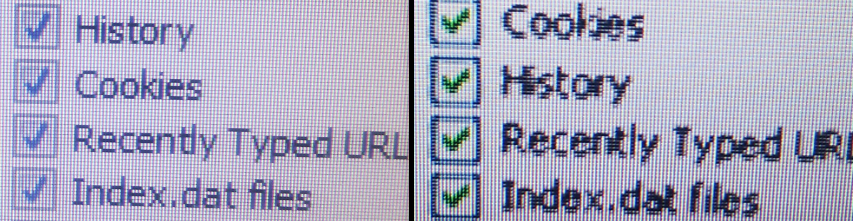
Heres a pic comparing my 27" 1080 TN monitor (left) with my friends 32" 1080 TV (right) which he uses as a monitor. Pic taken on my rubbish phone camera so try to ignore the colour variation, its more to show how TVs dont seem to be able to cope with detailed text etc.
Basicaly it's going to be a compromise either way, unless you go for a very expensive monitor.

montv2.png
 
I use a bog standard 22" HDTV only cost me £200. HDMI = text blurry, games look darker but color stands out more and blacks are good. DVI-D is way better for reading text, general photo work and games are brighter and much more clear.
 
Back
Top Bottom