

You are using an out of date browser. It may not display this or other websites correctly.
You should upgrade or use an alternative browser.
You should upgrade or use an alternative browser.
MSI 990FXA-GD80 Overclocking
- Thread starter Apem
- Start date
More options
Thread starter's posts
One thing, I would check that the CPU is still running at its default voltage. It should be, but sometimes with an "auto" setting you can't be 100% sure what the mobo will do
With the Phenom II it is not the core temps you need to look at, just the socket temp. I used the utility that came with my motherboard. It should not exceed 62C. That is what I was told.
With the Phenom II it is not the core temps you need to look at, just the socket temp. I used the utility that came with my motherboard. It should not exceed 62C. That is what I was told.
Last edited:
One thing, I would check that the CPU is still running at its default voltage. It should be, but sometimes with an "auto" setting you can't be 100% sure what the mobo will do
With the Phenom II it is not the core temps you need to look at, just the socket temp. I used the utility that came with my motherboard. It should not exceed 62C. That is what I was told.
incorrect its the other way round the core temps are what you look out for.
Denebs point of threshold is around 52-58 degrees c, (Thuban slightly higher), ( heat vs voltage vs vicious cycle of stability)
i'm very experienced with amd, and overclocking amd. But lets say theres more to overclocking than just increasing the cpu freq. But I can't be bothered to give you advice when theres so much info out there.
Anyway for a good guide I recommend this http://www.overclockers.com/forums/showthread.php?t=596023
Last edited:
Seems to be a difference of opinion on it, but clearly both should be looked at.
Yes there is more to overclocking than the CPU frequency, but with an unlocked multiplier it is so quick and east I don't bother with the rest. Especially since all I'm actually interested in overclocking is the CPU, not the memory or the motherboard. Depends I guess how much extra performance you want. Me, I'm happy with the 3.7Ghz from the multiplier overclock. Maybe further down the road I'll be interested in pushing things further. Thanks for the link.
Yes there is more to overclocking than the CPU frequency, but with an unlocked multiplier it is so quick and east I don't bother with the rest. Especially since all I'm actually interested in overclocking is the CPU, not the memory or the motherboard. Depends I guess how much extra performance you want. Me, I'm happy with the 3.7Ghz from the multiplier overclock. Maybe further down the road I'll be interested in pushing things further. Thanks for the link.

http://uk.msi.com/product/mb/990FXA-GD80.html#/?div=Utility&os=Win7 64
Is the MSI Control Centre the MSI tool for showing the temp ?
Is the MSI Control Centre the MSI tool for showing the temp ?
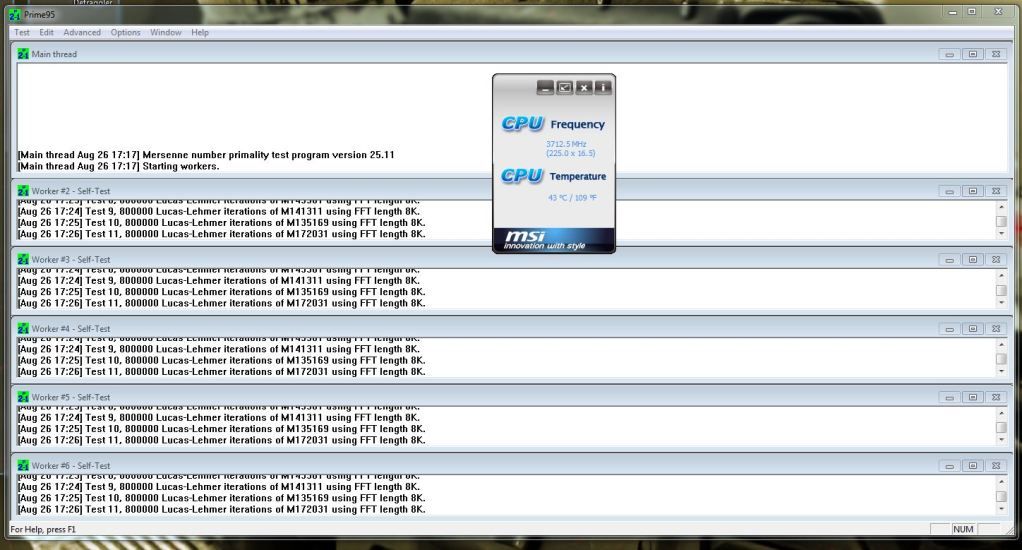
43 - absolutely fine I think. For me at 3.7 running Intel Burn Test, EasyTune 6 shows it between 55-62. Prime95 was less but I can't recall how much. Of course in real life it doesn't get anywhere near those temps. I daren't try to run mine higher, because those temps are right on the limit.
http://www.overclock.net/t/1128821/amd-temp-information-and-guide
Sorry but the core temp is far more relevant that the cpu temp which can be situated anywhere near the cpu socket. Thus why if a waterblock is connected instead of air cooling the cpu temps will be 20/30+ higher than the core temps.
Cpu temp isn't accurate, because it is affected by ambient temp and heatsoa, but comes in handy when you turn on acc or core unlockers as the core temp is 0c, and you need to extropolate from the cpu temp. but its onyl a rough temp guide.
Whilst overclocking the memory is an option too memory timings are more efficient, Also overclocking the cpu-nb link improves the speed of l3 cache and memory controller, this helps with stability when reaching over 3.8ghz,+ memory bandwidth and ipc increases, Also another myth is that cpu cool and quiet has to be disabled for a high overclock, not so I was running an unlocked b55 4.2ghz @1.525v /2750 nb-cpu and ddr2 ram at 1000 with cool and quiet enbabled. so throttled down to around 1ghz with 1.12v. Saved the mosfets and the cpu from being worked too hard.
Sorry but the core temp is far more relevant that the cpu temp which can be situated anywhere near the cpu socket. Thus why if a waterblock is connected instead of air cooling the cpu temps will be 20/30+ higher than the core temps.
Cpu temp isn't accurate, because it is affected by ambient temp and heatsoa, but comes in handy when you turn on acc or core unlockers as the core temp is 0c, and you need to extropolate from the cpu temp. but its onyl a rough temp guide.
Whilst overclocking the memory is an option too memory timings are more efficient, Also overclocking the cpu-nb link improves the speed of l3 cache and memory controller, this helps with stability when reaching over 3.8ghz,+ memory bandwidth and ipc increases, Also another myth is that cpu cool and quiet has to be disabled for a high overclock, not so I was running an unlocked b55 4.2ghz @1.525v /2750 nb-cpu and ddr2 ram at 1000 with cool and quiet enbabled. so throttled down to around 1ghz with 1.12v. Saved the mosfets and the cpu from being worked too hard.
Last edited:
Well, CoreTemp does not show 6 individual core readings as it does for Intel. It shows a single temp for the CPU, which is labelled with TjMax 81C, and gives temps for me under load similar to Gigabyte's Easytune 6 program, i.e. 55-60C under Intel Burn test
Hardware monitor - that gives 6 individual core temps, but all are a good 6 degrees LOWER than the single temp reported by Core Temp and EasyTune 6.
I read somewhere that AMD core temps cannot be read in the same way is Intel. So anything which says it is giving you the core temp actually isn't.
Hardware monitor - that gives 6 individual core temps, but all are a good 6 degrees LOWER than the single temp reported by Core Temp and EasyTune 6.
I read somewhere that AMD core temps cannot be read in the same way is Intel. So anything which says it is giving you the core temp actually isn't.
Last edited: