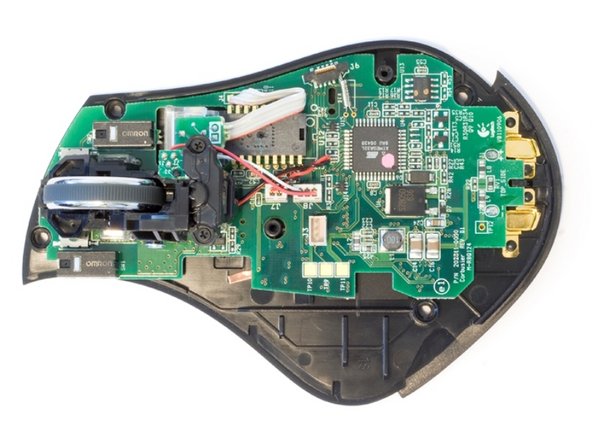
A little late in the game to be trying to put out another fix, but for what it's worth...
I've been living with this issue for quite some time. Eventually slamming stops working effectively and requires more and more slamming. I tried Cooper Bill's resistor fix for a time. Again, that works for a while, then it's back to slamming.
What I believe is really going on here is that there is a solder connection that was poorly made on the mouse circuit board and it's chronic to all of these mice. My hypothesis is that this is a manufacturing flaw that hit a large number (all?) of these mice. Because the issue is isolated to charging and everything else about the mouse works, I figure it's probably where the charging contacts are soldered to the board or at the voltage regulator that takes the 8V from the charging station down to 5V. If this is the case, the reason the slamming works is that the connection is temporarily recreated and one is able to get a charge out of it. Why lowering the input voltage works for a while I'm less sure about, perhaps a lower voltage is able to traverse the sketchy circuit without sufficient fluctuation to make the mouse cut off the charging, but only until the circuit is so bad that doesn't work anymore either. Using Cooper Bill's resistor or as others have suggested a lower voltage wall wart should in theory make no difference because the voltage from the charging station heads straight through a voltage regulator in the mouse that should normalize whatever voltage > 5V is coming from the charging station.
I made an attempt yesterday to remove the resistor that Cooper Bill originally recommended and resoldered the charging contacts at the bottom edge of the board and the 2 small pins at the voltage regulator. After doing this, I was able to get a charge without slamming or other fiddling. We'll see though, this problem has been elusive and has temporarily gone away for a time after messing with it in some way.
If anyone feels reasonably handy with a soldering iron and wants to give it a go, the connections for the charging pads are easy enough to find, relatively large compared to other solder points in that mouse anyway. The voltage regulator is the little square-ish thing a tiny bit lower than center, a larger metal pad is soldered down to the board at the top of it, then it has three smaller pins at the bottom of it, the center one being clipped. Its markings include the number "7805". Be really careful with a hot iron in that area, there are lots of SMD components that could be easily wiped out!
Good luck all!




 and lowered the voltage its charging atm 80% so far