Need help with a dual boot pc.

Joined
5 Feb 2026
Posts
9
Location
Canada
I have a pc that I have 2 ssd's installed in it and I have Windows 10 on 1 ssd and Windows 11 on another ssd and I use Windows 10 from a few programs that aren't supported on Windows 11.


I had to reinstall Windows 11 and when I did I couldn't boot into Windows 10 anymore so I had to reinstall Windows 10 as well.


I have an ASUS X870E Proart and when everything is running the way it should and I restart my pc I get a blue screen that shows Windows 10 and 11 and I can choose which OS I want to boot into,but if I reinstall one of the OS's then the blue screen doesn't come up anymore.


Also pressing the F8 doesn't bring up the Boot Menu showing each installation of Windows either.


Can anyone tell me how to fix this problem when it happens,I guessing it's a bootloader problem but I'm not sure.

 
Are you reinstalling the OS with both drives installed? You want to take the other SSD out when doing that, otherwise they'll both end up sharing the same bootloader, which can be on any drive.

Installing while one drive is connected ensures the bootloader for that OS stays on the same drive.
 
I left them both installed.

Do you if there is a way to repair the bootloader if this happens because my motherboard is and ASUS X870E Proart which means I have to remove this ig stupid heatsink that is held down with 3 or 4 screws.

I read something about repairing the bootloader and using thse commands,I may try that next time and if that doesn't work I will have to pull the ssd each time,I have an aftermarket ssd cooler I'm not using and I may use that one if I have to pull the ssd each time so I only have 1 screw to deal with as the main ssd closet to the cpu has it's own built in separate heatsink.

I don't if these commands when I'm in Windows 11 would fix the Windows 10 ssd or not.

Bootrec / fixmbr
Bootrec / fixboot
Bootrec /rebuildbcd
 
I think I just found the solution to my problem and will be trying it soon,I found a video and why the guy has Windows 10 on one ssd then another I'm not sure but is show a very simple way to supposedly fix the problem.

 
I have a pc that I have 2 ssd's installed in it and I have Windows 10 on 1 ssd and Windows 11 on another ssd and I use Windows 10 from a few programs that aren't supported on Windows 11.

Have you tried running the compatibility test on these programs to force them to run as they would on Windows 10 (or older if needs be)?

Seems like a very long-winded way to go about having some older programs running.
 
I have and the one program will only run on Windows 10,if the steps in that video work for me that will be such a simple process and it will make me happy for sure.

I have to install Windows 11 in a day or 2 as it's acting up and I will update this thread then to share what happened.
 
Out of curiosity, which app is it that's having issues in W11? W10 and 11 are pretty similar, I haven't had any issues with apps between the two.
 
Ideally as mentioned
You should only have 1 drive connected
When installing windows
But with m2 drives that can be a PITA
Sata drives its easy just remove the cable
Or disable in the bios

If doing multiple windows install on separate drives
And you can't disable the other drives
The bootrec commands sometimes work sometimes not
I have 4 options on the choose which to boot blue screen
You mentioned
3 windows and 1 for macrium recovery environment

For drives that dont show
As long as 1 windows drive is bootable
I use either msconfig
Dual boot repair tool
Or easybcd
To add the other windows installed drives
To the boot menu

I also use easybcd to rename them
So I know what drive is what on the choose
Operating system screen
This is useful if you have multiple windows of same version
Instead of them all showing as 10 or 11

And pressing f8 won't show everything
If multiple installs are tied to one boot record
Only 1 drive shows in my f8
After choosing that drive I then get the screen
With all installs to choose which to boot

Typed all that without
Looking at the video shown
So will have to watch that to see what it shows

Edit
The video does pretty much what easybcd does
Just easybcd is point and click/has gui

And when he has 2 x windows 10 showing
That's why I would rename them
For example windows 10 with games installed
Windows 10 new clean install
Doesn't really matter what name you use
As long as it let's you know which is which
Rather than having to remember which is on which
Volume number
 
Last edited:
I use a program called M4VGear that is used t remove the DRM from iTunes tv shows,I purchase some tv shows from iTunes and I like to keep them without the DRM on the copy so I can play it anywhere and with iTunes I don't the fact they won't play the we lost the rights to this content card for stuff that I paid for,it's a very easy program to use you just drag and drop your file into M4VGear once you've downloaded it in iTunes and it make a copy without he DRM.

The only problem there was a program that worked on Windows 11 and Apple found away to fix it but not with the M4VGear which works on Winodws 10 flawlessy and is only 44 dollars Canadian for a lifetime key,I can also purchase shows in Apple TV from my Windows 11 installation then boot into Windows 10 and open iTunes and just look under my purchased content and it's there and I can remove the DRM,I also go away a lot and I take an Android Box and portable ssd that's has to be formatted to Exfat and GPT and watch shows that way when I don't have access to the net.

https://www.m4vgear.com/m4vgear-for-windows.html
 
Ideally as mentioned
You should only have 1 drive connected
When installing windows
But with m2 drives that can be a PITA
Sata drives its easy just remove the cable
Or disable in the bios

If doing multiple windows install on separate drives
And you can't disable the other drives
The bootrec commands sometimes work sometimes not
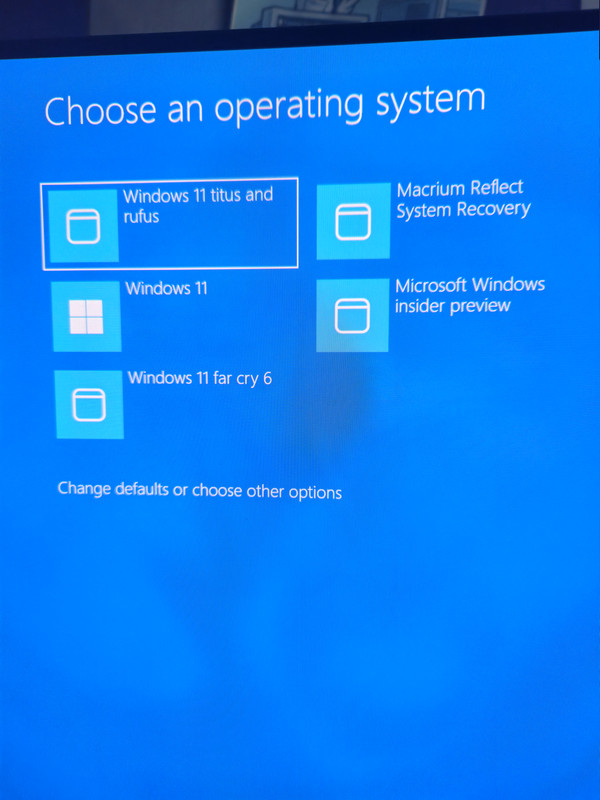
I have 4 options on the choose which to boot blue screen
You mentioned
3 windows and 1 for macrium recovery environment

For drives that dont show
As long as 1 windows drive is bootable
I use either msconfig
Dual boot repair tool
Or easybcd
To add the other windows installed drives
To the boot menu

I also use easybcd to rename them
So I know what drive is what on the choose
Operating system screen
This is useful if you have multiple windows of same version
Instead of them all showing as 10 or 11

And pressing f8 won't show everything
If multiple installs are tied to one boot record
Only 1 drive shows in my f8
After choosing that drive I then get the screen
With all installs to choose which to boot

Typed all that without
Looking at the video shown
So will have to watch that to see what it shows

Edit
The video does pretty much what easybcd does
Just easybcd is point and click/has gui

And when he has 2 x windows 10 showing
That's why I would rename them
For example windows 10 with games installed
Windows 10 new clean install
Doesn't really matter what name you use
As long as it let's you know which is which
Rather than having to remember which is on which
Volume number
I will give that easybcd a try,thanks for the help.
 
@Mcnumpty2323 I used easybcd and after installing Windows 11 I added the ssd to the boot menu with easybcd and renamed it to Windows 10 and then I booted into Windows 10 but then I couldn't get the boot menu to come up again.

When you use easybcd do you need to add Windows 10 and 11 after the installation for it to work.

Thanks for your help

 
@Mcnumpty2323 I used easybcd and after installing Windows 11 I added the ssd to the boot menu with easybcd and renamed it to Windows 10 and then I booted into Windows 10 but then I couldn't get the boot menu to come up again.

When you use easybcd do you need to add Windows 10 and 11 after the installation for it to work.

Thanks for your help

 
The first operating system
Ie the one you're using easybcd on
Should already be listed in easybcd
Then you add the second one

Not on the pc right now
Its 6am and just woke up so dont remember
The precise steps I do it in easybcd
Done it so many times I just do it on autopilot
Without thinking about it
 
The first operating system
Ie the one you're using easybcd on
Should already be listed in easybcd
Then you add the second one

Not on the pc right now
Its 6am and just woke up so dont remember
The precise steps I do it in easybcd
Done it so many times I just do it on autopilot
Without thinking about it
I don't know why but for whatever the reason after targeting the Windows 10 ssd when I was in Windows 11 after installing it it wouldn't boot into Windows 10,I had to delete the current Windows 11 and then re-add it to the list and then both show up,but instead of getting the blue menu screen I get the school black screen.
 
I don't know why but for whatever the reason after targeting the Windows 10 ssd when I was in Windows 11 after installing it it wouldn't boot into Windows 10,I had to delete the current Windows 11 and then re-add it to the list and then both show up,but instead of getting the blue menu screen I get the school black screen.
Not seen the black choose OS screen
In a very long time
But all my installs are windows 11
Might be something to do with it
Can you select which drive to boot from?
Doesn't really matter if it's blue or black screen
If it works

This is what I end up with
Assuming i can load an image
This forum seems to have issues with certain
Image hosts lately
Actually 5 boot items thought was only 4

 
Last edited:
I can still choose which drive I want to boot from I just wasn't sure if there are 2 ways of doing it and I choose the path least traveled.

I will contact easybcd and explain what happened to them just incase.

My PC also wanted to boot into only Windows 10 at first as well after using easybcd and I wasn't getting the options for the bios screen or the black screen,I did a restart and pressed Delete which was my bios key and then after a restart I got got the boot menu.
 
Not sure
But it might depend if 10 or 11
Is installed first
Whether you get the black or blue
Choose boot screen
Can't actually remember if 8 or 10
Was last one with black screen

Pretty sure theres a tweak
That can switch it from black to blue
And vice versa
Though dont remember exactly how right now
I am not a morning person lol
 
Back
Top Bottom