New system won't post

Associate
Joined
18 Oct 2002
Posts
1,349
Location
Blantyre, Scotland.
Hi guys,

Hoping someone can help me.

Just bought a new upgrade which i can`t seem to get to post.

Intel Core i7-3820 3.60GHz (Sandybridge-E) Socket LGA2011 and a Gigabyte X79-UD3 Intel X79 (Socket 2011) DDR3 Motherboard.

8GB of Corsair Vengeance Arctic White 8GB (2x4GB) DDR3 PC3-12800C9 1600MHz Dual Channel

All power connecters seem to be plugged in correctly.

The machine will power up, fans will start etc but then nothing. The fans keeps spinning then stop.....then start......as if it`s resetting.

Read through the manual a couple of times to see if there`s anything in there different to the way i`ve built machines 100 times before.

No system beeps to indicate any issues, monitor light stays orange.

I`ve tried booting it with and without the 12v CPU 8 pin plug in and it doesn't make any difference.

Anyone have any ideas?

 
I would start by taking out one stick of RAM (Leaving you with 4GB), then turning it on. If that doesn't do anything. Swap the sticks around. Try different combinations. Ultimately though, make sure they are sitting well on the motherboard.
 
Get a paper-clip and turn it into a U shape and put one end into the motherboard connection with the green coloured cable and the other in a black coloured cable slot, plug a 4 pin fan into the PSU and turn it on. Make sure you have the PSU turned off from the mains and the PSU before you go sticking a cable into it because it's a live connection :)
 
I also though PSU might be faulty so i popped in to Glasgow yesterday and bought a brand new one.

Exactly the same.

I will try removing memory.

Thanks for the initial help guys. Will let you know if it works.
 
I also though PSU might be faulty so i popped in to Glasgow yesterday and bought a brand new one.

Exactly the same.

I will try removing memory.

Thanks for the initial help guys. Will let you know if it works.

Go return it for your money if it's not your PSU and your other one is fine :) No point being out of pocket.

Edit:

Verify that the power supply voltage switch is set correctly. If the input voltage for the power supply does not match the correct setting for your country, your computer may not stay powered on.

As the other poster said try go to bare minimum to boot, check there is no loose circuits, loose screws or damaged cables.
 
Last edited:
Triple check your cables. 9/10 times that I come across this problem on friends/colleagues builds its because they've forgot to plug in the CPU power connector. Easiest cable to miss IMO.
 
When that happens with different power supplies, I suspect a short between the motherboard and case, especially around the mounting holes (inspect each, on both sides) or at the corners (add non-metal support there, as needed), although shorts usually cause the power to shut down, rather than reboot, as your computer seemed to do.

What power supplies did you try (power ratings, brands), and do they have genuine UL or CSA registration numbers? Also what video card do you have? I typically test a new system by using either the motherboard's built-in video or a slow, low power card and only one memory module. I avoid memory brands like Corsair, Mushkin, Kingston, Patriot, Geil, and G.Skill, unless it's obvious they're made from prime quality, branded chips (Samsung, Hynix, Micron, Nanya/Inotera, Elpida/RexChip, PowerChip, ProMOS). IOW I prefer Samsung or no-heatsink Crucial modules.
 
Get a paper-clip and turn it into a U shape and put one end into the motherboard connection with the green coloured cable and the other in a black coloured cable slot, plug a 4 pin fan into the PSU and turn it on. Make sure you have the PSU turned off from the mains and the PSU before you go sticking a cable into it because it's a live connection :)
The green wire can safely be grounded even after the AC is applied, and a few power supplies (very few), like some Deltas, won't turn on if the green wire is grounded prior.
 
Hi guys,

Hoping someone can help me.

Just bought a new upgrade which i can`t seem to get to post.

Intel Core i7-3820 3.60GHz (Sandybridge-E) Socket LGA2011 and a Gigabyte X79-UD3 Intel X79 (Socket 2011) DDR3 Motherboard.

8GB of Corsair Vengeance Arctic White 8GB (2x4GB) DDR3 PC3-12800C9 1600MHz Dual Channel

All power connecters seem to be plugged in correctly.

The machine will power up, fans will start etc but then nothing. The fans keeps spinning then stop.....then start......as if it`s resetting.

Read through the manual a couple of times to see if there`s anything in there different to the way i`ve built machines 100 times before.

No system beeps to indicate any issues, monitor light stays orange.

I`ve tried booting it with and without the 12v CPU 8 pin plug in and it doesn't make any difference.

Anyone have any ideas?

Just travelled up to help my good friend McRod and oh how he needed some assistance...

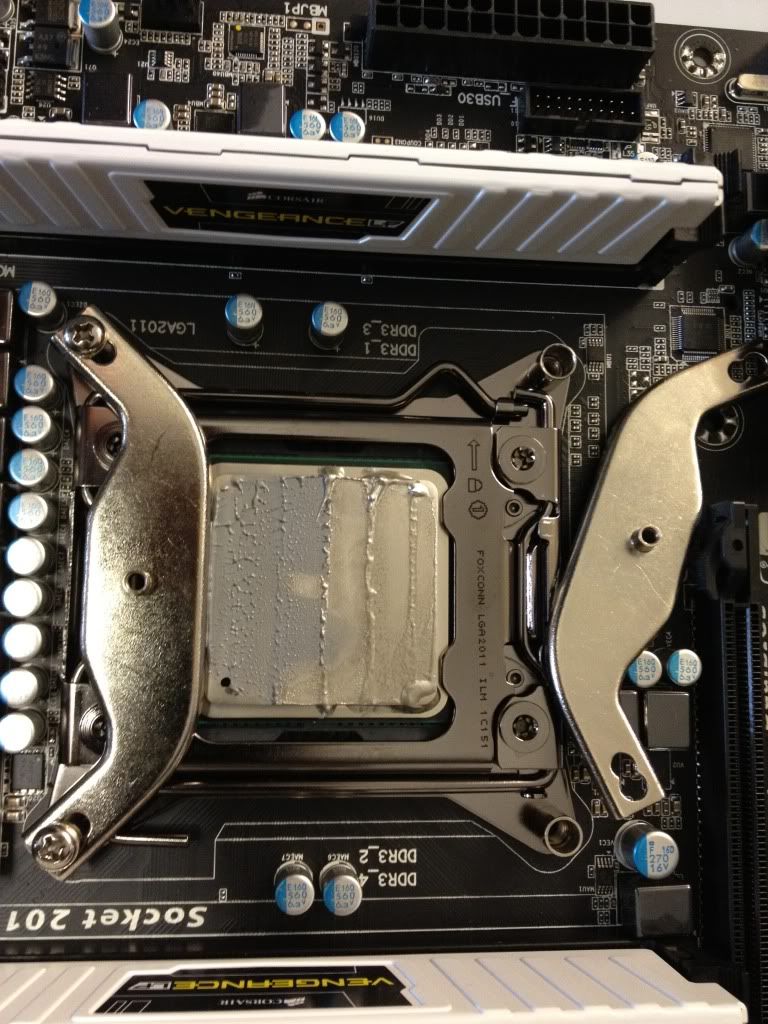
CPU had been caked up like it was about to be served at a wedding...

Even 2 (different) thernal materials applied - the AS5 very liberally - was lapping all over the CPU and surrounding area :D

After much moaning from Mcrod we discovered a faulty ram chip (one of the 4 DIMMS was faulty) this prevented the whole system posting and not even supplying a beep code to suggest the problem. System is now being installed to and running well.

Took a picture of the TIM **** up which has now been corrected.. Club hands come for free in Scotland :)

photo-2.jpg
 
fneh

paste schmaste.

I was simply followiing orders. :D

The little thing that came with the Heatsink told me to put an even line of paste down each fin of the heatsync. Whats the big deal? :D

I spread my paste like i spread my lurpak in the morning :p

Thanks for the help everyone.
 
Back
Top Bottom