• Competitor rules

    Please remember that any mention of competitors, hinting at competitors or offering to provide details of competitors will result in an account suspension. The full rules can be found under the 'Terms and Rules' link in the bottom right corner of your screen. Just don't mention competitors in any way, shape or form and you'll be OK.

Now NV broke optimus

Soldato
Joined
1 Mar 2024
Posts
2,819
Location
Leeds
Just when you think NV cant get any worse the new driver bummed optimus..
after updating my laptop became unusable, latencymon shows massive continues spike's all linked to the NV driver.

this is my 4070 laptop at idle.

this it gpu on.. off... on... off... continuously.
at idle the GPU normally reads about 40c and it has a sheard heat pipe with the CPU, right now its reading 57c.
my system stutters continuously. both audio and image

i rolled back the driver but dont worry the optimus driver or controller didn't roll back.
 
I think we should calm down a little bit. Nvidia is a really small indie company, with very small market-share. And they're practically giving their products away.
Can we really expect them to test driver updates across a range of hardware?

Is it going to be a Windows reinstall, to get this one sorted?
 
Just when you think NV cant get any worse the new driver bummed optimus..
after updating my laptop became unusable, latencymon shows massive continues spike's all linked to the NV driver.

You sure about this ? As I'm not seeing anyone else complain Nvidia Advanced Optimus is broken on Nvidia laptops with the latest drivers.

What laptop do you have ? Brand, model number etc. Could be related to your type of laptop and may need a BIOS update or a VBIOS update. Also turning off BIOS and VBIOS updates off in windows update can cause such issues if your laptop maker sends out updates. Also make sure you have the latest drivers for Intel/AMD graphics installed too for the on CPU graphics. Also latest chipset drivers as AMD has made a recent large update to that for AMD CPUs/chipsets too and same for Intel CPUs/chipsets always make sure to have latests ones too.

Just curious what is going on as I don't see any other recent reports apart from yours.
 
Last edited:
All I can say is after updating the driver it started. Rolling back the driver did nothing. I did a fresh install of windows and it’s fixed the problem.

I’ll install the new drivers tonight and see what happens
 
ive now installed the latest driver and everything was fine until installing NSI Afterburner now the constant spikes are back...
but latencymon shows massive continues spike's all linked to the NV driver not Afterburner

after uninstalling Afterburner and a reboot, there gone. but Afterburner was fine with the last driver so this puts me in a funny situation.
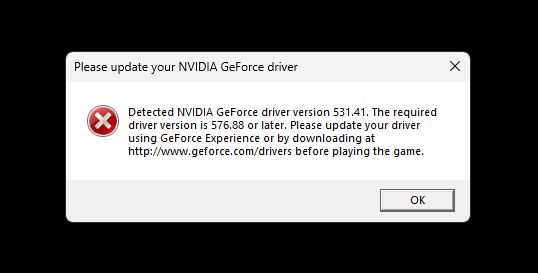
i cant play battlefield 6 without the new driver, but i cant undervolt with the new driver because i cant run Afterburner leaving me with a GPU that throttles way before it should.
 
Last edited:
ive now installed the latest driver and everything was fine until installing NSI Afterburner now the constant spikes are back...
but latencymon shows massive continues spike's all linked to the NV driver not Afterburner

after uninstalling Afterburner and a reboot, there gone. but Afterburner was fine with the last driver so this puts me in a funny situation.
i cant play battlefield 6 without the new driver, but i cant undervolt with the new driver because i cant run Afterburner leaving me with a GPU that throttles way before it should.

So it sounds like Afterburner is broken with the new drivers then, maybe an update is needed.
 
ive now installed the latest driver and everything was fine until installing NSI Afterburner now the constant spikes are back...
but latencymon shows massive continues spike's all linked to the NV driver not Afterburner

after uninstalling Afterburner and a reboot, there gone. but Afterburner was fine with the last driver so this puts me in a funny situation.
i cant play battlefield 6 without the new driver, but i cant undervolt with the new driver because i cant run Afterburner leaving me with a GPU that throttles way before it should.

It's probably not not Afterburner, more likely rivatuner which you've installed alongside it. Latencymon handles monitoring and is part of rivatuner.
You can undervolt without rivatuner
 
I don’t have rivatuner installed. Just installed afterburner so I can undervote


Edit: or do I… tbf I don’t remember if I unchecked the box when I installed it on my new laptop
 
Last edited:
Could even be the recent windows updates that have broken a lot of systems and Nvidia performance and other issues.

Nvidia confirms its “looking into” Windows 11 Update KB5074109​


I do wonder if Microsoft Cross Adapter Scan-Out (CASO) is causing some issues too.


Not had time to do advanced test on my laptop to see what is going on but just some thoughts of why you maybe seeing issues, but you also didn't list the laptop you have and I did ask in previous post. Without knowing your laptop and what hardware it has and how you have it firmware updated (BIOS/VBIOS) I can only guess.

I did try quick tests on my Alienware laptop X17 R2 with a Intel 12700H & Nvidia 3080Ti (Has a MUX and Advanced Optimus) and all running latest firmware, Chipset drivers and Intel display drivers for the on CPU graphics. Tried latest version of MSI Afterburner as you said you had issues with it and didn't see any issues or latency issues using Latencymon.

Maybe try overclocking/underclocking/undervolting with the tool that comes with your laptop. Afterburner is an MSI tool really and may cause issues on some systems.

Not sure what is going on for you as I don't see it in quick testing on my laptop that uses Optimus.
 
Last edited:
I dont wish to sound like a total ass.... but maybe stop updating every new release on release day?

Read the notes. Evaluate if you even need the update. If you do, accept it might break something.

New updates rarely bring must have uodates, especially on previous gen hardware.
 
I dont wish to sound like a total ass.... but maybe stop updating every new release on release day?

Read the notes. Evaluate if you even need the update. If you do, accept it might break something.

New updates rarely bring must have uodates, especially on previous gen hardware.

It’s a new laptop… are you saying I should just keep it the way it comes out of the box for ever??
 
Damn you Nvidia, damn you!

images-1.jpg
 
Last edited:
After a fresh install and giving it a few days everything looks to be ok now

Afterburner still shows the core spikes but the lag and heat as gone away
Gpu is back to idling at 40c
 
Back
Top Bottom