• Competitor rules

    Please remember that any mention of competitors, hinting at competitors or offering to provide details of competitors will result in an account suspension. The full rules can be found under the 'Terms and Rules' link in the bottom right corner of your screen. Just don't mention competitors in any way, shape or form and you'll be OK.

nvidia surround... what would I need?

Soldato
Joined
8 Nov 2006
Posts
9,237
Well... in the ongoing attempt to ignore the fact that I shouldn't be spending money, I was thinking I'd get one of the up coming 34" ultra wide monitors from lg, and replace my TN 3D screen with an IPS...

But then I got to wondering about surround. 3 x 27" might be a bit much... so was considering maybe 3 x 23" LG IPS screens. Would take a bit of getting used to when using single screen, but I could probably handle it.

I realise a few things, like:
1) Performance would take a big hit compared to 2560x1440
2) Perform in 3D can already take a hit at just 1080p, so that will be worse.
3) I may hit VRAM limits earlier
4) More cables!

The current 29" 2560x1080 screens are already ~£350. So a 34" 3440x1440 is going to, at the very least, double that - though I think I am still being optimistic.

3 x 23 screens can be had for £450, and add £150 for a triple monitor stand.

But I don't know what, apart from the above, are down sides to surround.

Would I be able to use 2 monitors via dvi and one via hdmi?

Can it be quite flaky, or is it quite stable?

How much tweaking and mucking about do I need to do in games to get them looking right?

Does it tend to run a lot easier on modern games? Not in terms of performance.

The up side, is that I can simply play games on single screen if I needed, though that would be small :(

How easy is it to swap between surround/individual screen mode? Example, I know game "X" won't run in surround - what would I need to change settings-wise to get it on single? Is there hot keys?

I am now quite familiar with my dual screen setup, and if it is likely to mean I have an easier life going forward, I may stick to that route.

Just be nice to know what people who have experience think.

 
You have enough grunt and enough VRAM to run surround at 5760x1080. Until recently, I was running 3x120Hz 1080P's and enjoyed my time doing it.i Ieven gamed in 3D surround and in some games, you would be blown away.

Connections are simples - 2xDL-DVI on the first card 1xDL-DVI on the second card. I never tried with 2 connected on D-DVI and 1 HDMI because mine were 120Hz but for 60Hz, this should be no problem.

You run the display in surround and choose what monitor you have your task bar on. Mine was on the middle screen and no issues at all.

There is a program called Widescreen fixer and for games that don't natively work in surround, this makes them work and work well. There might be games out there that don't but I never found one (not that I was hunting). Of course, if you just wanted to play on one screen, you set the resolution in that game to 1920x1080 and it will run on the screen you have chosen as the main monitor.

The downside is, it soon gets to be too much and you find yourself trying to ignore the side screens or you are only giving them a glance. My wifes monitor packed up, so I was more than happy to give her one of mine as a temporary screen but I didn't miss triple screen gaming as much as I thought and have since bought a 1440P screen and allowed her to keep the 120Hz 3D screen (she only really does facebook and excel/word on it).

I am now running the same as you with 2 screens. 1x1440P and 1x1080P 120Hz screen. I mainly miss 3 screens in FSX and Dirt3 but I wouldn't want to go back to triple screen gaming.
 
Thanks for the insight Gregster.

One thing I was worried about was it being "too much" - yes, there is such a thing :D

Was that with 3x27 inch though?
 
Decided, to hell with it.

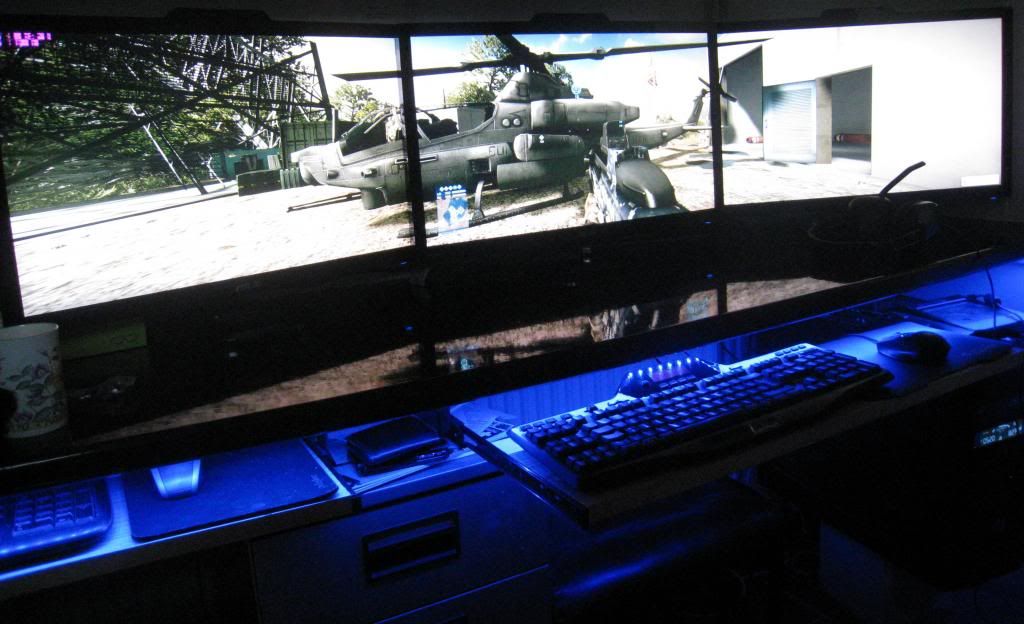
3 x 23 inch LG IPS 3D ordered. Got a big enough desk, and while I will lose some vertical resolution, I will still have lots more desktop space than 2560x1440.

Performance hit will be there, but I guess it will give me an excuse to OC the cards!

Will just have to get used to slightly smaller screen for single screen uses. 3 x 27 inch would have just been too much.

Hope to hell I like it and don't have problems!

Figured I was never going to get the perfect single screen, so this was best compromise.
 
Yep, I was using 3x27" and 3x27" is too much IMO. I feel you have gone for the ideal size screens to run surround. I sit 4 ft away from my screens and that much screen space is a little OTT :D

I do miss it a little mind. Something special about TR in 3D surround.

Edit:

If you have any issues, let me know. Also, make sure you get a program called widescreen fixer. invaluable little program for running games in surround.
 
Just nervous - screens are my least favourite thing to buy, as I can be picky, and often have issues with screens... :(

Will be sure to download that app. And at least if I have issues with particular games, can just use a single.

Will miss the size of single 27 inch a bit though. especially for watching stuff.
 
3screens.jpg


Missing it now :(
 
That was a nice setup... but I can imagine those 3 x 27 being a bit overwhelming.

Will post some pics tomorrow, once I got it all set up. Assuming I get it all set up tomorrow. And assuming I don't have issues.

Can't wait! Been wanting to try 3 screen setup for a long time now :)

One day, if someone makes a 32/34 inch 2560x1080 IPS/VA ultra-wide with 3D support, I will get that. Til then, this was the absolute best I could do in way of compromise.
 
I was very tempted to go for a 2560x1080 screen to go along side my 1080P but opted for a 1440P Dell instead. They do look good those ultra widescreens.
 
I was very tempted to go for a 2560x1080 screen to go along side my 1080P but opted for a 1440P Dell instead. They do look good those ultra widescreens.

They look nice, but I would rather at 29" I think the 16:9 2560x1440 are better.

The new 34" LG 3440x1440 will be absolutely awesome, but it won't have 3D - and I just need to get away from mismatched screens, and having to shift them depending on use!
 
hmmmm, oh dear.

While dismantling my current screens in anticipation of arrival of the 3 x 23", I cam up with an arrangement that never occurred to me, which would not bother me as a dual screen setup... and would allow me to get an ultra wide.

Now contemplating if I don't just want to refuse delivery and wait on the 34" ultra wides...

Not sure how long I have to decide. I would be happy with either setup. Only real down side to triple monitors is the loss of vertical res and the bezel.

Only down side to the dual screen setup... well, the only possible one I can think of is cost...
 
I had a triple monitor setup but to be honest i found them more trouble than they were worth for gaming, especially with Xfire

Have a 27 inch Asus now and its great for gaming and the 3D is not bad too
 
Try it and see what you think. You've got 7 days to try it for free before deciding for definite anyway. The worst that can happen is you're £20 down on return postage.

I enjoyed my triple screens a lot but I racked them off as I had a major project at work which meant I wouldn't have much time to game and I couldn't have all the monitors and graphics cards I had sitting there doing nothing :p.

Dual 780s should get decent enough frames at 5760*1080 with 2xMSAA. In some games you should quite easily be able to max out.
 
Try it and see what you think. You've got 7 days to try it for free before deciding for definite anyway. The worst that can happen is you're £20 down on return postage.

I enjoyed my triple screens a lot but I racked them off as I had a major project at work which meant I wouldn't have much time to game and I couldn't have all the monitors and graphics cards I had sitting there doing nothing :p.

Dual 780s should get decent enough frames at 5760*1080 with 2xMSAA. In some games you should quite easily be able to max out.

Agreed with this. I would try it for a few hours. The bezels were never a problem and you don't notice them after a short spell of gaming.
 
Looks good Chris and not over powering :)

Ta :)

Takes a lot of getting used to though. I need a good long session of BF4 to see how it sits.

I can only imagine what 3x27 would have been like. Don't think I would have liked it one bit.

Batman+Surround+3D = Amazeballs!

But a single 23" feels soooooooooo much smaller than a 27".
 
So..... one issue I am having a couple of issues

Nvidia and HDMI and RGB output.

My main/middle screen is via HDMI, because I use that for audio, so wanted it to be a matter of if wanted to use single screen, the centre one would be in place with audio.

BUT... it seems nvidia outputs limited RGB over HDMI rather than full RGB. I stumbled upon this when calibrating monitors - it looks like the gamma/brightness/contrast is off on the hdmi screen compared to the two dvi screens.

When trying to figure this out, I stumbled across the fact this can be a common problem with Nvidia and HDMI. I found a tool which was supposed to update the registry to fix the output, but it seems to have done nothing.

2nd issue: It slipped my mind the second before I started typing this. I'll have to come back to it later :(

Edit: Finally remembered second "issue"

I was under the impression that I would be able to connect all monitors to GPU 1. But when I had 1 x HDMI and 2 x DVI on GPU 1, it moaned at me and told me to connect one to GPU 2. I did that, and got surround working.

The only reason I may want to have all on GPU 1, is in case I have to disable SLI for a particular game, am not sure it will still run in surround. I can check this tonight when am home though.

The bigger issue is the gamma/brightness/contrast issue over HDMI.
 
Last edited:
Well, in case anyone should every come across this thread on a search, the problem with issue 1 did not lie with Nvidia and the drivers, but with the monitor itself.

It must treat the hdmi source as a tele or something and apply some processing of some kind. Thankfully I had a DVI to HDMI cable lying around, and now all monitors are pretty much exactly the same.

Is it normal though for monitors to have different colours between panels? To get gamma/brightness/contrast as close to "right" as possible, have had to use custom colour settings, and it varies across each screen.

Not that it bothers me - they are not perfect but pretty close to it.

As for 2nd issue, I have not had time to play with it right now. Would be nice to get it working on one GPU, in case one ever went faulty, or I had to disable one for a game not liking SLI.

Anyone know if there is some easy way to switch between surround/individual screens? Right now it's a case of going into control panel, selecting "use individual screens", but then it for some reason disables the surround screens, and I have to re-enable them in control panel...
 
Back
Top Bottom