

ocing my crysis rig

Associate
Joined
25 Jun 2007
Posts
2,098
right ive finally finished my crysis rig
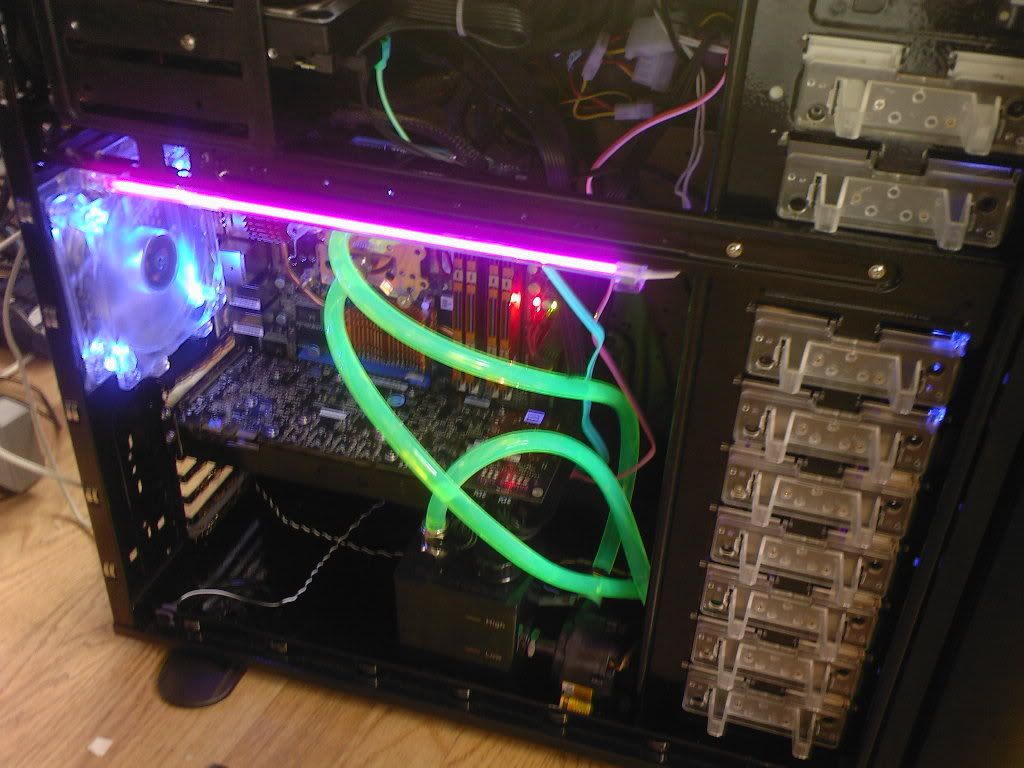
Photo-0188.jpg


q6600 go gtx 4 gig ballistix 5300 ip35-pro

ok so everything was running ok core temp showed 22c on all cores. tat doesnt run for some reason. anyway played moha and crash crash crash. and core temp then stopped working every time i opened it it reset my system instead of showing temps. so i was looking in voltages in guru it showed cpu at 1.2875 i think and mem at 1.8v added volts to both but still the same. today i ran orthos and it failed within 2secs. read up here to increase voltages more which then spurred me on 2 find the volt spec for my memory. it is 2.2v!!

i had it running at 1.8 v1.9 at most. changed to 2.2 and no more crashes core temp works again although now cpu at idle is 27c?? uguru still shows 19c like it did when core temp showed 22c.

anyway i tried ocing a bit but failed, cpu-z confuses me. i got a calculator out and tried to make sense of things in regards to fsb/ fsb/dram bus speed multi. i started to see some patterns. cpu-z says one multi bios says another? the speed is out too i think. when i oc to 3ghz the rated fsb said 1260. after about 20 secs it just hung. also cpu z says 4:5 fsb dram. is that a ratio? does it mean memory is running 4/5ths the speed of cpu or sumet?

if any1 has got any quick advice i would much appreciate it......will be going out now so will try to oc at 11 tonight

 
Go by what CoreTemp says.

CPU-Z is showing a lower multiplier than the BIOS because you have SpeedStep enabled. It will drop to the lower multiplier at idle, but will raise it as soon as it detects a load.

4:5 means that for every 4mhz on the CPU FSB, the memory has 5mhz ie- your memory is running 25% faster than the FSB. Drop it to 1:1 before starting to overclock the CPU to keep the memory out of the equation.

Overclocking the G0 should be quite easy to start with. You should be able to run 3ghz (334x9) on stock volts, maybe a tad higher.
 
hey thanks guys for the relies. i havent read them because my system hangs now in a unclocked state. i think its core temp so i havent opened it now. we will see what happens. right let me read what you guys have said
 
Go by what CoreTemp says.

CPU-Z is showing a lower multiplier than the BIOS because you have SpeedStep enabled. It will drop to the lower multiplier at idle, but will raise it as soon as it detects a load.

4:5 means that for every 4mhz on the CPU FSB, the memory has 5mhz ie- your memory is running 25% faster than the FSB. Drop it to 1:1 before starting to overclock the CPU to keep the memory out of the equation.

Overclocking the G0 should be quite easy to start with. You should be able to run 3ghz (334x9) on stock volts, maybe a tad higher.


ok should i do it through windows ie guru or restart in bios. well i will have to go in bios to drop it to 1:1. ive seen a dram speed option it says CPU:DRAM . thats the one right. i will age up and down on it until i find 1:1.

ok here goes.
 
right ive finally finished my crysis rig

Photo-0188.jpg


q6600 go gtx 4 gig ballistix 5300 ip35-pro

ok so everything was running ok core temp showed 22c on all cores. tat doesnt run for some reason. anyway played moha and crash crash crash. and core temp then stopped working every time i opened it it reset my system instead of showing temps. so i was looking in voltages in guru it showed cpu at 1.2875 i think and mem at 1.8v added volts to both but still the same. today i ran orthos and it failed within 2secs. read up here to increase voltages more which then spurred me on 2 find the volt spec for my memory. it is 2.2v!!

i had it running at 1.8 v1.9 at most. changed to 2.2 and no more crashes core temp works again although now cpu at idle is 27c?? uguru still shows 19c like it did when core temp showed 22c.

anyway i tried ocing a bit but failed, cpu-z confuses me. i got a calculator out and tried to make sense of things in regards to fsb/ fsb/dram bus speed multi. i started to see some patterns. cpu-z says one multi bios says another? the speed is out too i think. when i oc to 3ghz the rated fsb said 1260. after about 20 secs it just hung. also cpu z says 4:5 fsb dram. is that a ratio? does it mean memory is running 4/5ths the speed of cpu or sumet?

if any1 has got any quick advice i would much appreciate it......will be going out now so will try to oc at 11 tonight


Sorry to take this off topic, but what case is that and what watercooling are you using?
 
ok cpu-z now shows 1:1 in memory. now i will turn up the GO.

right it just hung again....starting to think its cpu-z now. anyway GO is at 3gz now. i will try orthos blend, cpu-z not running

also cpu-z still shows wrong multi even with speedsted disabled. i also have bios number 11 for the ip35 it came like that.
 
no probs. i always wanted to know how the 4x1 gb q6600 system would oc on the p35 chipset. well so far so good orthos hasnt failed, only been 6mins but it usually fails within a minute.

has any1 ever had cpu-z hang their system? let me google it
 
im scared too open cpu-z now. system still running strong. i can only google 2 pl who are having the same prob as me with cpu-z
 
right i sacked off orthos after 20 mins because i just read on here it only stresses 2 cores. task manager shows two core at 100%. got prime 95 25.4 and now all four cores are getting it. temps correspond aswell.

right im running core tem now aswell. so if it doesnt hang i think its cpu-z thats the culprit. google made me think if i should flash the bios again. but it came with 11 and ppl say thats the best one.


oh all my core temps are at 44c... thats not too bad right?
 
Which version of CoreTemp? v0.95.4 is the latest and gives the best readings for the G0 chips.
 
Back
Top Bottom
