OcUK Bundle Upgrade Advice Please?

Associate
Joined
15 Aug 2008
Posts
45
Hi,

Firstly, I'll say "Hi" as this is my first post on here, and secondly, as is traditional on a first post, can I someone help me with a few questions? :p

I'm considering upgrading my tired old AMD system with this bundle;

** Overclocked Bundle ** Abit IP35 Pro Motherboard / Intel Q6600 Quad Core @ 3.3Ghz / 2GB (2x1GB) OCZ PC-8500 RAM / Tuniq Tower CPU Cooler


There is a warning on the product description "** Please Note - Adding extra RAM or deviating from the guide in any way can cause instability **"...

Can any one advise if it is possible to beef this bundle upto 4Gb, or am I treading on dangerous ground? I run Vista64HP, and as any Vista user knows, it's a memory hungry beast, so I'd like to build in a little "wriggle" room for the OS once it gets running ;)

The rest of the internals that I will be plugging into the MB are;

  • 8800GTX 756Mb
  • SATA II HD
  • Creative Fatlity SB
  • IDE DVD/RW

Will my 500W power supply strain at all with the new MB/Mem/CPU combo or is there no issue?

 
x64 Vista loves 4gb, so it would be wise to go for 4gb.

Tbh I would just pick the components seperately and go for a 4gb kit. The board and CPU will have no issues running or overclocking with 4gb. And virtually all Q6600's will do 3.3ghz anyway.

Which PSU do you have?
 
Thanks for the quick response :)

The exact internals are;

  • BFG GeForce 8800 GTX OC 768MB
  • Western Digital Caviar Special Edition 200GB 2000JS SATA-II
  • Creative Sound Blaster X-Fi Fatal1ty FPS Edition

The PSU is;
  • Akasa Ultra Quiet 550W PowerPlus Active PFC ATX2.0 PSU

Excuse the questions, but this is my first venture into OC a rig, so I don't want to fry anything :) I can't see any matching spec'd RAM from OCZ in 4Gb kits, so I assume just grabbing another matching 2x1Gb kit along with the bundle would be OK?

As I'm going to be trying to following the OC'ing guide that comes with the bundle, has anyone got any experience of implementing it, and what I would have to consider upping the memory to 4Gb?
 
Last edited:
I would use this 4gb OCZ kit.

Tbh the overclocking guide is nothing to get excited over. The same (actually better ;)) information is easily available in these forums.
 
Thanks for the info - just compiling the order now, and shifting funds around - and right under my wifes nose too!

I'll kick off following the guide and see how it goes... I'm sure I'll be back ;)

Again, thanks for the input.
 
Oki doke - bought the kit, but looks like I'm not going to get a chance, due to work, to fit it until the weekend. :(

As Cob advised I've upped the memory from this;

OCZ 2GB (2x1GB) PC2-8500C5 1066MHz SLI-Ready

to this;

OCZ 4GB (2x2GB) PC2-8500C5 1066MHz

Looking through the overclocking guide it all looks pretty straight forward, but just a few queries :)

It recommends some DRAM timing changes to match the memory - I assume the Precharge Delay should be set to 18 to match the memory (5-5-5-18), and not 15 as in the guide for the original spec'd memory (5-5-5-15)?

It also recommends DDR2 voltage of 2.2V, though the EVP of the new memory is 2.15V - am I going to fry the memory at 2.2V, or just invalidate my warranty? ;)

BTW - that Tuniq cooler is a bit of a beast! LOL :D
 
Last edited:
Looking through the overclocking guide it all looks pretty straight forward, but just a few queries :)

It recommends some DRAM timing changes to match the memory - I assume the Precharge Delay should be set to 18 to match the memory (5-5-5-18), and not 15 as in the guide for the original spec'd memory (5-5-5-15)?

It also recommends DDR2 voltage of 2.2V, though the EVP of the new memory is 2.15V - am I going to fry the memory at 2.2V, or just invalidate my warranty? ;)

BTW - that Tuniq cooler is a bit of a beast! LOL :D

I'd say the TRAS could be set to 15 without any issues, tho setting it to 18 won't affect performance.

I would set it to 2.1v if you're going to run it at 1066mhz. Should only need to set the voltage higher if you're going to be running it near 1100mhz.
 
Well - all in place and working fine :)

Lost all the skin on the knuckles of one hand though, trying to fix one of the leads to the MB after installing the cooler tower...!

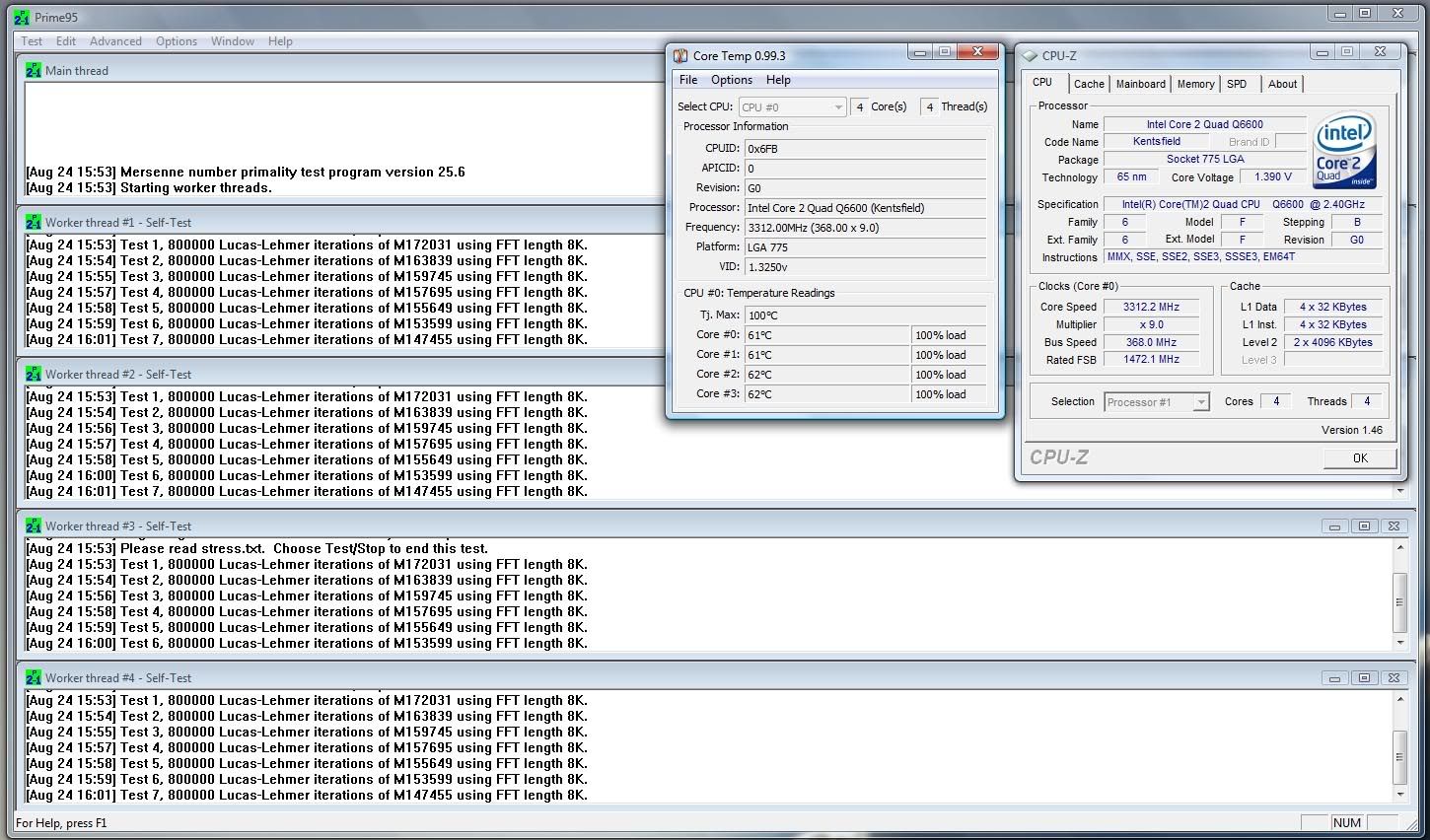
Here's the results - room ambient of about 25c.

OCed.jpg


Non load, it drops down to sub 40c's :) - I'm happy... Now to upgrade the HDD, which is the new bottle neck! :D
 
Thanks for the quick response :)

The exact internals are;
  • BFG GeForce 8800 GTX OC 768MB
  • Western Digital Caviar Special Edition 200GB 2000JS SATA-II
  • Creative Sound Blaster X-Fi Fatal1ty FPS Edition
The PSU is;
  • Akasa Ultra Quiet 550W PowerPlus Active PFC ATX2.0 PSU
Excuse the questions, but this is my first venture into OC a rig, so I don't want to fry anything :) I can't see any matching spec'd RAM from OCZ in 4Gb kits, so I assume just grabbing another matching 2x1Gb kit along with the bundle would be OK?

As I'm going to be trying to following the OC'ing guide that comes with the bundle, has anyone got any experience of implementing it, and what I would have to consider upping the memory to 4Gb?

Well i bought the IP 35 Pro and decided to get another 2 Gig set of matched RAM.

I asked in store if I'd need to alter any settings from the OC guide and they told me to increase the CPU multiplier by 1 MHz. Didn't really understand why I'd need to do this? Anyways, have been running with the new RAM fine without any problems.
 
The IP35 Pro needs about an extra 0.1v on the northbridge and needs the DDR2 Ref Voltage set to +2% when running 4 sticks.
 
i now have all the components in the guide except i have 2x2gb 8500 ocz reaper ram and wondering what settings i need to change as i have 2 sticks now not 4? and what do i need to change to make it stable because i keep getting bsod "bad pool caller", and "irq requests not equal etc..." so i guess its my ram thats unstable?. any settings i need to change? as i followed all the settings in the ocuk guide?
 
Back
Top Bottom