OLED vs IPS as daily driver

Associate
Joined
20 Apr 2010
Posts
43
Morning everyone, just after a bit of advice please. My Dell S2721DGFA is potentially dead: the screen keeps going blank but the power light stays on. If I turn it off/on again it comes back for a bit but it just happens again. I’ve tried my work laptop on it through the HDMI input (desktop is through the DP) so convinced it’s the monitor or power cable.

Looking to replace it and thinking of jumping to an OLED display. Are these ok for daily use? I work from home 2/3 days per week where the screen will be my main driver. Work use is mainly excel/powerpoint (I working in oil and gas but facilities side so no special software). Gaming wise I play a bit of everything - currently just discovered Captain of Industry and had just been playing horizon Forbidden West and I do play the odd rounds of PUBG too.

New screen requirements would be 27” 1440 and G-Sync and Free sync compatible. Don’t need super high refresh rate, 240hz should be plenty for my old man eyes. Current PC is 9800X3D with a 9070XT GPU.
 
It's a bit more of a tricky decision right now because you've got a lot of good options that all come with slight caveats. Apologies in advance for the slightly lengthy post.

OLED would be fantastic for gaming on - but at 1440p you're going to notice text fringing when you're working in Excel/PP/general browsers etc. compared to a 1440p IPS.

The 4k OLEDs do a good job of almost 'hiding' the text fringing that occurs becasue of the non-standard pixel layout (although it's still there to see) but on 1440p you can absolutely see the difference in text clarity between an OLED and an IPS monitor. At 32" 4k the text fringing is a little more visible than at 27" 4k - at 27" I found it really difficult to spot any sort of oddities with the text.

Burn-in is obviously a consideration but I think we're in a much better place now with the quality of panels, the burn-in prevention features and the burn-in guarantees offered that it shouldn't be the thing that sways you. An OLED monitor will 100% burn in at some point, it's just the nature of the tech - but if you're alright with replacing a monitor in 4 or so years then burn in shouldn't necessarily be something that impacts your decision making. If you don't want to replace a monitor because of it then I'd be more tempted by an IPS monitor.

The other consideration is doing usual burn-in prevention approaches like hiding your desktop icons, hiding the task bar etc. which is more just a little bit inconvenient if you do end up choosing to do it. I've only ever really bothered with hiding desktop icons rather than the whole black background, hide task bar etc. For me, text fringing on 1440p OLEDs is more of an annoyance than the worry around burn in.

VRR flicker is also a thing on OLEDs, as much as some people can ignore it or not notice it, it's entirely going to come down your own eyes. I notice it mostly on menus, loading screens, friends list, the Steam overlay etc. so have ended up switching VRR off on my OLED as it was getting a little irritating.

Gaming is great, response times, the overall picture quality and (in some cases) the glossy finish really do make games just pop. However, a good IPS display is also still really good. You're not going to get the same 'inky blacks' that you get on OLED but you still get good colour reproduction, good viewing angles and a good IPS monitor is still a really good option right now.

Your PC is good enough to consider 4k though, especially with FSR4 Performance at 4k being actually a really good option now for upscaling so I wouldn't rule it out. It really comes down to:

Would you be worried about burn-in eventually happening? If so, probably best looking at an IPS monitor.

If you're not worried about burn in, would you be put off by text fringing? If so, then it's either looking at a 4k OLED rather than 1440p or sticking with IPS again.

If you're not worried about burn in, text fringing doesn't bother you, then you've got a huge amount of choice right now. You can get one of the new tandem WOLED monitors from either Gigabyte, Asus or LG. 280hz 1440p, Asus model is glossy, LG and Gigabyte's are both matte (Gigabyte are releasing a glossy version this year).

You also have QD-OLED options too also ranging from 240hz up to 500hz. Right now the 360hz models seem to actually be the best priced ones (it looks like they're discontinuing them and offering either just 240hz or 500hz this year) but you have MSI models, Asus models, Gigabyte again and then brands like Philips and AOC too. All QD-OLEDs are semi-gloss finishes (apart from Samsung) but will suffer from raised blacks in well lit rooms. At 1440p, I actually find glossy QD-OLED better for text clarity than the WOLED - but I think it's subjective here as I've seen others prefer text on the WOLED. The newer tandem WOLED monitors are definitely much improved for text clarity, although I still didn't like either of them at 1440p to work on.

If you're not worried about burn in but you are put off by text fringing then you should look at 4k OLEDs. Either 32" or 27", depending on what size you can realistically fit in the space, and then you've got plenty of options available. Both QD-OLED and WOLED at 32" - and just QD-OLED (right now) at 27".

I think the below monitor is an insanely good deal right now for a 4k 240hz OLED 27" monitor with DP 2.1 - for 500 quid! 4k at 27" will mean you don't have anything to really worry about with text fringing on OLED - but you still have the burn in and VRR flicker considerations.


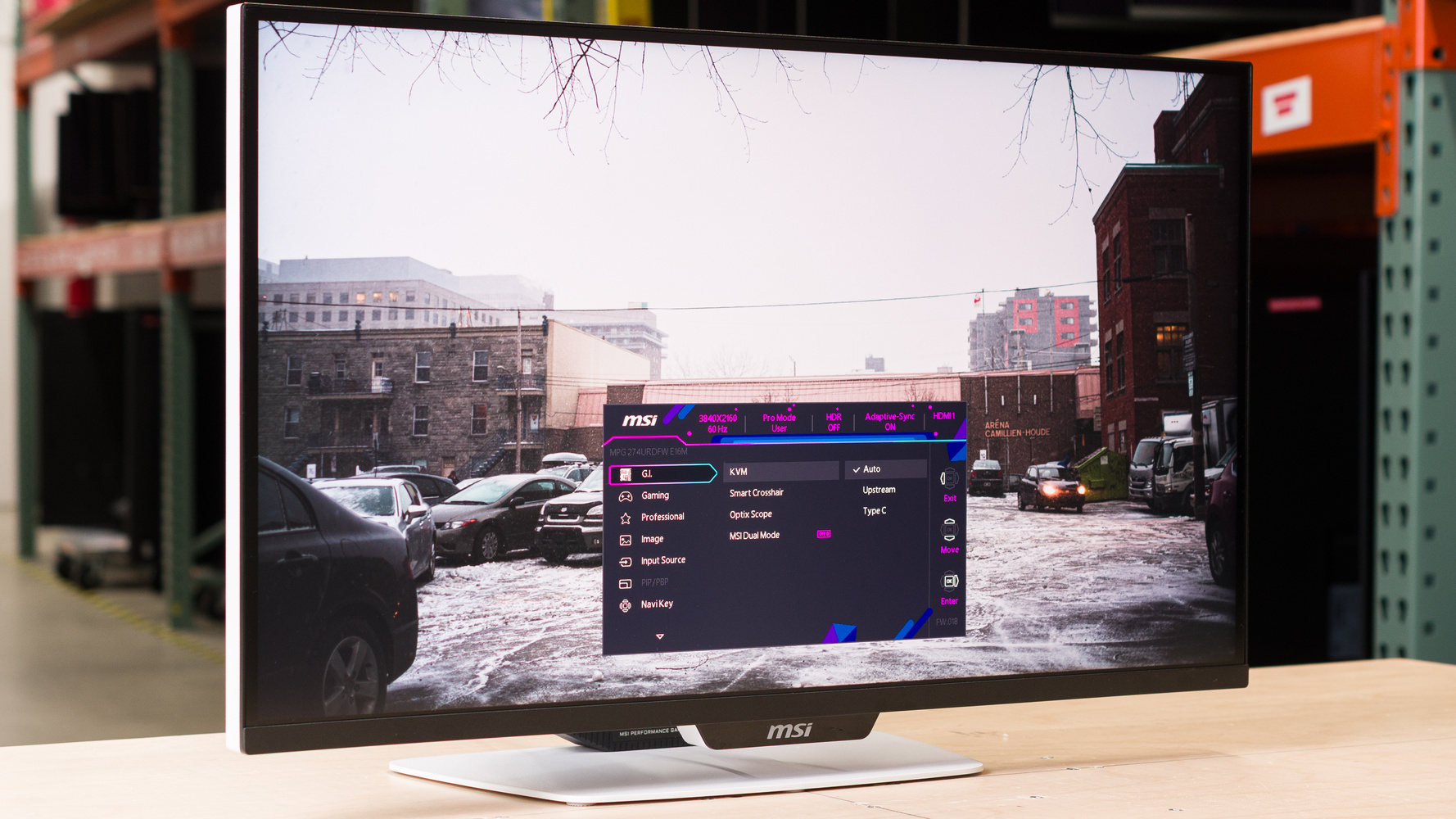
Alternatively, you could look at one of the newer mini-LED monitors. MSI's new 4k 27" IPS mini-LED monitor has been really well reviewed despite it's awful monitor name (MPG 274URDFW E16M) and has 1,152 dimming zones, dual mode (so you can swap from 4k 160hz to 1080p 320hz) and usb-c with 90w of charging so you can plug your laptop straight into it.

I saw a mate and his family over Christmas and he'd just picked it up as his work from home/gaming monitor as a Christmas present to himself and it really surprised me how good it looked with HDR on (and the backlit zones enabled) - and then how well it actually performed in the 1080p mode when he wanted to hit 300fps in Apex and die over and over again.


If you're set on 1440p as the resolution and IPS as the panel tech then you're likely to find most offerings around the 180hz refresh rate range. The new Gsync Pulsar IPS monitors are 360hz (but are pointless for you as you have an AMD GPU) and 240hz is sort of the 'max' current refresh rate that a 1440p IPS monitor can realistically run in line with the response times (outside of Pulsar).

You've got a lot of good options right now, I don't think you can make a bad choice.

 
Thanks for the very detailed post. Text clarity is a major issue for me, I work with a lot of large spreadsheets (I do a lot of M&A due diligence so look at a lot of cost/production profiles in large spreadsheets).

I tried an old power cord as a last resort on the existing one and it held together in a 30 min or so test so it may have been a false alarm. Will see how it goes but I think a replacement IPS might be best for me but will look more at 4k OLED
 
I had basically the same decision (4k instead of 1440p) and ended up going mini-led IPS with local dimming (BenQ EX321UX). I have an OLED TV and have used OLED monitors. They are such a treat for the eyes but I just couldn't bring myself to buy one for my daily driver where I spend more time working than gaming. Text clarity and burn in were the two major concerns along with ensuring whatever I got had a decent KVM built in with 65W+ of PD.

I know the tech in OLED's is getting better all the time but sitting 8+ hours a day with relatively static content visible is going to cause some amount of burn in eventually. As t2na said, it's the nature of the beast. It's pleasing to see manufacturers offering decent burn in warranty and standing by their products....but I'm not interested in the faff of sending a monitor back for replacement. At the end of the day I'm lazy and I'm not interested in changing the way I use a computer to try and baby an OLED through daily work life by hiding taskbars, super eager idle timeouts etc to try and eek out a bit more longevity before burn in which all but seems inevitable.

I know that mini-led IPS doesn't quite compete with OLED performance, but on the whole, they aren't a bad compromise and do even beat out OLED in some areas. For me, the upgrade from an old 28" BenQ TN panel was still huuuuuge and I feel confident it'll take all the abuse I throw at it for many years to come. I will say that the EX321UX while very packed with features is absolutely not worth the RRP that BenQ are trying to charge for it, not when there are decent OLED's for less! I got mine for less than half the price 2nd hand with warranty which made it an easier decision. the KVM is solid and while I never thought about it, I really appreciate having a remote to interact with the settings and switch KVM input
 
I had basically the same decision (4k instead of 1440p) and ended up going mini-led IPS with local dimming (BenQ EX321UX). I have an OLED TV and have used OLED monitors. They are such a treat for the eyes but I just couldn't bring myself to buy one for my daily driver where I spend more time working than gaming. Text clarity and burn in were the two major concerns along with ensuring whatever I got had a decent KVM built in with 65W+ of PD.

I know the tech in OLED's is getting better all the time but sitting 8+ hours a day with relatively static content visible is going to cause some amount of burn in eventually. As t2na said, it's the nature of the beast. It's pleasing to see manufacturers offering decent burn in warranty and standing by their products....but I'm not interested in the faff of sending a monitor back for replacement. At the end of the day I'm lazy and I'm not interested in changing the way I use a computer to try and baby an OLED through daily work life by hiding taskbars, super eager idle timeouts etc to try and eek out a bit more longevity before burn in which all but seems inevitable.

I know that mini-led IPS doesn't quite compete with OLED performance, but on the whole, they aren't a bad compromise and do even beat out OLED in some areas. For me, the upgrade from an old 28" BenQ TN panel was still huuuuuge and I feel confident it'll take all the abuse I throw at it for many years to come. I will say that the EX321UX while very packed with features is absolutely not worth the RRP that BenQ are trying to charge for it, not when there are decent OLED's for less! I got mine for less than half the price 2nd hand with warranty which made it an easier decision. the KVM is solid and while I never thought about it, I really appreciate having a remote to interact with the settings and switch KVM input
I've always liked the sound of that monitor, it's just the price that makes it pretty insane to justify.

Great that you could grab it less than half the price, it's 100% worth it at that cost. I wish it had a slightly higher refresh rate (160hz at 4k for IPS monitors isn't unheard of now) but I know it's only a 16hz increase over 144hz. It also sounds like it's got a great algorithm for the mini-led backlight as well.

If you aren't playing fast paced shooters then a 144-160hz mini LED IPS 4k monitor is honestly the play if you're more leaning towards static content/productivity over gaming. If I'm a 70/30 work to gaming use case then I'd for sure go with that type of display (if I have to only have 1 monitor).

That said - for anyone who doesn't keep a monitor for 7+ years then OLED is absolutely fine for productivity and gaming on. It'll burn in at some point - but with a 3 year warranty you can just use it like you would a normal monitor and then replace it when it eventually develops burn-in under warranty and do the same again for another few years - then upgrade after that!
 
I had basically the same decision (4k instead of 1440p) and ended up going mini-led IPS with local dimming (BenQ EX321UX). I have an OLED TV and have used OLED monitors. They are such a treat for the eyes but I just couldn't bring myself to buy one for my daily driver where I spend more time working than gaming. Text clarity and burn in were the two major concerns along with ensuring whatever I got had a decent KVM built in with 65W+ of PD.

I know the tech in OLED's is getting better all the time but sitting 8+ hours a day with relatively static content visible is going to cause some amount of burn in eventually. As t2na said, it's the nature of the beast. It's pleasing to see manufacturers offering decent burn in warranty and standing by their products....but I'm not interested in the faff of sending a monitor back for replacement. At the end of the day I'm lazy and I'm not interested in changing the way I use a computer to try and baby an OLED through daily work life by hiding taskbars, super eager idle timeouts etc to try and eek out a bit more longevity before burn in which all but seems inevitable.

I know that mini-led IPS doesn't quite compete with OLED performance, but on the whole, they aren't a bad compromise and do even beat out OLED in some areas. For me, the upgrade from an old 28" BenQ TN panel was still huuuuuge and I feel confident it'll take all the abuse I throw at it for many years to come. I will say that the EX321UX while very packed with features is absolutely not worth the RRP that BenQ are trying to charge for it, not when there are decent OLED's for less! I got mine for less than half the price 2nd hand with warranty which made it an easier decision. the KVM is solid and while I never thought about it, I really appreciate having a remote to interact with the settings and switch KVM input
This is how I feel. I have an OLED for personal use and an IPS screen for work. I’m not overly cautious with the OLED when gaming or relaxing, but if I used it for work, I’d be frustrated if it developed burn-in from static elements.

For my hobby of using illustrator programs with a Wacom, I prefer the IPS since a white canvas with menu bars, like in Excel or Word, seems likely to speedup or cause burn-in. Still, my OLED is nearly three years old and has been excellent despite regular use - shortcuts on the desktop, decent brightness, and wallpapers.

I just make sure to use full-screen windows, run pixel refresh, and keep the Windows Ribbons screen saver on, so if I leave the screen, the screen saver kicks in quickly, which I think has helped.
 
Back
Top Bottom