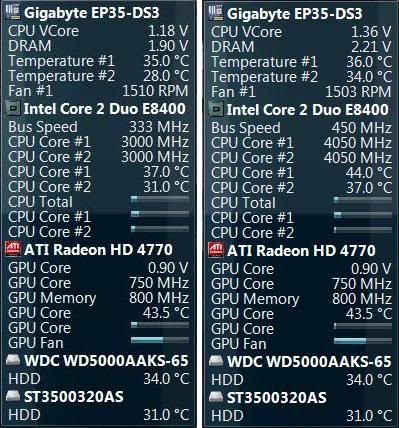
Soldato
- Joined
- 14 Sep 2010
- Posts
- 2,909
- Location
- Port Talbot - Wales
Hey guys, just want some other oppinions as to whether or not I'm pushing my CPU too hard...
I was given my current setup in it's stock state and within a couple of days I decided to up it from 3.00GHz to 3.60GHz with the RAM running at 1000MHz - after a while then (plus reading on here a lot lol) I decided I wanted to hit the magic 4.00GHz so I had a fiddle with the FSB an the voltage etc and managed to get 4.005GHz with my RAM up to 1066MHz - then through sheer speed greed I decided to try to get 4.10GHz...that didn't happen but I did manage to milk 4.05GHz with RAM running at 1080MHz It's passed 10 runs of IBT and ran prime95 for a few hours with no glitches so IMO it's pretty stable...
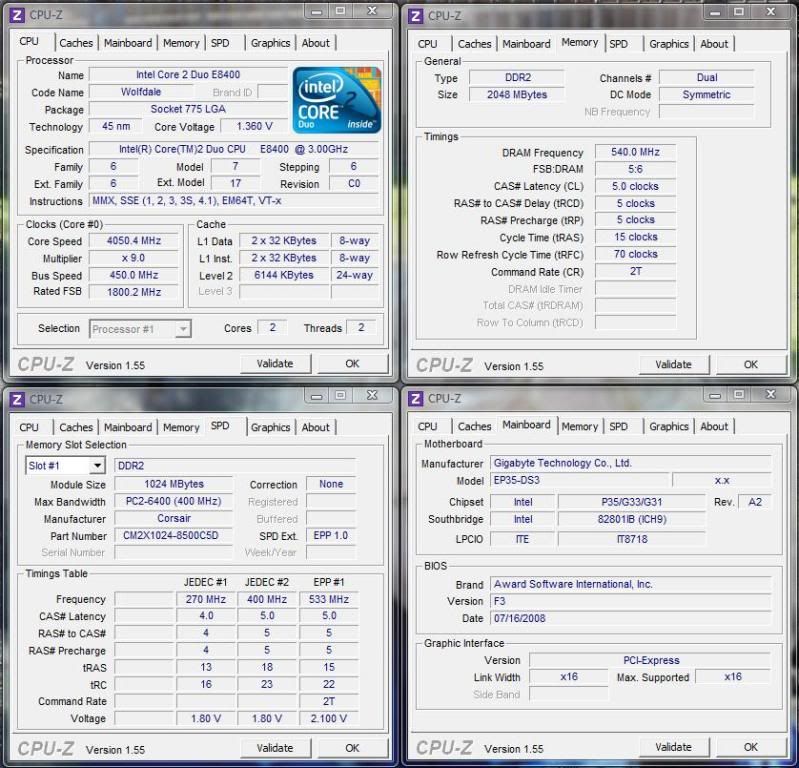
Here's my settings as displayed in CPUz
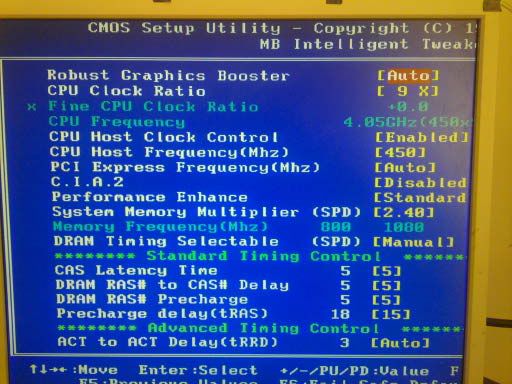
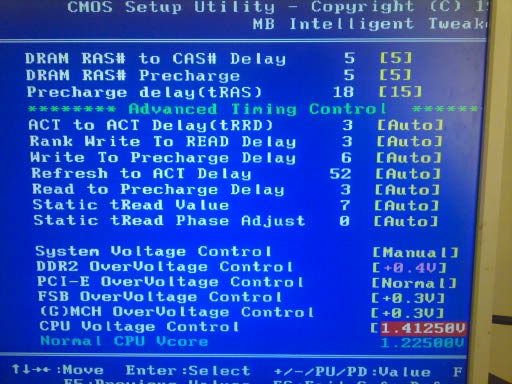
And here's my BIOS O/C settings
Let me know what you think
I'm happy with it, but I don't want to murder my system obviously so if some of you think I'm driving it a bit too hard, it'd probably be best to wind it down a bit yes?
Thanks in advance.
I was given my current setup in it's stock state and within a couple of days I decided to up it from 3.00GHz to 3.60GHz with the RAM running at 1000MHz - after a while then (plus reading on here a lot lol) I decided I wanted to hit the magic 4.00GHz so I had a fiddle with the FSB an the voltage etc and managed to get 4.005GHz with my RAM up to 1066MHz - then through sheer speed greed I decided to try to get 4.10GHz...that didn't happen but I did manage to milk 4.05GHz with RAM running at 1080MHz
It's passed 10 runs of IBT and ran prime95 for a few hours with no glitches so IMO it's pretty stable...Here's my settings as displayed in CPUz
And here's my BIOS O/C settings
Let me know what you think
I'm happy with it, but I don't want to murder my system obviously so if some of you think I'm driving it a bit too hard, it'd probably be best to wind it down a bit yes?
Thanks in advance.