• Notice regarding image hosts and attachments. See here.

Outlook Free version

Joined
11 Jan 2007
Posts
9,184
Location
*̡̡ı ̡̡͡|̲̲̲͡͡͡ ̲▫̲͡ ̲̲̲͡͡π̲̲͡͡ ̲̲͡▫̲̲͡͡ ̲|̡̡
Hi,

Anyone using this on Windows 11? The replacement for Express.

I have an email account which is a safe one, one which does not get spam and has not been leaked in any of those breaches. When I check the Web app, I get no dodgy spam.

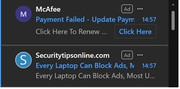
When I check the Outlook app, recently when checking "other" I have seen two instances of being told my MacAfee subscription has expired as an advert (You would be insane to have such malware installed) and I need to click a link to fix it. When I examine the link, it is clearly not from MacAfee and you know it is a trap.

Anyone else seen this recently? How can they allow this to happen? I have got my angry trousers on about this.
 
Last edited:

Hi,

Anyone using this on Windows 11? The replacement for Express.

I have an email account which is a safe one, one which does not get spam and has not been leaked in any of those breaches. When I check the Web app, I get no dodgy spam.

When I check the Outlook app, recently when checking "other" I have seen two instances of being told my MacAfee subscription has expired as an advert (You would be insane to have such malware installed) and I need to click a link to fix it. When I examine the link, it is clearly not from MacAfee and you know it is a trap.

Anyone else seen this recently? How can they allow this to happen? I have got my angry trousers on about this.
I have not seen it in awhile but I have seen it in the past.

Seems to stop for a bit then comes back
 
snip2.jpg


Just had it again.
 
It's free software with ads. You might be able to block them but it's easier to either use the web version with your browser's adblock blocking them or use another email software.
I only see that when I click on other. Which isn't often but some emails such as order confirmation ones end up there. I mostly use my mobile to check emails anyway so don't see this usually. I just thought it was a cheek to show scam emails like an ad.
 
Hi,

Anyone using this on Windows 11? The replacement for Express.

I have an email account which is a safe one, one which does not get spam and has not been leaked in any of those breaches. When I check the Web app, I get no dodgy spam.

When I check the Outlook app, recently when checking "other" I have seen two instances of being told my MacAfee subscription has expired as an advert (You would be insane to have such malware installed) and I need to click a link to fix it. When I examine the link, it is clearly not from MacAfee and you know it is a trap.

Anyone else seen this recently? How can they allow this to happen? I have got my angry trousers on about this.
Yep I get the ad as well.
I guess if they pay money to Ms they can advertise whatever they want
 
Have only ever used the Gmail App on my phone or just logged in to my account through a browser window on a PC. Wouldn’t be bothered with Outlook :D
 
You can buy a stand alone (key) copy of Office that includes Outlook for not much money. Best alternative if you don’t need calendar and contacts is Thunderbird in my opinion.
 
Could just use something like Thunderbird instead, you can sign in to your Outlook account with that. Outlook for Windows was replaced with a web version which made it slower and more bloated (with ads) than the original Mail app that first shipped with W10.
 
Set up my uncle and he had 2 of the same spam mail adverts at the top of the links too.... he's not tech savvy enough to not click on them so I've stuck him on my 5 person office 365 license to get rid of them and limit my tech support phonecalls....

The 'free' outlook should only have one advert at the top, deliberately designed to make people think it's a new email, kept sending in negative reviews/bugs about it but MS are after the clicks of people who either autoclick on top link or aren't tech savvy, or for people to buy 365. Honestly I think the ads at the top of the inbox are pretty scummy thing to do and more influencer type people should be calling MS out for it.

If they must have an advert make it a stupid banner ad or something but oh wait people wouldn't click on that by mistake...
 
Last edited:
The ads in the 'free' outlook have been there for years now.
Not for long though, the "classic" version is going end of life in 2029
I hope when we get to that point Microsoft put effort in to get the new version to have all the features 'classic' currently has, too many of our customers have tested it since it's become available and find features / settings they used to use have been ripped out for a more 'streamline' look.
 
Not for long though, the "classic" version is going end of life in 2029
Given I was running Outlook 2019 until I recently updated to 2024, I am not worried about that. I am already syncing contacts and calendar with Google.
 
I hope when we get to that point Microsoft put effort in to get the new version to have all the features 'classic' currently has, too many of our customers have tested it since it's become available and find features / settings they used to use have been ripped out for a more 'streamline' look.
You put too much hope in Microsoft unfortunately, as I doubt this will happen.
 
My edited hosts file used to block the ads on Outlook but seems to no longer work. Using adguard DNS on my phone stops the ones on there still. I moved to Mailspring and customised it to look rather 'simple'. I used to actually like the Mail app, and there is a similar app in the store called wino mail iirc which was relatively new when I looked, but might have to look again at it.

Would move to thunderbird, but never been happy with it. The mobile app version seems alright though.
 
Back
Top Bottom