


Soldato
- Joined
- 15 May 2012
- Posts
- 5,981
- Location
- Louth, lincs

ANNOYING ISN'T IT!!, don't worry where here to help

Just thought i'd share this list to help the ones that dont know
This list has been compiled to help when overclocking your system, if your experiencing BSOD's with a stock system, ensure that your drivers are upto date and that windows is fully updated. If problems still persist, running Memtest wouldn't be a bad idea.
Unless you have eagle eyes and are very quick to read the bsod code i would advise you to download a program called whocrashed or Bluescreen view is very good click to download your prefered choice
WhoCrashed
Bluescreen View
once you have had a bsod, boot back into windows run the program and click analyse then hey presto you have your code.
If you are not getting your codes you may have your minidump file disabled to enable follow instructions below
For win 7/8
1. Go to the Control Panel, choose 'System And Security', and then click 'System', and then click the 'Advanced System Settings' link.
2. In the opened window, click the 'Advanced' tab and then inside the 'Startup And Recovery' frame, click the 'Settings' button.
3. In the opened 'Startup And Recovery' window, there is 'Write Debugging Information' section. You should set the combo-box in this section to 'Small memory dump', and then click 'ok' to confirm the change
Should look like this
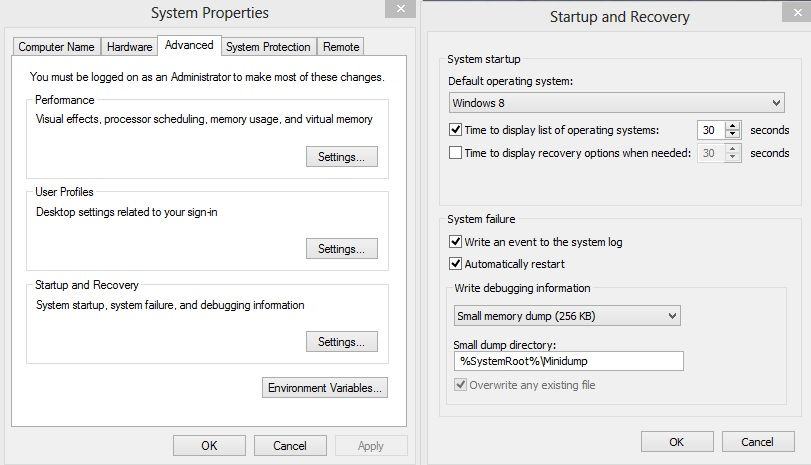
To make the below codes more accurate make sure that all your drivers are upto date or that you are using known versions not to cause problems.
Also run memtest to rule your RAM out of the equation, unstable ram can cause many BSOD's.
Here is the DL link for this to install on a usb stick http://www.memtest.org/download/5.01/memtest86+-5.01.usb.installer.zip Latest memtest installer (27/09/2013)
Main Memtest webpage http://www.memtest.org/
BSOD codes for overclocking
0x101 = increase vcore
0x124 = increase/decrease QPI/VTT first, if not increase/decrease vcore...have to test to see which one it is
on i7 45nm, usually means too little VVT/QPI for the speed of Uncore
on i7 32nm SB, usually means too little vCore
0x0A = unstable RAM/IMC, increase QPI first, if that doesn't work increase vcore
0x1A = Memory management error. It usually means a bad stick of Ram. Test with Memtest or whatever you prefer. Try raising your Ram voltage
0x1E = increase vcore
0x3B = increase vcore
0x3D = increase vcore
0xD1 = QPI/VTT, increase/decrease as necessary, can also be unstable Ram, raise Ram voltage
0x9C = QPI/VTT most likely, but increasing vcore has helped in some instances
0x50 = RAM timings/Frequency or uncore multi unstable, increase RAM voltage or adjust QPI/VTT, or lower uncore if you're higher than 2x
0x109 = Not enough or too Much memory voltage
0x116 = Low IOH (NB) voltage, GPU issue (most common when running multi-GPU/overclocking GPU)
0x7E = Corrupted OS file, possibly from overclocking. Run sfc /scannow and chkdsk /r
BSOD Codes for SandyBridge
0x124 = add/remove vcore or QPI/VTT voltage (usually Vcore, once it was QPI/VTT)
0x101 = add more vcore
0x50 = RAM timings/Frequency add DDR3 voltage or add QPI/VTT
0x1E = add more vcore
0x3B = add more vcore
0xD1 = add QPI/VTT voltage
0x9C = QPI/VTT most likely, but increasing vcore has helped in some instances”
0X109 = add DDR3 voltage
0x0A = add QPI/VTT voltage
Haswell, according to a source from the R.O.G forums these codes still very much apply, but where it says QPI/VTT this can also mean SA/IO for this particular architecture.
124 Devils Canyon too high or low VCCIN tune accordingly. Usually down.
.
Last edited:
