Overclocking Beginner

Associate
Joined
10 May 2012
Posts
121
Location
Midlands
Stability Help Please

Hi guys, I have been tinkering with overclocking gradually for a while now, with my Q6600 sat happily at 3.0ghz on my asus striker ii extreme.
Until now that has been fine for me as I have haven't had to mess with voltages and the complicated stuff. Just simple fsb alterations and leaving the board to it on auto voltages.

But now I would like to just tweak it a touch more to 3.2ghz. At first it seems fine with this, running Prime95 stably for about 5-10 minutes at 46° (with coolIT vantage) but then it will blue screen and have to be restarted. I have stepspeed and C1E disabled now and it still does it. So I'm guessing that this is where I have to start on the volts, but I'm clueless when it comes to this part as numbers arent exactly my strong point :confused:

Am I right in thinking this and can anybody help me please?
 
Last edited:
if u can, download cpu-z and load it up, then take a screen shot of the cpu tab and the memory tab, then upload them to a imagehosting site like imageshack, etc....
then post the pic on here so we can see it

Thanks for reply! Good point I've got cpu-z, I'll do that now at 3.0Ghz first. My RAM is running at 1600Mhz which is stock for Vengeance DDR3. Is that ok?

Okaaay... here you go!

CPU-Z30Ghz.jpg
 
Last edited:
take voltage of auto, then raise it a couple of levels. or just go straight to 1.4v
also make sure ram is set to run at stock speed or at least 1:1 fsb/dram ratio for now.

Ok so cpu-z already showed 1.456v CPU core volage at 3.0Ghz. So I went to BIOS>Over Voltage>CPU Voltage and took it off auto, going down the list to 1.45625v then I took it up (down the list) two notches like you suggested, to 1.46875v. Then I clocked the FSB back up to 1424 making it 3.2Ghz and then gave it another whirl.

CPU-Z32Ghz.jpg


Windows seemed twitchy and for some reason cpu-z now showed 1.520v. Then as I was typing here it crashed to blue again.

*Drops head in shame* :( What am I doing wrong?? I've set it back to 3.0Ghz for now
 
Last edited:
right, no way should it take 1.45v for just 3.0ghz. most G0 revision Q6600's will do this on stock volatge.
even my old B3 revision Q6600 only needed 1.44v for 3.4ghz.

Download Intel Burn Test, select high or max ram, and 4 threads, and run a test for at least 10 runs.
if it passes, go back into bios, set cpu voltage to 1.4v, then raise fsb to 350, reboot and test again.
repeat again

also found bios settings for 3.4ghz, most of the settings will be similar to yours
http://forums.guru3d.com/showthread.php?t=360725

Ok thanks a lot for your advice! I set the motherboard back to completely default settings. So it's back at 2.4ghz first just to make sure I'm starting fresh. This is CPU-Z at that, is it right? Coz its still saying 1.312v:

CPU-Z24Ghz.jpg


UPDATE:
Yeah just as I thought, even again after a default reset and set to 2.997ghz its still running at 1.456v on auto voltage. Are you sure the Striker II Extreme isn't just a voltage happy board? lol If not what else could be causing this? =S

I'll look through that link and see if I can get my head round it. Thanks again for that by the way!


CPU-Z2997Ghz.jpg
 
Last edited:
3.6 Ghz!!

also found bios settings for 3.4ghz, most of the settings will be similar to yours
http://forums.guru3d.com/showthread.php?t=360725

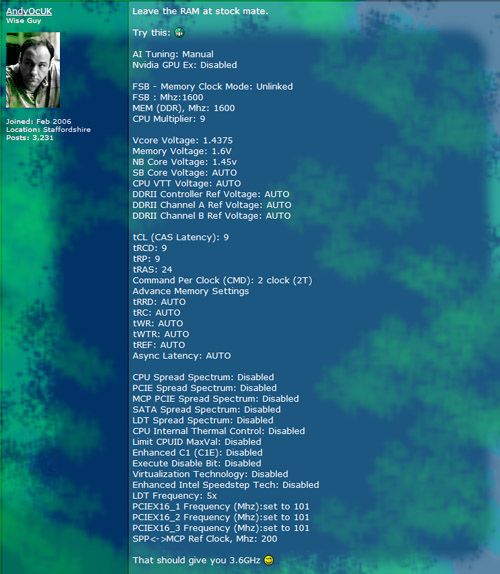
Ok so it crashed again so reset and looked around the net. Then typically I found this post on here about clocking using the Q6600 on Striker II Extreme, and AndyOcUK lists some Bios settings for the guy to try.

36GhzBios.jpg


So I thought what the hell! I tried it and it works!
It's now at 3.6 Ghz and it just ran Prime95 for 20 minutes without the slightest bump in the road! And seems stable (So far:rolleyes:)
Fingers crossed eh!

She's idling at 39.1°C on CoolIT Vantage and 45°C average on Core Temp.

CPU-Z36Ghz.jpg


I'm not sure what I was doing wrong before, but I think the cpu configuration settings (stepspeed, virtual tech etc.) were causing issues as they're all disabled now and its ok.

Anyway thanks for the encouragement ;)

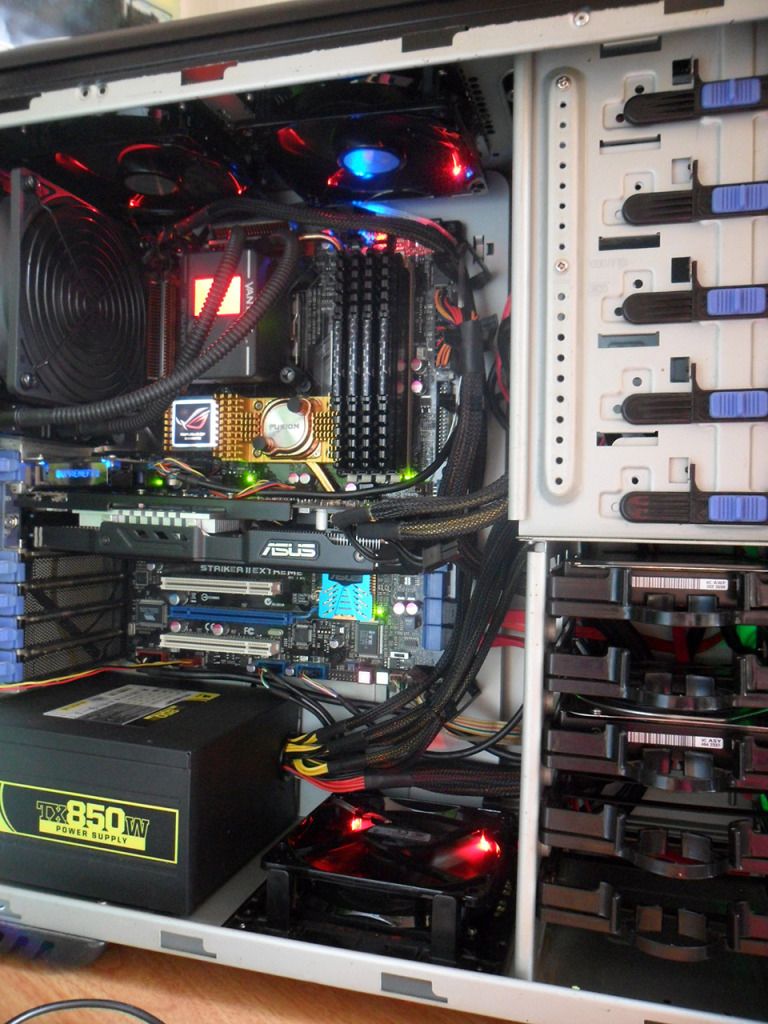
PCBuild28.jpg
 
Last edited:
before runnning intel burn test, download coretemp and/or realtemp.
run one of these first,
open cpu-z
then run the stress test. (recommend IBT)
dont let it go over 80.C,
IBTwill usually find an unstable overclock with 20 passes, (about an hour) and it runs hotter than prime, as it puts more load on the cpu.
so dont leave it alone, keep an eye on it when its running

Ok cheers for the heads up, I will be like a hawk!
Plus I've always got coretemp going on my All CPU Meter gadget, thats what I meant by average on core temp :p
 
prime typically needs 12 hrs+ to be classed as stable.
keep an eye on it when its running

Okaaay, so it crashed to blue screen again. It had seemed fine for a couple of days but then last night I was converting a video with Freemake while watching streamed video on my playstation and it just finally fell off!

What would you say to try first? I didn't go to 101 on the pci-e, like those settings said, as I don't want to clock my card but that wouldnt effect it would it? Not sure if I did the SPP MCP either.
 
Last edited:
no 101 wont affect the card.
just drop it down to 3.5ghz or raise vcore some more. dont go above 1.5v for 24/7 use.
that is why i use IBT, if it passes 20 runs, u know u can trust the pc wont crash;)

Ok will do, I've got IBT now ;) Ive put the vcore up a notch and I'm gonna do some testing tomorrow.
I'll keep you posted mate, thanks for your help :)
 
just drop it down to 3.5ghz or raise vcore some more. dont go above 1.5v for 24/7 use.
that is why i use IBT, if it passes 20 runs, u know u can trust the pc wont crash;)

Ok so it passed 20 runs of IBT at 3.5ghz @ 1.4375v so I think that'll do me as it still nudged 83°C once on core 0. It was up to 84°C a few times on core 0 & 1 when at 3.6ghz. CoolIT's overall temperature though was still only 45°C so I think it'll be fine as I'm not going to be stressing it to that extreme very often, if at all.

Fingers crossed she's stable now and if not I think i'm comfortable playing with it myself now, so thanks for the help mate. :)
 
Back
Top Bottom