overclocking old hardware

Associate
Joined
8 Jul 2008
Posts
120
Location
Uk
HI all,

its about time i upgraded my system. i plan on doing my new build in the summer :) I've got a nice shopping list in mind.

However, can someone point me in the right direction to getting some more power from my old system in the mean time.

i currently have the following.... (its old i know haha)

Q9550 (water cooled) running on a
P5Q-E with
4Gb g.skill ram (2x2gb)
Radion 4870

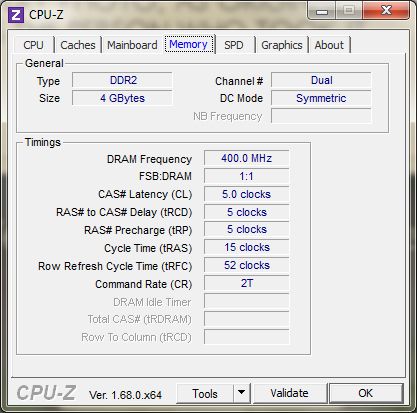
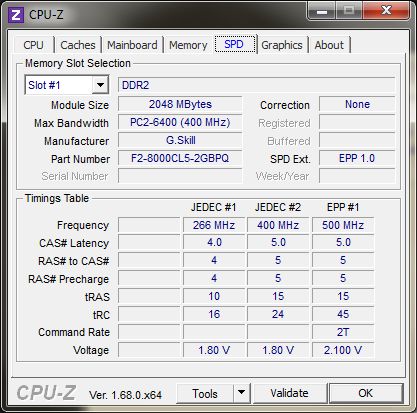
Everything is running at stock levels. I think my Ram is only 800Mhz, si there anyway i can check ?
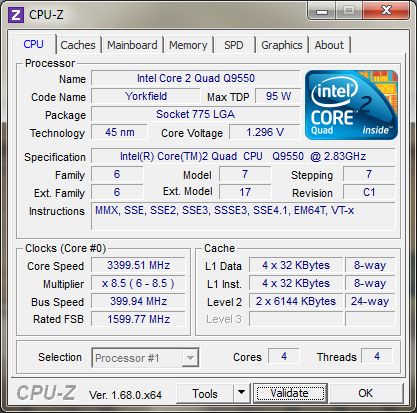
I'm really not sure about my ram speed. Think it's showing up wrong on cpz
Thanks all, hope i can squeeze some more life out of her till July.

Theo
 
Last edited:
hi guys,

i've now done some more reading. Will my ram be the limiting factor to my max overclock ? i'm at home today so i'm hoping i can get started with some guidance.
 
Thanks JonSmith.

I've printed out the overclocking basic guide from the sticky. I have it next to me. im just not sure where to start. any advice ?
 
Thanks UTmanic,

As this really isn't my field (Photographer) should i be doing this in the bios rather than something like Asus' Ai tweaker ?
looks like i've got a lot more understanding to do before i can pull this off.
 
Ok buddy, that sounds ace.
Am I ok to just go in and only change the FSB to 400 as a starting point before I report back to you ? Taking into account if I get the error.
 
Ok I'm in the bios now. Just changed the FSB to 400.
I can't see anything that looks like it relates to memory divider or multiplier.
Could they have different names ?
 
Thanks !
So changed the FSB to 400 and the dram frequency to 801mhz (never had the option for 800)

Thanks for sticking with my so far guys.
She's booted up ok. Is it worth running something like prime or do I need to make some more changes first ? So far I can't see any changes in cpuZ unless I'm being dense

I really appreciate the so far everyone. Means allot ! .
 
Hi Pastymuncher.

i've made a massive cuppa. i'll get reading! thanks for showing me it. im sure i'll find some great info in there.

here is what CPU-Z is showing currently after making those 2 changes.
clock_zpsa187173e.jpg
 
You RAM is rated up to 1000 mhz at 2.1V!

Basically means you can set your FSB at 500 and the RAM will be fine. It is exceedingly unlikely you'll get the chip running at an effective 4250 MHz though, but it gives us plenty of room to play with. As an example if you now wanted to increase the FSB past this point you would first raise your RAM voltage to 2.1.

Next step I would say is to run a Prime95 blend test for 10 minutes and see if it passes. Past this point it's going to be about tweaking the other voltages and I have little experience with that.

so as a test i've now run prime for about a hour and everything looks fine.
so as the next move should i up the FSB to 500 and leave the Ram volts ? or do they need to go up to 2.1 at the same time ? that's the bit i wasn't clear on.
 
Perfect, i think i'm finally getting the hang of this........i think hahah.

Ok so i've just gone back in and increased the ram voltage to 2.1 just to get it out the way. Then changed the FSB to 410. Problem is im already showing a core speed of 3485MHz on CPU-Z. Thats over the 3400MHz threshold you told me to stay under.
 
Ok :)
Unfortunately I'm off to work. Hopefully I'll get a full day at it again tomorrow. Fingers crossed I make some headway :)
 
Good morning all !
I'm ready to go again. I'll start off by lowering the CPU multiplier. How can I calculate what my lowest setting can be ? It doesn't give me a range in the bios.
Building these things is so much easier Hahahahaha
 
Perfect. That's dropped the clock speed down to 2460MHz

So is it just a case now of slowly upping the FSB till it becomes unstable ? Or do I have to move the other settings alongside that ?

Sorry I'm still being dense buddy. I really appreciate the help though.

Thanks again
Theo
 
Just keep raising the FSB and running a blend test til it becomes unstable, stop at 500. If it starts crashing we can look at raising the FSB termination and NB voltages to compensate.

ok i've got it to 430.
Prime gave me an error in a couple of minutes.

[Thu May 29 09:57:01 2014]
FATAL ERROR: Rounding was 0.5, expected less than 0.4
Hardware failure detected, consult stress.txt file.

Temps look ok i think under load, after about 10min at 100% they maxed out at 49oC (is that too high ?)
 
Done that now, mine would only let me set incraments of .02 so there at 1.26v

Prime ran for about 30min. Temp is the same. worker 3 stopped straight way with the same error but the rest kept passing till i stopped it. Is it normal for one to stop ? or should they all stop ?
 
Ok, I set the ppl to 1.56. I couldn't find an option for VVT so I left that. Booted back in and it blue screened.
So I reset the PPL to auto and it still blue screenes. It defiantly doesn't like something or other

Ram is still at 2.1. When I boot back in I'll get the print screens and type all my current settings :)
 
here is what everything is at currently

Ai Overclock Tuner = Manual
CPU Ratio Setting = 06.0
FSB Frequency = 430
PCI-E Frequency = 100
FSB Strap to Northbridge = Auto
DRAM Frequency = DDR2-861MHz

DRAM Static Read Control = Auto
DRAM Read Training = Auto
Mem. OC Charger = Auto
AI clock twister = Auto

CPU Voltage = Auto
CPU GTL Reference (0/2) = Auto
CPU GTL Reference (1/3) = Auto
CPU PLL Voltage = Auto
FSB Termination Voltage = 1.26
DRAM Voltage = 2.1
NB Voltage = 1.26
NB GTL Reference = Auto
SB Voltage = Auto
PCI-E SATA Voltage = Auto

Loadline Calibration = Auto
CPU Spread Spectrum = Auto
PCIE Spread Spectrum = Auto
CPU Clock Skew = Auto
NB Clock Skew = Auto
CPU Margin Enhancement = Optimised

25be920171_zpsb69a72d4.jpg


w_zps4c296e25.jpg
 
Last edited:
ok, i've done that. turned both
CPU Spread Spectrum = off
PCIE Spread Spectrum = off
Loadline Calibration = on.

i set the NB to 1.3. Prime failed almost instantly again. Could i of reached its max already ?
 
Back
Top Bottom