Overclocking Ram :confused:

Associate
Joined
20 Jan 2009
Posts
811
lol , ok I started a new seperate thread with this question as it was obviously getting missed because people thought it was another issue, anyways.....

with my ram and motherboard that is in my signature (as you can see).

In my bios, what would I change to get my ram speed pushed up if I want to and is it safe ?

I have looked myself but as I have never ever overclocked ram I dont know what I would be changing at all, and I am new to asus motherboards too, so the bios looks all different to me too.

I have heard the ram will clock up no probs etc, but also heard its not even worth the bother, and I have also heard it can stress the motherboard/cpu in some way too (dont know if thats true ?) , all of this I dont know as I said I have never done it, so I dont know.

I am just trying to get info on this please if anyone can help me please ???

I hope now someone in the know can maybe help ? :confused:

What settings in the bios would I change to crank it up and by how much etc etc etc, all that kind of stuff, I have an idea, but as I have a nice cpu OC going on just now etc I want to make sure its all done correctly, and correctly means hopefully advice from other members that have done what I am talking about obviously :)

much appreciated. thank you

p.s
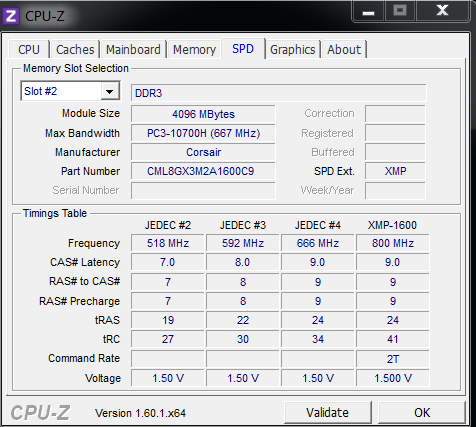
currently the ram is set on XMP @ 1.5v and @ 1600 Hz (I.E - its not overclocked for that type of ram on this type of board as far as i am aware).
cpuzram.png
 
Last edited:
BUMP :D

Just trying to get an answer on this question one way or the other, I guess not many people are into clocking ram, I dunno, that is why I am asking what I am asking ?

If I can just get a straight answer on this then I will know how to either move forward or do nothing at all, thanks guys ;)
 
look in the bios for ram speed and set it one click above 1600mhz speed

it will scale from

1333mhz
1600mhz
1866mhz
2133mhz
2400mhz

you might manage to do 1866mhz and set dram voltage to 1.55v,you might need a slight bump in cpu vtt or on asus vccio voltage from stock 1.05v to 1.10v

then test for stability with memtest86 or prime blend test
 
look in the bios for ram speed and set it one click above 1600mhz speed

it will scale from

1333mhz
1600mhz
1866mhz
2133mhz
2400mhz

you might manage to do 1866mhz and set dram voltage to 1.55v,you might need a slight bump in cpu vtt or on asus vccio voltage from stock 1.05v to 1.10v

then test for stability with memtest86 or prime blend test

thanks very very much man, at last I have some info to go and try ;), I will defo come back and keep you posted on how it goes or if I have problems etc.

What about the safety aspect, should it be perfectly safe to do this type of thing with my mobo and cpu, yea ? ;)
 
yeah aslong as you dont use more than 1.2v vccio,youd only need 1.10-1.12v max,and dont use more than 1.6v dram voltage just to be safe

vccio is for the integrated memory controller inside the cpu
dram is for the ram itself
 
yeah aslong as you dont use more than 1.2v vccio,youd only need 1.10-1.12v max,and dont use more than 1.6v dram voltage just to be safe

vccio is for the integrated memory controller inside the cpu
dram is for the ram itself

ok mate, just to say that I was able to select 1800 speed, 1866 was causing allsorts of problems nomatter what I tried.

BUT, guess what, I selected 1800, left the other settings you mentioned at default which is Auto on this board/bios, and firstly tried my luck with 1.50v, nope it crashed, so I simply skipped up to 1.55v and then ran intel burn test on maximum settings, all cores and 10x runs and it stayed stable ;)

I looked up details on intel burn test to see what it said about how much it tested the ram and system and this is what I found >>>

"A program that simplifies the usage of Intel(R) Linpack. Linpack by Intel(R) is an extremely stressful program that will put even the most pow--erful X86/X64 CPU in the world at its knees. Load temp under Linpack will be up to 22*C higher than the competing software Prime95. This program will
make usage of Linpack easier and more practical.

Benefits of using Linpack:
1. More accurate than Prime95 Small FFTs/Blend (under x64 OS).
2. Takes less time to tell if your CPU/RAM is unstable than Prime95 (usually something like 8 minutes Linpack vs 40 hours under Prime95).
3. Use the same stress-testing engine that Intel uses to test their products before they are packed and put on shelves for sale.

Benefits of using IntelBurnTest:
1. Simplifies usage of Linpack.
2. Real-time output of results to the screen.
3. Simplifies the process of selecting a test size to use.
4. Better appearance.
5. Intuitive interface.
6. Real-time error checking.
7. System status acknowledgement."
________________________________________
So from that I guess it stresses the Ram too, lol, although I now have memtest too on a usb stick, never used it before, so not quite sure how it works :confused:

Anyways, thanks again mate, and maybe you or anyone else can give me more info on everything here, for example, ram voltage going from 1.50 to 1.55, can it cause problems ? I cant see it myself but you guys that are in the know will defo know more about this.

i was quite happy though with that slight tweak to see that outcome, dunno how you guys feel on the matter though ? :D
 
Thanks guys, but I cant figure out what test exactly it is in memtest+86 (4.20) that it is I choose, I got it to boot into the memtest control panel from usb stick etc and I ran some sort of test but to be honest I didnt even know what I was doing or checking, so I just stopped the check and then thought I would ask you guys more about, I think I would need to be told a quicky guide like choose this option, then this, then this and then this etc as i am lost in it guys :(:confused:

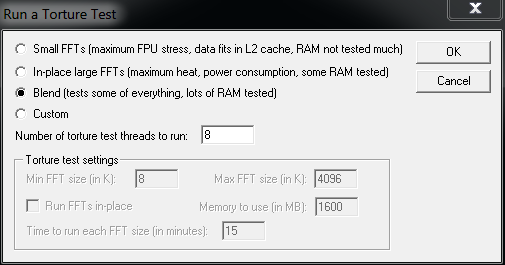
Anyway, after that I thought I would give prime95 (v277) a try and run a blend test as wazza300 previously mentioned too, but I honestly hate prime simply because of the amount of time it takes, but I run a few blend tests anyway each for maybe 30minutes to 45minute, again, in prime I am not entirely sure what I am doing as its been about errm, mega years since last time I used it, lol.

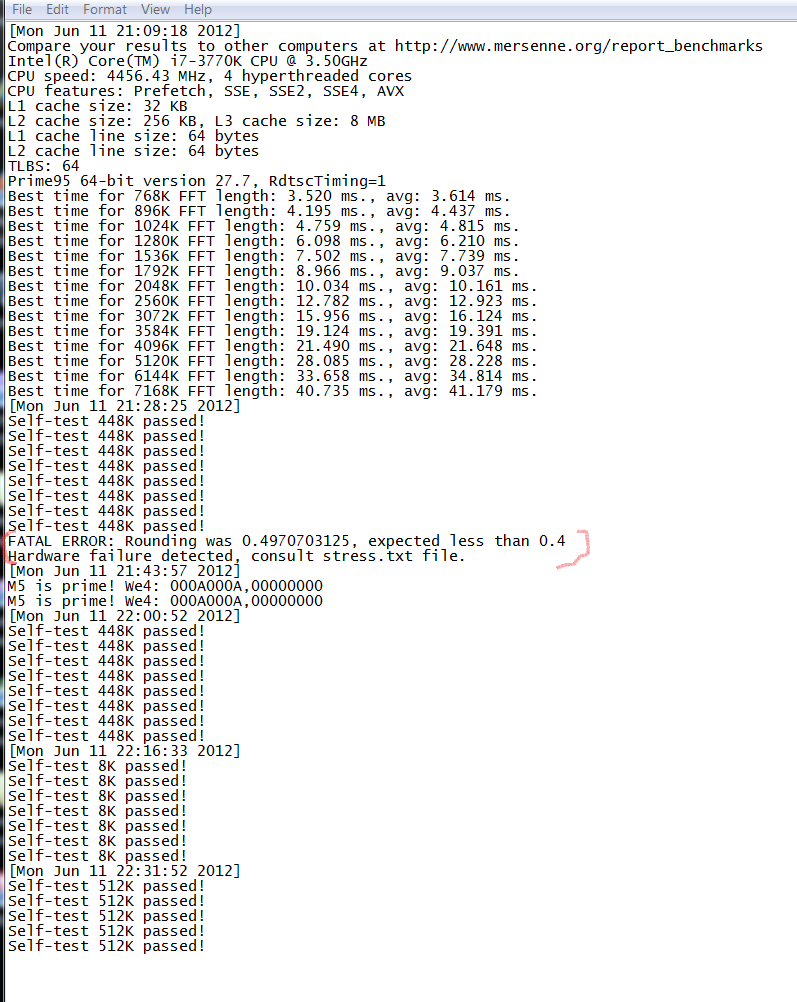
I have included two screenshots as you can see, one is of the option I selected in prime (just to make sure I chose the correct thing), the other I wanted to show because it kept reporting an ERROR on worker 3, I dont even know what worker 3 is or the error, its not as if it tells you exactly what the error is, know what I mean ? :confused:

Anyway, the error certainly didnt make the computer crash and all the other workers continued to do thier job and temps etc were very low, and as previously stated I have ran several runs of intel burn test on flat out maximum settings, all threads and x10 runs each time and the pc doesnt crash either.

So going by all this info and the screenshots, what do you guys think ? (or anyone that cares to comment, will be appreciated).

primeblendtest2.png

primeblendtest.png
 
Last edited:
I have just turned the ram back to 1600MHz @ 1.5v like its meant to be at, well for now anyway.

I havent really had any solid feedback on this subject if its worth pushing this type of ram to a higher speed or not, plus I have heard that there is no point anyway as I wouldnt notice any performance difference anyway, and that part is correct, I dont notice any performance gain at all pushing 1600 ram up to 1800 :(

Apart from the other questions I have asked earlier, could someone tell me please, is there even any point in buying very good ram that will run very very fast and at low voltage etc or again is there not really any advantage anyway ?

I have had one guy tell me so far (who works in a place I wont mention the name of), say to me that he has excellent mega high speed ram (expensive too) yet he really see's not much of a big deal of a difference with the super ram and 1600 ram, so maybe that tells the story, eh :confused:

Plus I notice lots and lots of you guys into overclocking seem to just have 1600MHz ram too, so that makes me think twice too, you know what I mean ?
 
I can't say i've ever seen that error come up on prime, but then again whenever it's 'failed' for me I have been presented with that shade of blue we all love so dearly...
What does the stress.txt file say, anything more useful?

As for ram, i'm no long running expert but i've been OC'ing for a while and never really found getting an extra few clocks on the memory to be noticeable. The only thing i'm aware of which might make a noticeable difference is adjusting the timings, that might make more of an impact, but then again messing about with timings trying to trim them down (or even understand what the damn things do) is a whole other level compared to simple CPU/GPU clocking.
 
Thats the test failing due to unstable CPU/RAM OC.

There is very little benefit in going over 1600mhz on Sandybridge
 
I can't say i've ever seen that error come up on prime, but then again whenever it's 'failed' for me I have been presented with that shade of blue we all love so dearly...
What does the stress.txt file say, anything more useful?

thanks mate, but that .txt file only tells you about whats what with the program and other things you can try etc :(

Thats the test failing due to unstable CPU/RAM OC.

There is very little benefit in going over 1600mhz on Sandybridge

Thanks mate, yes thats why I did mention that for now I have just took it back down to 1600 @ 1.5v.

Pity prime doesnt actually tell ya what the error is though, would be handy if it did :(

Ohh, its an ivy bridge by the way, not a sandy, just thought I would say, seemingly in reviews etc ivy bridge is meant to be able to let you play with the ram a lot easier and better than the sandy etc :confused:

Its also surprising that I can run Intel burn test and it doesnt show any errors on a maxed out test several dozen times over (and its meant to be far better and heavier tests too than prime, read a few posts above and you will see what it says about it from the site), ive even used windows 7 x64 built in memory tester too (windows memory diagnostic) and that also reports everything is fine.

Have ran loads of benchmarking tools and all that too, never a prob with them either, strange isnt it :confused:
 
Another thing I meant to add was that when I had the ram in the overclocked state was that for some strange reason 1 of the gpu's in my graphics card started to run a lot hotter too.

I have an AMD 6990 graphics card and as you will know it has two gpu's, but always gpu 1 runs 10-20% hotter than gpu 2, thats meant to be normal for these cards etc, but I did notice straight away that when I overclocked the system ram gpu2 was running at same temp as gpu1 which was strange.

Does anyone know why that might have happened, if so please let us all know because it will help me and others know why things like this happen, please ?

thanks guys :)
 
Back
Top Bottom