PC Not starting up

Associate
Joined
23 Oct 2007
Posts
27
Hey

I've recently upgraded my PC and overclocked my Q6600 to 3.0ghz fine (ths is just in case it helps)

anyway I fitted a new fan to my Thermalright Ultra-120 Extreme yesterday and had to take my motherboard apart

but now putting everything back together my PC wont boot

the speaker just clicks & everything runs until you would usually hear the everything OK beep from the internal speaker, then it shuts off until everything powers down, then turns on again and then just runs until I get bored and turn it off

I have a Gigabyte GA-P35-DS3L motherboard

Can anyone hep me with my dilemma?

 
anyway I fitted a new fan to my Thermalright Ultra-120 Extreme yesterday and had to take my motherboard apart

Have you put it all back together right? I assume by you saying you overclocked it, it was working before?
Have you conencted the 4 pin power socket to the mobo for instance, and checked all other connections.

edit: why did you have to take the mobo apart to fit the fan?
 
it was being awkward fitting so I had t take apart to get it to fit at first then I realised I didn't need to

was tired being more of a nub than usual

I thought would be an issue with power connection, but I've removed and reinserted all the power connections fro mobo CPU & gfx but is still occurring

ad yes it was running fine after OC
 
It would make sense then that you havnt put it back together properly? If it was working before you took the mobo apart. You havnt used too much force in fitting the cooler, and damaged the printed circuit board? Maybe hit/bent a capacitor or similar?

I learned the hard way many moons ago when I first started building computers - trying to fit the heatsink with a screwdriver: slipped and ran screwdriver across the mobo. Needless to say it died.
 
hmmm I'll take it all out and have another look

I did have to use a bit of force removing the power for the mobo though, that's thing that has made me think whoops =P

thing was in tight, ha to wiggle it a lot

(and yes I opened the clip)
 
No,

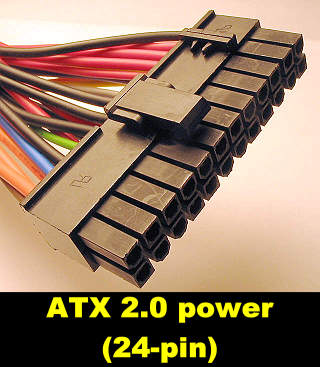
We mean you need to plug this into the motherboard (2 pics/angles of it there):
tutorial-atx12_power_conn.jpg


As well as this 20/24:
ATX20PWRS.jpg


Which is totally seperate from your CPU fan connector. These are what provide main and all power to your board.
 
did you end up taking another look?
could be that you haven't seated the cpu/cooler properly and its reaching its shutdown threshold on boot up. Also check to see all the pins are in alignment on the mobo just to be sure you havent damaged any of them.
 
you installed a new cpu fan. Did you put on a new layer of thermal paste?

I have a friend who had the exact same problem just because he forgot to add a new layer of paste onto the fan. From when its crashing and what you did that sounds most likely to me.
 
hey, thanks for all the help so far

I will try taking apart and having a look tonight and will also try with the thermal grease, cause I didnt put a fresh coat on I was lazy =P

just got a bit addicted to TF2 last night so will try when I get home and update if it works or not
 
right have tried re-applying grease and re-fitting fan but doing the same

have also tried unplugging everything one by one and still the same

am now at just the mobo the cpu & the power to both

and still same

so which 1 would you say is knackered?
 
Take note of any beeps or lack of beeps on boot and how far it get into bios/boot sequence with cpu then try without cpu.

If you get further without it MAY point to a dead cpu. BUT this isn't guaranteed it's only what I found on my system. :)

Wasn't sure from the post do you get any output to your monitor during boot or is it just a blank screen with no boot info etc.
 
Take note of any beeps or lack of beeps on boot and how far it get into bios/boot sequence with cpu then try without cpu.

If you get further without it MAY point to a dead cpu. BUT this isn't guaranteed it's only what I found on my system. :)

Wasn't sure from the post do you get any output to your monitor during boot or is it just a blank screen with no boot info etc.

it's just blank no output

and with the speaker all I get is a click when power first goes through the system

EDIT: removed the cpu and it doesn't turn itself of and doesn't click when i turns on

still no display though
 
Last edited:
is the click from *** speaker itself and not from a psu fan or maybe the cpu fan? which would indicate it not working correctly.
 
Back
Top Bottom