PC Turning Itself Off - Overheating

Soldato
Joined
16 Mar 2006
Posts
4,307
Location
Wirral
Hi All,

Any help would be greatly appreciated.

I built a new PC last week and it is not running well. Any time I game for a while it will just power down.

Downloaded MSI Afterburner and got the on screen display to show temperature. CPU got over 100 so assume it is that.

I ordered some new thermal paste assuming the (week) old paste hadn't spread properly. The old stuff looked fine but I cleaned it all off put new in and put it all back together.

Still happening. CPU temp goes up pretty quick and pc soon switches off. By watching the temp I can pause the game and it cools down but it is not right.

Specs:-

Ryzen 5 3600
Asus TUF B450-plus
XFX RX590 Fatboy
16 GB Corsair Vengeance

TLDR:

CPU overheating not sure why.

 
Hi All,

Any help would be greatly appreciated.

I built a new PC last week and it is not running well. Any time I game for a while it will just power down.

Downloaded MSI Afterburner and got the on screen display to show temperature. CPU got over 100 so assume it is that.

I ordered some new thermal paste assuming the (week) old paste hadn't spread properly. The old stuff looked fine but I cleaned it all off put new in and put it all back together.

Still happening. CPU temp goes up pretty quick and pc soon switches off. By watching the temp I can pause the game and it cools down but it is not right.

Specs:-

Ryzen 5 3600
Asus TUF B450-plus
XFX RX590 Fatboy
16 GB Corsair Vengeance

TLDR:

CPU overheating not sure why.

Cooling solution ?
 
Sorry, stock cooler that came with Ryzen.

NP, Have you tried any other temp monitoring software other than afterburner, give hardware info a try: https://www.hwinfo.com/

but as it stands now, id say you need to remove the cooler and remount it, its a pretty good cooler but can be tricky to mount flat, especially the way the screws are, trying to get them all to line up with the holes at the same time, just press it down in the middle and half a turn on each screw at a time.

LOL Minibiker beat me too it.
 
Still shouldn't hit over 80's tbh... Maybe its not seated correctly

That it what made me think the thermal paste had squished out (using technical terminology) as it was a bugger to get flat.

Second time round I had an extra pair of hands but it was still a bind, much preferred the old clip on ones.

How can I physically check?
 
Running HWInfo just now while pc idle.

Current temp is 46 fan at 1397 rpm.
Max temp 70 fan was 1917 then.
 
Do some gaming or run a benchmark with on screen display so you can see the temps... If its still hitting 80+ then I'd just reseat it and try again.. Was it the stock paste that's pre applied on the cooler?
 
Hi All,

Any help would be greatly appreciated.
I built a new PC last week and it is not running well. Any time I game for a while it will just power down.
Downloaded MSI Afterburner and got the on screen display to show temperature. CPU got over 100 so assume it is that.
I ordered some new thermal paste assuming the (week) old paste hadn't spread properly. The old stuff looked fine but I cleaned it all off put new in and put it all back together.
Still happening. CPU temp goes up pretty quick and pc soon switches off. By watching the temp I can pause the game and it cools down but it is not right.

Specs:-
Ryzen 5 3600
Asus TUF B450-plus
XFX RX590 Fatboy
16 GB Corsair Vengeance

TLDR:
CPU overheating not sure why.

Does the bracket on the underside of the motherboard look even and flat?
Does the cooler look even and flat?
Have you been into the bios for anything? If so I'd try a CMOS reset with the jumper or by removing the battery.
 
Do some gaming or run a benchmark with on screen display so you can see the temps... If its still hitting 80+ then I'd just reseat it and try again.. Was it the stock paste that's pre applied on the cooler?

It got to 100 since the redo. Thermal paste first go was what was on the stock cooler, second attempt was Arctic MX-4.

Does the bracket on the underside of the motherboard look even and flat?
Does the cooler look even and flat?
Have you been into the bios for anything? If so I'd try a CMOS reset with the jumper or by removing the battery.

Second time out I didn't take the motherboard out of the case, didn't know the lower bracket could detach.

May be third time lucky...

Checked in hwinfo what the vcore is running at?

So much data in HWInfo Core voltage has ranged from 1.056 to 1.131 with a rogue 0.200 in there on Core 0 VID.

CPU Core Voltage (SV12 TFN) states a minimum of 1.319 and a max of 1.356.

All above in four hours at idle.

Really appreciate any and all input.

i had some of the same, changed the stock cooler for a Be Quiet! Dark Rock Pro 4,temps ok now gaming.

Was hoping not so spend any more but do have a Raijintek Aidos fan from my old system I never had any issues with, would need an AM4 mounting kit though.
 
Last edited by a moderator:
So you have tried new paste and reseated everything and you still have problems?
Yes, but I didn't take it out of the case so there is a niggle that the backing plate may not be 100% flush.

Will try again tonight.

Thanks mods for tidying!
 
Just found an adapter for my old cooler to work on this motherboard (OCUK currently out of stock). Will see what that does.
 
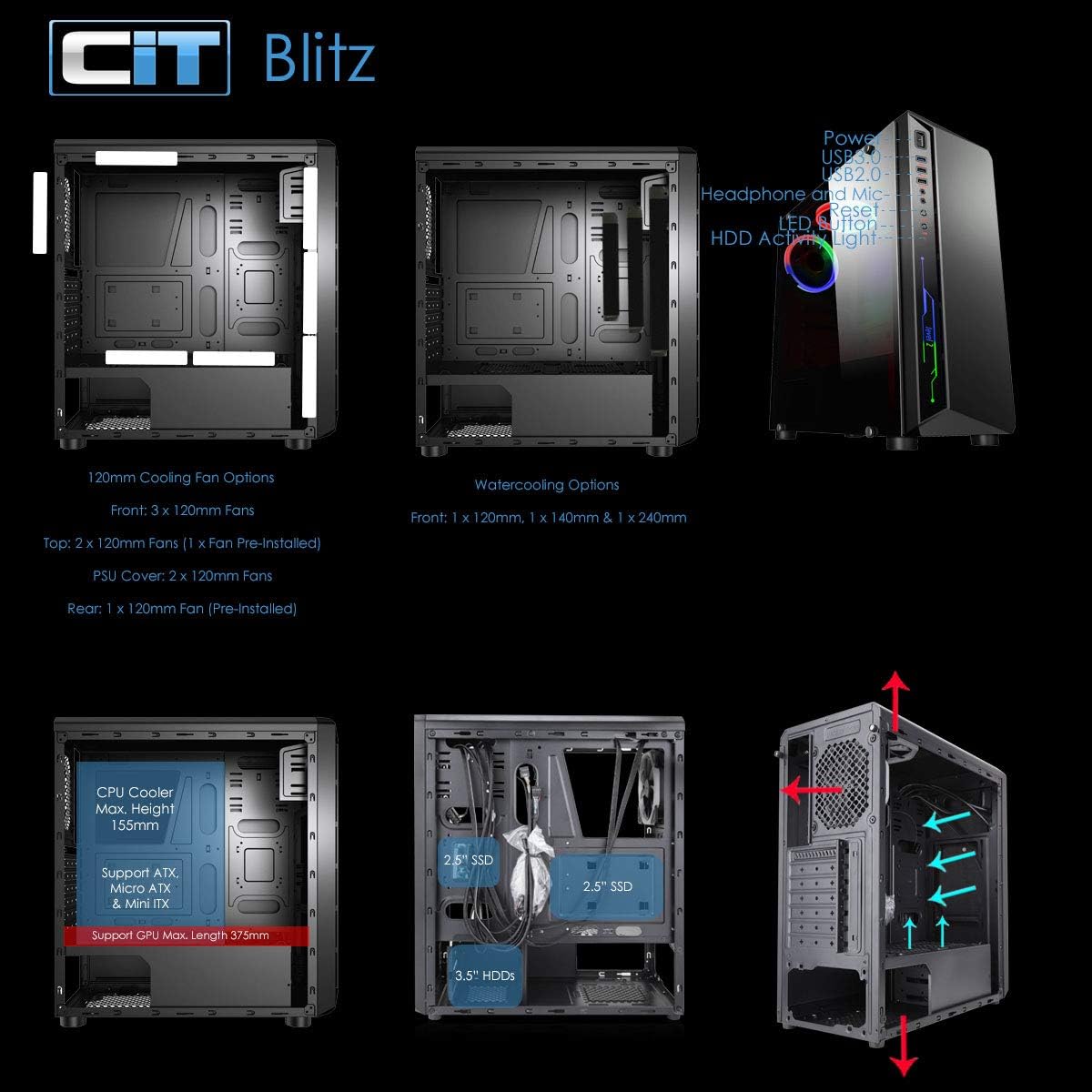
71j4yJ1RXqL._AC_SL1500_.jpg


I like their cases, I've got an even smaller one from them that I am building at the moment.

The airflow looks fine. Although a PSU exhausting through the base is not brilliant because that hot air is likely to get recycled by the intake fan/holes in the base showing in the diagram.
 
Back
Top Bottom