• Competitor rules

    Please remember that any mention of competitors, hinting at competitors or offering to provide details of competitors will result in an account suspension. The full rules can be found under the 'Terms and Rules' link in the bottom right corner of your screen. Just don't mention competitors in any way, shape or form and you'll be OK.

Phenom II 940

Associate
Joined
23 Aug 2007
Posts
1,699
Location
Rothesay
I have recently just updated my system with a new mobo as well as modding my case to improve the WC system.
After approx 4 weeks now i have most of the mod completed and have just setup my system with windows 7 ultumate 64bit as it was before.
During my modding i did update the mobo from an Asus M3a32-mvp deluxe to an Asus M3A79-t deluxe.
I have updated to the most upto date bios and setup all my timmings manually.
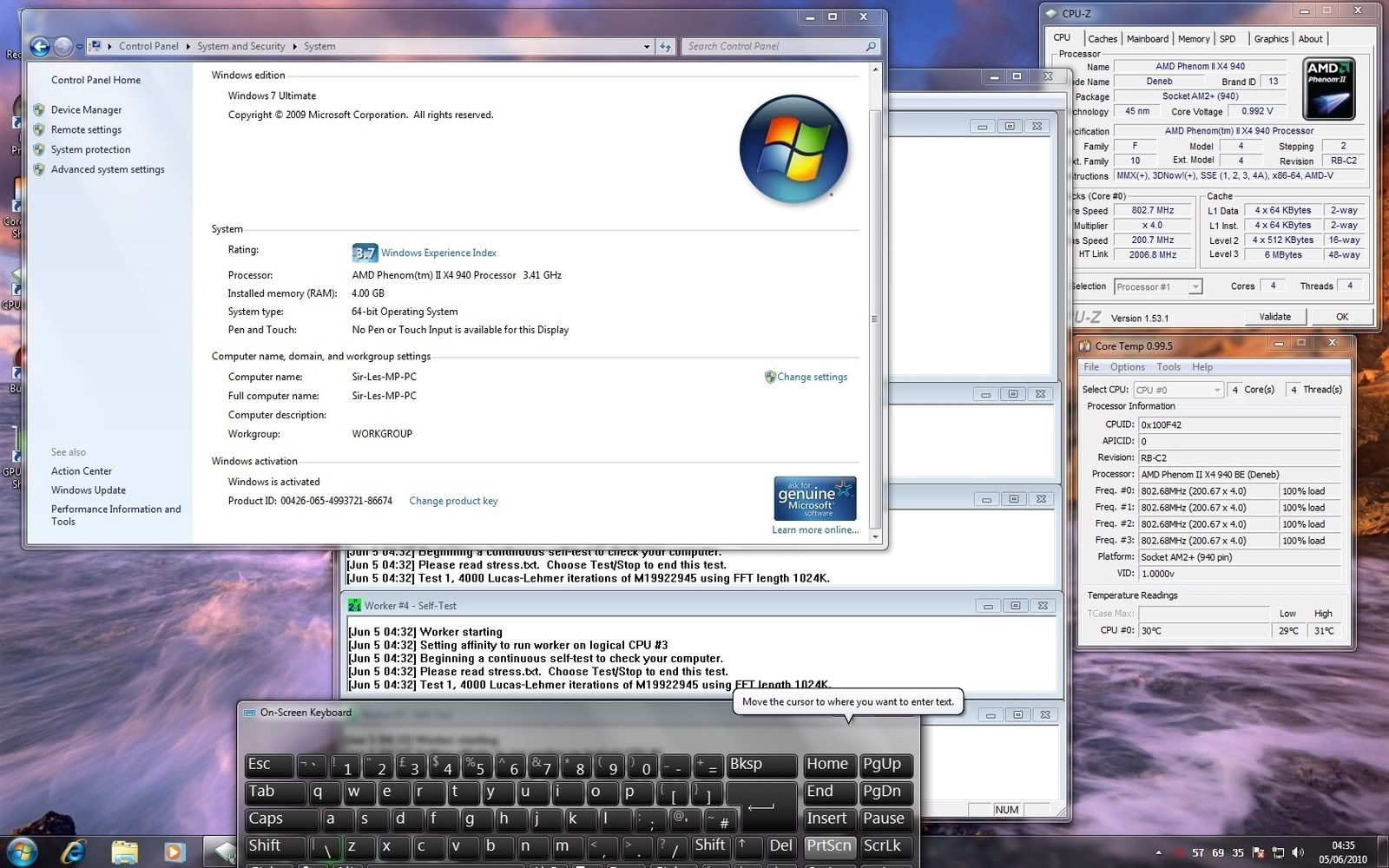
However when i boot into windows the system shows the cpu running at only 800Mhz and not the 3.6Ghz i have it set too in the bios.
Now when booting the system it doe's show 3.6Ghz in post
i have disabled amd cool and quiet in the bios and C1E which should stop the system ruducing the clock i have set.

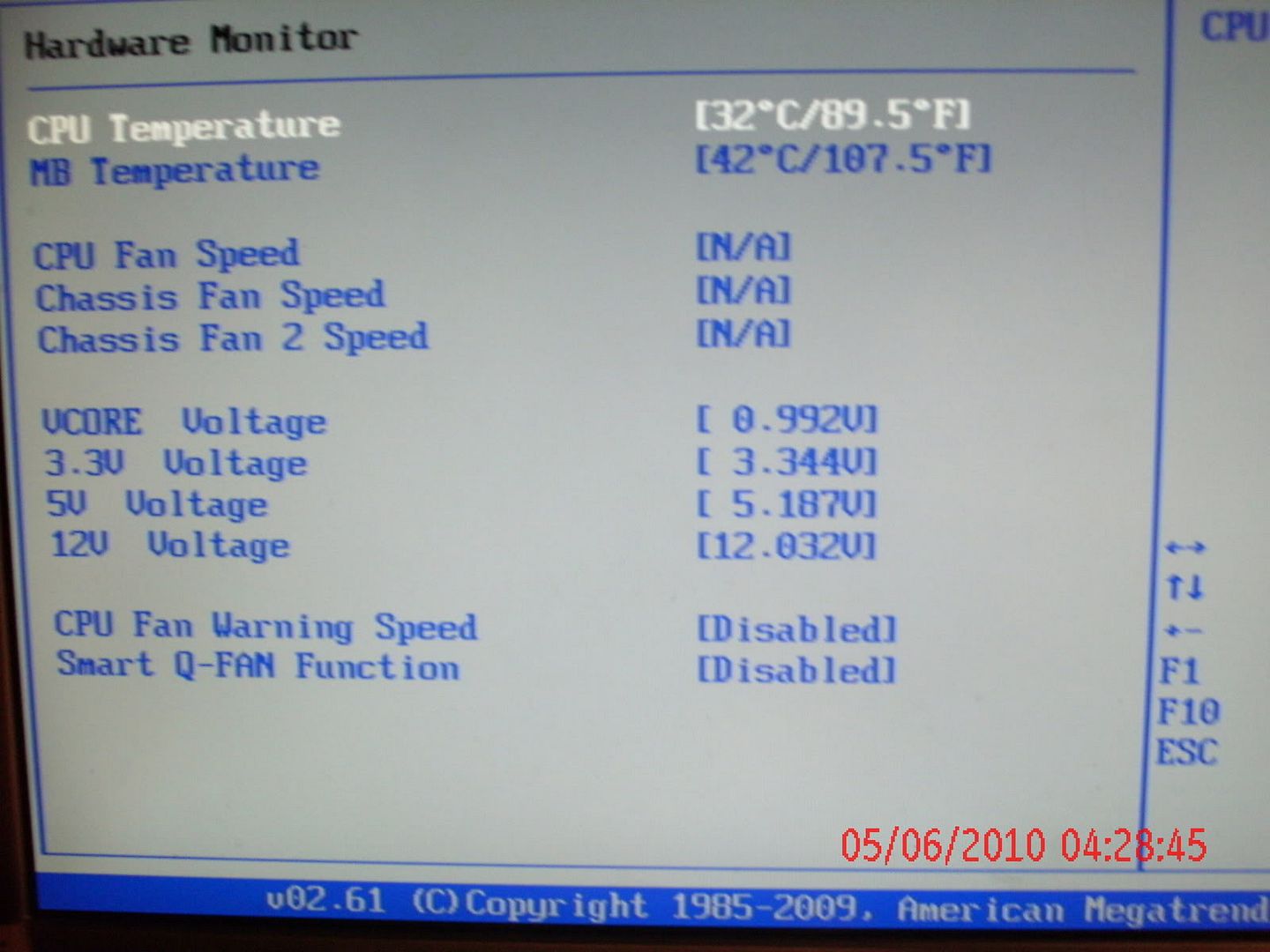
i did notice in the bios it is showing the cpu voltage via the hardware monitor as just under 1v instead of the 1.375 volts ive set it at.


HELP ive spent a lot on the upgrades to the case in both money and time, a quad core cpu running at 800Mhz just wont cut it when it should run at stock 3.0Ghz.

i have also tried running at stock and get the same results.

 
sounds like it has not diabled correctly to me , check in the bios again to make sure it saved properly , if it has then it must be a bios bug ? . not had that board so perhap somebody else who has might be more help
 
heres a couple of screenies to show some of the settings ive getting

GEDC0196.jpg


screen.jpg


I have also tried a few differrent bios versions just incase it is a bios prob but still get the same problems.
I have even switched the cpu power cable from the 8 pin cable to the 4 pin cable to see if that was the issue but again no difference.
 
ive been having a good look around the asus forums and have spoted a few other posts with the same issue, one of the post suggests it could be down to the TIM on the cpu not giving proper contact and the mobo throttling the cpu for protection could this be the issue

note my cpu is cooled via a D-tek Fusion V1 block and a PA120.1 & PA120.2 Rad and temp has not risen above 35c
 
This "latest bios".

does it by any chance enable support for 6 core CPUs?
because theres another thread with similar problems (but a different asus board). pparently its a dodgy bios, which would make the first core in a 6 core throttle (so core0 is 800mhz, core 1-5 are 3.2). but the quad core phenoms cant control each core seperately, so this bug would affect all cores.
 
Nope its not the latest bios
im currentley using bios version 905 and the latest for this mobo is 1502 which i have also tried
the latest bios for this mobo was rel;ease in december last year they are still working on one to enable this mobo to accept the new X6 processors.
 
Ive done another round of tests via the bios
ive manually set all the voltages for the northbridge, southbridge, cpu, core/pci-e and hypertransport to 1.26v
ive set the vcore to 1.4v
ive also set it to auto overclock by 20% which bassically up's the FSB/HTT to 240Mhz which should give a clock of 3.6Ghz
However core temp and cpuid still show the system as running at a multiplier of 4 and a vcore of 0.992v on the up side it did add an extra 160Mhz to its current speed so now it runs at 960Mhz instead of the 800Mhz it was running at previously.

I would be correct in saying then there is nothing wrong with the cpu itself and the problem lie's with the motherboard.
 
is the computer running noticeably slow ? run a benchmark like fritz or cinebench and see what score you get, it may be cpuz and coretemp are displaying incorrect info.
 
is the computer running noticeably slow ? run a benchmark like fritz or cinebench and see what score you get, it may be cpuz and coretemp are displaying incorrect info.

it is defineatly running slow
did the windows expereince test with win 7 and only got 3.7 for the cpu where as before i got 7.2 there abouts with the other mobo.
 
Did you clear the CMOS before and after installing each BIOS? I've had this exact problem on my ASUS board recently, and it was due to a bad BIOS release. Flashing to the older BIOS did solve the problem, but if you don't clear all the settings before and after sometimes you can run into difficulty. My problem, as above, was related to a BIOS sporting X6 compatibility, I see you've tried more than one, which I why I ask what procedure you followed.
 
Did you clear the CMOS before and after installing each BIOS? I've had this exact problem on my ASUS board recently, and it was due to a bad BIOS release. Flashing to the older BIOS did solve the problem, but if you don't clear all the settings before and after sometimes you can run into difficulty. My problem, as above, was related to a BIOS sporting X6 compatibility, I see you've tried more than one, which I why I ask what procedure you followed.

The bios was auto cleared for me each time i tried a different one
every time i change bios i have to enter it 3 times to get the system to boot to windows.
 
as for software modifying the p-states for cool and quiet i not aware of any that i have installed.

Windows 7 would be one of those. :)

Although you've selected high performance already you could make sure something hasn't FUBAR'd with your settings. Go back into power options, select 'Change plan settings', then 'Change advanced power settings'. Expand 'Processor power management' and set everything as high as it will go (100 or Active, as appropriate).
 
i have checked all them and made sure its still the same
As for win 7 being one i was using the copy prior to modding and mobo change and it was not an issue then.
 
Back
Top Bottom