

• Competitor rules

    Please remember that any mention of competitors, hinting at competitors or offering to provide details of competitors will result in an account suspension. The full rules can be found under the 'Terms and Rules' link in the bottom right corner of your screen. Just don't mention competitors in any way, shape or form and you'll be OK.

PhysX disabled its self..

Soldato
Joined
22 Apr 2011
Posts
3,888
Location
Nottingham
Hi there, I've probably missed something really simple here but since updating driver's, PhysX has disabled it's self.
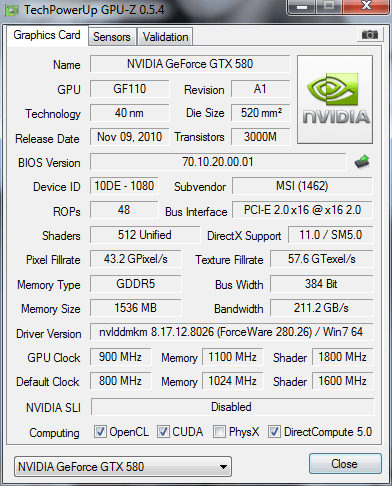
35a.png


I tried ticking the box (lol), Any ideas folks?
 
Last edited:
I've been poking around in there mate (Been ati for yrs so its a bit new), The only physx related option I can find is 'select a physx processor' and its on auto, with the other 2 options being '580' and 'cpu'.

Other than that I cant see anything, Sorry to be a complete noob but could you direct me to where you mean.. :D

cheers
 
I'll download a nv physx demo and see how that works out, My physx driver is Version:
9.10.0514 and I'm on the 280.26 beta drivers so it probably is that.

thanks.
 
Back
Top Bottom