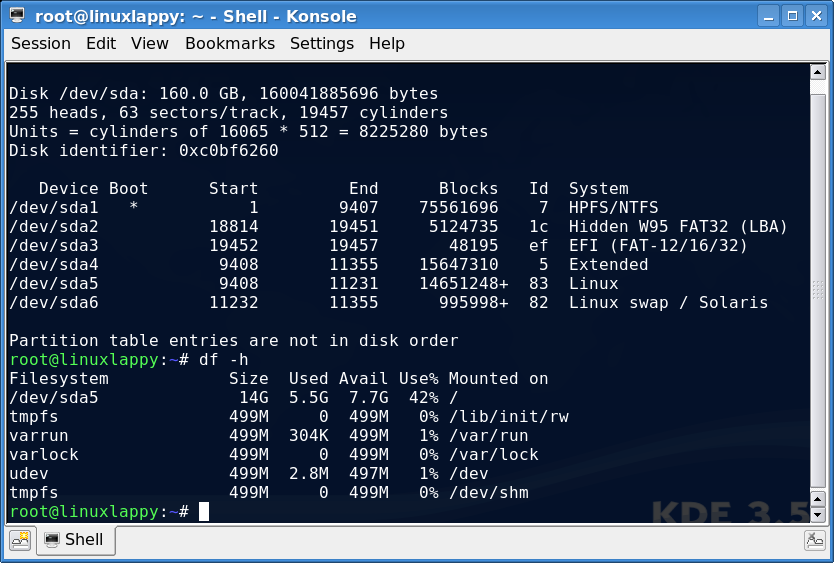
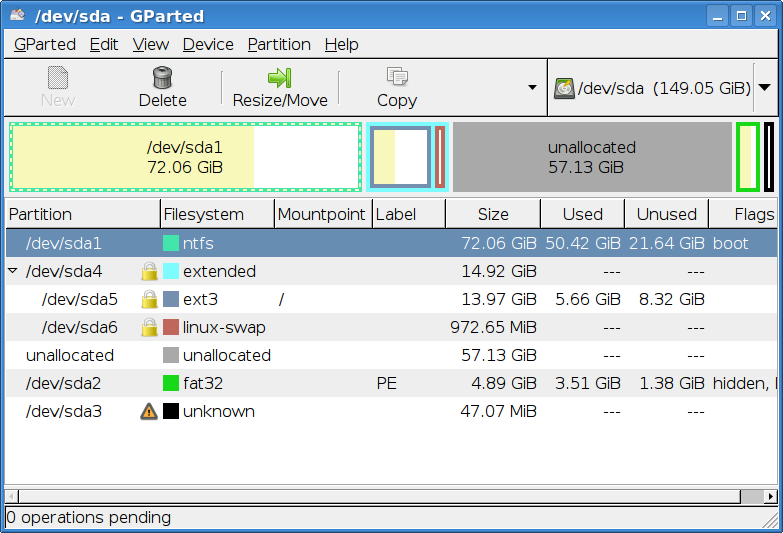
Problem with partitions

Soldato
Joined
7 Sep 2008
Posts
5,834
Hi I've got an Asus 1005 netbook and I decided to install backtrack on the main hard drive. I made the Linux partition around 70GB and my Windows partition got reduced to 70GB.

I also made the biggest blunder of installed GRUB and it appears my MBR is deleted.

I wish to downsize the Linux partition and giving my Windows OS more space.

This is what computer management within Windows shows me:
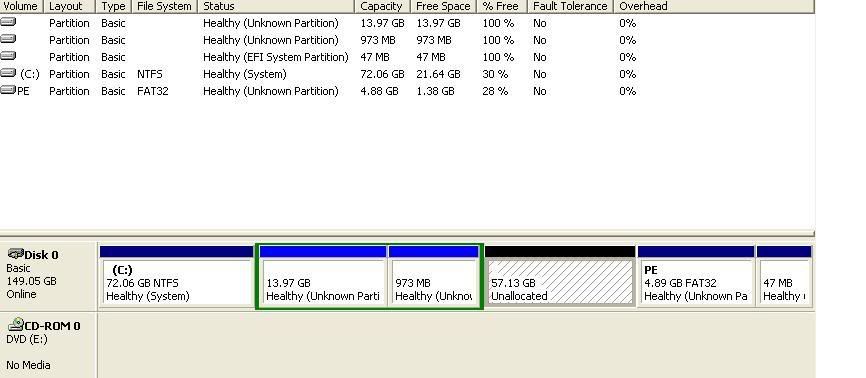
problem.jpg


As you can see it says "unused" space but that must be my linux partition.

If I wiped that would that destroy my GRUB meaning I will no longer be able to boot into Windows?

What's the easiest way of doing this without resintalling windows?

I got a 160GB drive in here ideally 110GB to Windows and rest to Backtrack.

 
When you installed BT, did it not create an entry in the grub menu for windows?

If you can boot into BT OK, there is a partitioning program installed by default.
 
Unsurprisingly the best approach here is to resize the partitions using linux. Gparted is probably the program you want. Which distribution did you install?

I don't like the look of the image. The unallocated space isn't a linux partition, it's 57gb waiting to be formatted as something. I'm unsure whether you started with 70gb for linux and then downsized this or not.

I suggest booting linux from a livecd, or a gparted livecd, and moving the linux partitions (probably the 13.97gb one with the 973gb one as swap) to the right, then extending the windows partition to fill the unallocated space which is now adjacent to it.

Shouldn't take long, but let it finish. Then boot windows, it'll complain at you and run its file system check (chkdsk? something like that). Then all will be well.

Oh. "Backtrack" is the linux distro. Fair enough, post still applies but you're probably going to want a gparted livecd. I'll be surprised if backtrack will let you move its root directory around while it's mounted.
 
Last edited:
hi thanks for the reply

how sure are you that the 57gb is not used by linux?
do you know which partition has grub installed?

I was thinking of formatting the 57gb and then using it drive d in windows
that will work right?
 
Yeah. Grub is probably on sda5 though you might have put it somewhere else during install.

From a gparted livecd you can umount sda[4,5,6], move them to the right, and then expand sda1 to fill the remaining space. Can resize the linux partitions while you're at it if you're so inclined. No need for a seperate D:/ drive

Where's gparted running from? If it's running from /usr/bin, then unmounting / isn't going to go well
 
Yeah. Grub is probably on sda5 though you might have put it somewhere else during install.

From a gparted livecd you can umount sda[4,5,6], move them to the right, and then expand sda1 to fill the remaining space. Can resize the linux partitions while you're at it if you're so inclined. No need for a seperate D:/ drive

Where's gparted running from? If it's running from /usr/bin, then unmounting / isn't going to go well

hi it is running from within the os (backtrack)

I could run a USB backtrack with gparted on there

if I did that can I still use the GUI to move the linux partitions to the right and then fill sda1 up with the remaining free space?

How do you know grub is on sda5? and not sda1?
 
Sorry boss, having a prolonged argument with a router at my end.

Grub isn't on sda1 since that's a windows partition, and it's unlikely that anyone writing a linux installation script is going to trust windows to look after a boot folder. You can check though, find the /boot/grub folder, probably on /dev/sda5.

If it's running from /dev/sda5, it wont be able to move /dev/sda5 around, for fairly obvious reasons. You can swapoff and move anything else around as you wish. A much easier approach is to run gparted from cd or usb stick, at which point you're free to rearrange anything you wish. An ubuntu livecd/usb will have gparted included as an example.

Gparted is gnome partition editor, it relies on a gui. Whatever source you run it from, it'll look like that. I imagine it's a front end to parted if you want a cli tool instead.
 
Back
Top Bottom