• Competitor rules

    Please remember that any mention of competitors, hinting at competitors or offering to provide details of competitors will result in an account suspension. The full rules can be found under the 'Terms and Rules' link in the bottom right corner of your screen. Just don't mention competitors in any way, shape or form and you'll be OK.

Radeon 6950/6970 crossfire

Associate
Joined
20 Aug 2007
Posts
1,333
Location
Solihull
Hi guys,

I recently a acquired a radeon 6950 to crossfire with my existing 6970, it's my first time attempting it.. I forgot I needed a crossfire bridge - I've ordered one from OCUK today, so I should get it tomorrow but I have a few questions:

  • What will happen if I install the second card tonight and boot up without the bridge?
  • Are there any things/prerequisites I need to be aware of before I crossfire? (Software and hardware wise)
  • Is there a performance difference if I run both cards from HDMI or DVI? Or mixed?
  • How much of a performance upgrade should I expect? I mean should my power almost double hypothetically or is it still bottlenecked compared to a single, more powerful card?

Thanks! :)

 
Id's See if you can unlock the shaders or flash a 6970 bios onto the 6950.
As you're limiting performance by pairing it with the lesser card. Also both models should be the 2gb models, otherwise you'll be limited to 1gb in games.

  • It'll work, There'll be no benefit.
  • as above, no extra software.
  • you can only connect monitors to the first card. There won't be a difference unless you want sound through HDMI.
  • There will never be 100% scaling, it'll vary game by game.
 
Oh I should have mentioned, it's unlocked to a 6970 already! :)

Both are also 2GB models :)

- So it will just sit in there and drain power?
- Shame I can't use both cards together for monitors, does it matter which card is in which slot? Logically to me the true 6970 should be in the first slot leading? (the true 6970 is just well worn and the DVI ports are a little wobbly)
- Main game for me is warcraft, which I believe is single threaded anyway.. I don't know if it will do much.. the main reason was so I could play AC: Unity on Ultra, I can run it on High at present :)

*Also, just sent a trust message!
 
Last edited:
Update: problem!

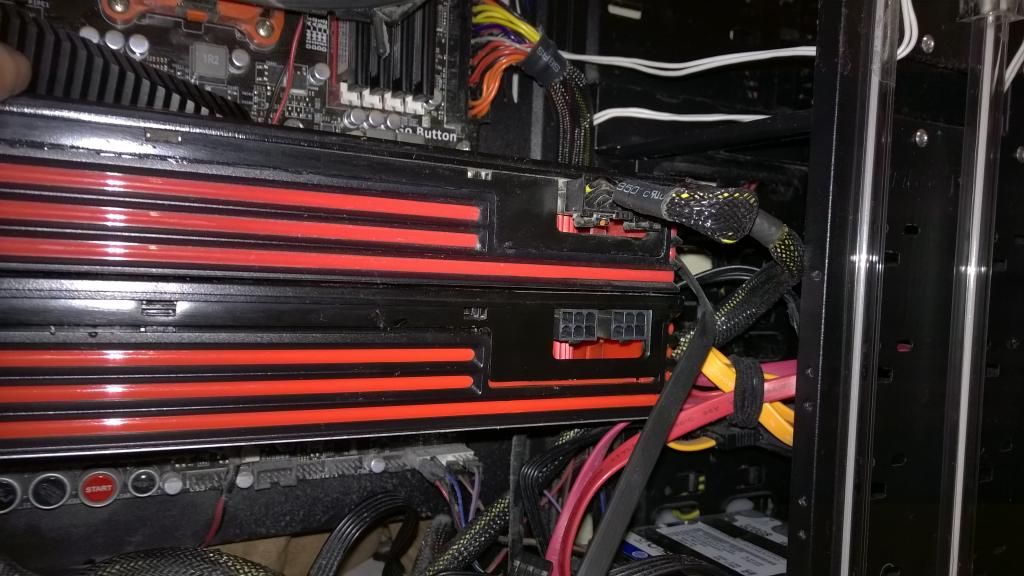
Got home and tried to install it, only to realise that since moving house last year I've misplaced the modular cables for my PSU (GRRRRRRRRRRRRRRRRRRRR)

WP_20141201_0071.jpg


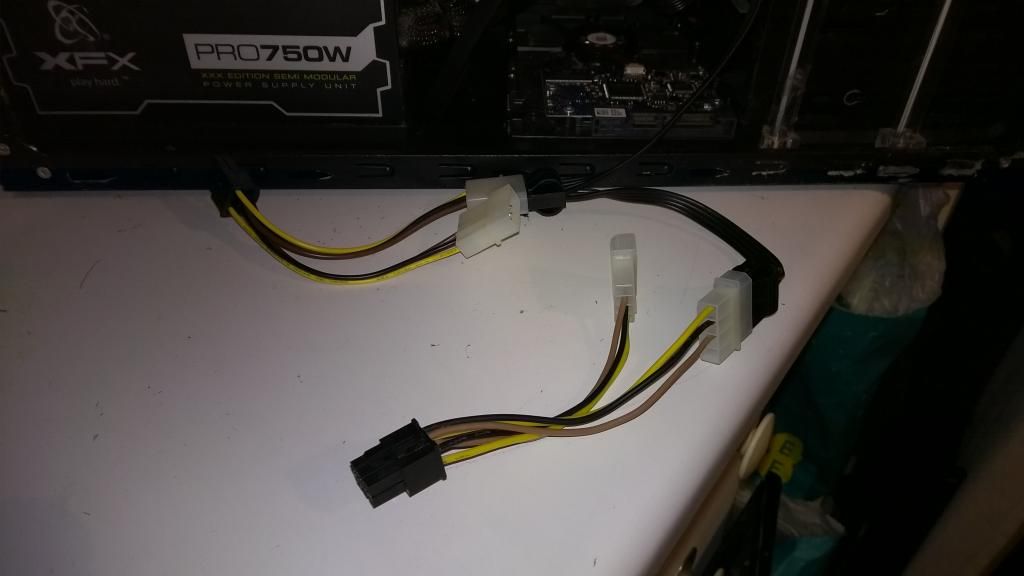
The card will shriek if I don't power it of course, although it does run like this plugged in with a molex in each adapter:

WP_20141201_0061.jpg


I don't know if this is enough power, but both molex into one connector also made it shriek, ideally I'd have it fully plugged in.

I booted PC like this and it did actually run, although CCC went weird and gave me like, no settings at all, didn't seem to recognise first card was even there, even though device manager showed both attached. I was also able to run WoW on ultra but I guess that the second card wasn't kicking in cause it stayed stone cold and my frame rate was as I expected from one card in a busy city.

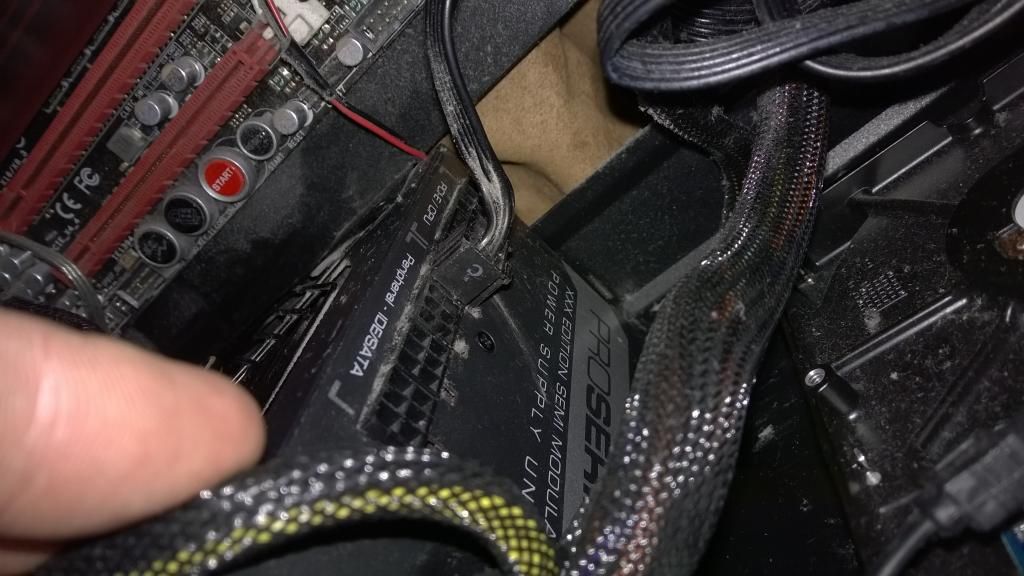
Basically I think I need to find some modular cables to fit my PSU, like pictured below - where can I get some? :c

WP_20141201_0091.jpg


WP_20141201_0111.jpg


Cheers!

Jamie
 
Does anyone know if my second card will be stable using a single molex connector into the 2 molex -> 1 12v adapter I have?

So 2 x 2molex->1 12v into the card, or is that not enough voltage?
 
I personally wouldnt chance it, you have 2 options, find those cables or buy a new psu , and while you're at it , clean that case of all the dust !
 
Yeah I'm gonna do the dust tonight! :P

Ok so what I've done is this..

I did manage to find 2 x modular sata cables with 2 connectors each, meaning I have another 4 x Sata connectors.

I've bought 4 of these:

https://www.overclockers.co.uk/showproduct.php?prodid=CB-053-AK

meaning hypothetically I have another 4 molex connectors, meaning if I hook 2 molex connectors into both of those converters (molex->12V) and put both into the card (basically 4 sata connectors adapted twice to fit) there should be enough power to run the card?
 
In theory it could work but the gpu is going to be drawing a lot more current than any sata devices would be so I don't know if the wiring on all those adaptors would be up to the job. Might be worth a post in the Power Supplies forum or even the Members Market (also known as the promised land to those of us without access ;)) to see about getting hold of proper replacement cables or a new psu.
 
In theory it could work but the gpu is going to be drawing a lot more current than any sata devices would be so I don't know if the wiring on all those adaptors would be up to the job. Might be worth a post in the Power Supplies forum or even the Members Market (also known as the promised land to those of us without access ;)) to see about getting hold of proper replacement cables or a new psu.

Hmm true, I mean it's a rock solid power supply so I've no doubt the actually supply could handle it; do sata ports offer 6V DC?

I'll have a look but I'm not hopeful for modular cables, I doubt many people would readily give them away! Tbf I did pick up said crossfire card from the promised land last week!

What's the worse that would happen if my workaround isn't sufficient to power it? Would it just crash on me and reboot?
 
Hmm true, I mean it's a rock solid power supply so I've no doubt the actually supply could handle it; do sata ports offer 6V DC?

I'll have a look but I'm not hopeful for modular cables, I doubt many people would readily give them away! Tbf I did pick up said crossfire card from the promised land last week!

What's the worse that would happen if my workaround isn't sufficient to power it? Would it just crash on me and reboot?

Well I'm not a qualified hardware engineer so don't rely too much on my info but I'd say the absolute worst case is that the cables melt, setting fire to your pc then your house leaving you homeless and destitute but your suggestion is probably more likely ;)

I think I've actually got some old modular cables lying around somewhere from my old Corsair psu that went pop a couple of years ago but I've no idea if they would be compatible with your psu. If you send me a trust message with your address I can stick them in the post if you want to try them?

From your other questions in the earlier posts:-

It shouldn't matter which card is the first and which is the second when xfire is working. For any games that don't support xfire then the first card is the one that will be used so should be the best card. In your case if the 6950 has been flashed succesfully to a 6970 then it shouldn't really make much difference.
As I found out, xfire only works when in true fullscreen mode, borderless window mode doesn't count so if you have 2 monitors then when running a game in xfire the second monitor will probably be blank and you can't move the cursor out of your game without alt-tabbing. Slightly annoying in something like WoW where I'm used to having something like Wowhead open on my second monitor but now can't.
On that note, WoW is my most played game as well and the xfire scaling is pretty decent so far. In outside areas in Dreanor I regularly see both cards being used at over 90%. I'm running at 1080p Ultra settings and with FXAA High I get 60 fps in a lot of areas with drops down to the 40s in busy cities. I've not yet had a chance to do any raids yet so can't comment on them. I have found the new CMAA options does knock a good 10fps off though so I've stuck to FXAA High.
If your motherboard allows it you'll definitely want to move the cards a bit further apart to help temperatures. Mine have 1 slot between them as shown below and the top card still hits 84 degrees under max load.

Pl1kKB4l.jpg
 
Haha, I'd hope to avoid the homelessness!

I've heard it's pretty bad idea to mix brand psu cables, different internal cabling etc. or maybe that was just bullcrap, I'd rather not risk fiery death though! :eek:

It's a very kind offer and I may take you up on it if I can't get anywhere else with it though!

As far as wow goes I get about 45 fps on ultra in my garrison, it sometimes goes a little choppy when I'm on a flight path with ultra view distance or in warspear etc.

I'll make sure to space the cards out, although it's a pain to find out that crossfire doesn't work unless I'm in proper full screen mode, makes dual monitors a total waste! :P
 
Back
Top Bottom