RAM Clearance

Associate
Joined
24 Mar 2013
Posts
2,268
Location
C-137
Just a quickie,

Anyone know if i'll have clearance issues using a Thermalright Silver Arrow SB-E with Avexir Core memory on LGA1155?

If so, any recommendations for a decent air cooler (it's to replace an ageing H100 on a rather warm 3770k @ 4.5ghz) that won't interfere with my RAM?

Thanks in advance (:
 
I think Avexir Core Series sticks measure in at 36.56mm plus 2-3mm for socket is 39.5mm above motherboard.
Silver Arrow SB-E bottom fin is 30mm above CPU plus 8mm to motherboard is 38mm total clearance.

So unless you bend the bottom fin...

As for others that will clear. It depends on what your CPU clearance is. Thermalright's new TRUE Spirit Power is an amazing cooler for an amazing price of about £35.00 but it's 171mm tall and OcUK doesn't have it yet. :(

Cooler size comparison
Here is a collection of coolers and their size. Several are newly out or released:
Cryorig R1 Universal(25mm frt fan)& Ultimate(13mm frt fan)(offset back w/ 38mm CPU center to front of fin pack)
TRUE Spirit 140 Power w/ 6x 8mm pipes,
Dark Rock Pro 3
Silver Arrow IB-E w/ offset base
NH-D15 w/ better RAM clearance

Cooler size comparison (Width x Depth x Height looking from front of case with motherboard laying flat)

Akasa Medusa .= . 8x 6mm pipes 144x129.5x163mm w/ 140mm & 120mm PWM fans 49.6mm*
Cryorig R1 Ult . = . 7x 6mm pipes 140x142.4x168.3mm w/ XF140(140x25) fans 40mm* *2*
Cryorig R1 Uni . = . 7x 6mm pipes 140x130x168.3mm w/ 1x XT140(13mm) & 1x SF140(25mm) fans 40mm* *2*
K2 / Assassin. . = . 8x 6mm pipes 140x128x158mm 146x154x160mm w/ 120mm & 140mm PWM fans 43.2mm*
Dark Rock Pro 2. =. 7x 6mm pipes 138x124x166mm 138x149x166mm w/ 120mm & 135mm PWM fans
NH-D14. . . . . = . . 6x 6mm pipes 140x130x160mm 140x158x160mm w/ 120mm & 140mm fans44mm*
NH-U14S . . . . = . . 6x 6mm pipes 150x52x165mm plus fans base offset 2mm 41mm*
NH-D15 . . . . . = . . 6x 6mm pipes 150x136x165mm 150x161x165mm w/ 2x 140mm fans *1*
PH-TC14PE .. . = . . 5x 8mm pipes 140x159x171mm w/ 2x 140mm fans, PWM adaptor40-45mm*
Megahalem. . . = . . 6x 6mm pipes 130x74x158.7mm plus fans 40mm*
SS HE01 . . . . .= . . 6x 6mm pipes 140x119x160mm w/ 140x38mm PWM fan 42mm*
Archon SB-E . . = . . 8x 6mm pipes 155x53.6x170.2mm plus fans 34.45mm*
Silver Arrow. . . = . . 4x 8mm pipes 147x123x163mm 151x149x168mm w/ 2x 140mm Fans 40.87mm*
SA SB-E. . . . .= . . . 8x 6mm pipes 155x105x164mm 170x130x170mm w/ 140mm & 150mm PWM fans 31.9/39/46mm**
SA SB-E Extreme. = . 8x 6mm pipes 155x105x164mm 155x130x165mm w/fans Smaller because of 140mm fan vs 150mm
SA IB-E. . . . . .= . . . 8x 6mm pipes 154.6x103x164mm 154x130x164mm*** w/ 2x 140mm 1300rpm fans 41.95mm*
SA IB-E Extreme. = . 8x 6mm pipes 154.6x103x164mm 154x130x164mm*** w/ 2x 140mm 2500rpm fans 41.95mm*
TRUE Spirit 140 Power 6x 8mm pipes 155x53.4x170mm plus fan 44.3mm*

*cooler base to bottom fin. (add 8mm for motherboard to bottom fin.)
**fins are at 3 different levels
*** base is off-center 9.5mm for better PCI-E slot clearance
*1* recessed lower fins, the NH-D15 provide 64mm RAM clearance
*2* offest back 19mm for better RAM clearance; 38mm CPU center to front + fan

 
Last edited:
Hi thanks for the thorough reply! So I'm considering the Meghalems (with x2 Noctua NF-F12's ), The K2, and the dark rock pro 2/3 or maybe the Phanteks, but tbh unless anyone is going to tell me it's a bad idea, I'll probably go with the Meghalems as I already have the fans so it'll be a bit cheaper for me. but then will it perform as good as some of the larger heatsinks?

But then I might just say sod it and grab the dark rock or the phanteks, despite being a bit more than I would have liked to spend, they cool really well and are quiet about it too... hmmmmm decisions decisions...
 
What case are you using?
If your case has 171mm cpu clearance the TRUE Spirit 140 is better and cheaper. 12.3c cooler in this review:
https://www.overclockers.com/thermalright-true-spirit-140-heatsink-review/

And TRUE Spirit 140 Power is better than TRUE Spirit 140.
Tested against NH-D14 and TRUE Copper with TY-143 fans it easily takes top honors. The stock TY-147 fan performs the same as TY-143 at 1200rpm. At 1200rpm with a single fan TRUE Spirit 140 Power matches NH-D14 with 2x fans at 1200rpm.. which is amazing for a cooler in the £35.00 range.
http://forums.overclockers.co.uk/showpost.php?p=26134788&postcount=14
 
I'm in a define R4, and I'm a bit skeptical about how well the TRUE is going to handle my 3770k. It's quite warm running and it gets warm in the case too since I want it silent (ie i'm using the "modu-vent" covers). I'm just concerned that where it keeps up with a large twin-tower cooler in reviews etc... they probably had better airflow or maybe even open air. I'm kinda convinced I'll get better temps having a larger/twin tower in my warm case...
 
Sadly Define R4 stock fans are not up to the task as front intakes. The fact your case is getting warm verifies it.
My R2 with 3x TY-140/147 intake fans in front and bottom with case raised 30-35mm to allow airflow to bottom fans will flow enough air to cool an i7 980 at 100% load under a PH-TC14PE (or similar) below 43-49c@ 950-1050rpm case and cooler fan speed. Case temp (30mm in front of cooler intake) is 2c above room ambient. I'm using a duct out back vent from cooler but have helped build R4's with rear exhaust and PCI slots open and had similar results. Open bottom base with 30mm castors works and looks good.

Here's a basic tutorial of how to control case fans using CPU fan header PWM signal.
http://forums.overclockers.co.uk/showpost.php?p=26079729&postcount=5

Case airflow and cooling is not hard to do but can be time consuming.
Setting up the case for optimum cooling is often the hardest and most time consuming part of a build... And often the most neglected.
  • There is much more to cooling than good cases and good CPU / GPU coolers. Add the fact that many GPU's make more heat than CPU means getting that heat out of the case and keeping a cool airflow to components can be a challenge.
  • There must be more air flowing through case than component fans are using. If the CPU cooler uses 70cfm and GPU uses 80cfm fans we need 180-220cfm.
  • Cases, especially those with filters, usually benefit from fans with higher static pressure ratings than stock fans... "cooler" fans instead of "case" fans.
    Intakes are typically have more restricted than exhaust because of air filters, more restrictive grills, HDD cages, etc.
  • I prefer more intake than exhaust. And don't confuse number of fans with amount of airflow... or airflow with airblow
    • airflow is flowing cool air from intake to component and flowing hot air from component out of case without the hot air mixing with the cool air.
    • airblow is lots of fans blowing air with some of hot air from components mixing with cool air making it warmer resulting in warm air not cooling components as well as the cool air will.
  • Putting fans in case as intake and/or exhaust is only the first step. These fans only move air in and out of case.
  • This does not mean heated air is not mixing with cool air.
  • Nor does it mean cool air is going to where it is needed.
  • Getting the air to flow inside of case properly is even more important. We still need to manage where the air flows inside the case. We can do this several ways; deflectors, more intake fans.. & exhaust fans, removing PCI slot covers, removing vent grills, removing HDD cage, using fans with higher pressure/airflow, building ducts to or from CPU/GPU cooler, etc.
  • Using a remote temperature sensor to monitor what air temps are is the key to finding out where the cool air is flowing and knowing heated air is not mixing into it. By monitoring this we can than make changes to get airflow the way we want it.

How to monitor air temperature different places inside of case:
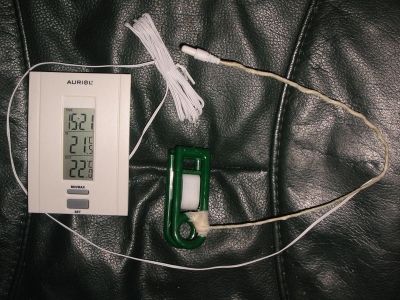
  • A cheap indoor/outdoor thermometer with a piece of insulated wire and a plastic clothspin works great.
  • Made up with floral wire and tape. We don't want anything to short out with metal. ;)
    e65759c3-fbf9-414f-9f1f-f5941d540397_zps2fe90c77.jpg
  • Clip and position sensor where I want to check the temp. Make it easy to see what the air temp going into components actually is relative to room temp. ;)
  • When system is working air temps going into coolers will be 2-3c warmer than room.. up to about 5c is okay.
 
Informative, thank you. As it is, I'm using 2x 140mm spectre pros as front intake, one as intake in the bottom and one in the rear as exhaust. I think my main problem is my ivy runs hot, as it needs high llc and and slightly more voltage than others to run stable at 4.5, and as a result, there's a fair bit of heat generated by the vrm cooling, so I think I'll benefit from a cooler with a large overall surface area for cooling, considering I don't want to open any more vents up, as I'm quite anal about the amount of noise I can hear from my case.

Going to ponder airflow and acoustics over a cheeky pint for now...
 
Back
Top Bottom