RAM Coolers

Soldato
Joined
26 Apr 2004
Posts
9,945
Location
Milton Keynes
Hi Guys
Just wondering if anyone has any experience with DDR5 clip-on RAM coolers, the little ones you can clip on over your RAM sticks (that tend to cost around £15)?
My new GSkill RAM seems like it'll actually hit 6000C26 with decent timings, but needs a decent whack of voltage to do it, which has the temps a little on the toasty side when I throw a heavy stress test thier way (normal temperatures are much lower and absolutely fine). I'm not seeing any errors or instability so far during stress testing, but I'd feel more comfortable if the temps were lower, so I need airflow.

The AIO is mounted above the RAM, unfortunately the cabling is integrated and it'll be a headache to reverse the middle fan, more than seems worth it (I considered it until I realised the cabling was going to be headache), so figured one of these might be a neat alternative, especially as I've got the Artic AIO so both ram sticks are already getting a little airflow, but not enough.

Just to ensure health and longevity, I was considering grabbing one of the clip on RAM coolers, especially if they're not that loud and actually do a decent job, but I don't want to spend the money if they're a waste of time.
 
Last edited:
I think I may have found the generic cooler Corsair used as the basis. I'm pushing moderate voltage and some decently tight timings, and it does seem to have knocked about 5-10 degrees off the RAM temps when I'm pushing a full scale stress test on them.

Should help keep them stable under normal use, given I'm trying to see if I can get away with 65535 tREFI along with other tighter timings, which hate higher temps on DDR5. Can't complain if it helps me run them faster than before for the £20 it cost, given the white one suits my design pretty well. :)
 
Last edited:
They're quieter than the case fans lol I considered using a 12mm and zip ties, but it wouldn't have fit the aesthetic of the machine at all, even ignoring the risks of movement, catching the AIO, etc :)
I figured I'd avoid the jank if there was something that'd do the job well enough at a reasonable price.

At the moment TM5 Absolut is maxing out around 54.25c on the hottest DIMM (with a slightly higher room ambient temperature to boot) than when I tested my other config without the RAM cooler, and it was hitting 59.5 without, so realistically, I've dropped around 5-7 degrees once you factor in ambient.

When its not running at max welly, its drowned out completely by the case fans, and is only barely noticeable at full pelt, over the case fans also going ham.

I can handle that.

In all honestly, I was expecting them to be much louder than they are; maybe I got relatively lucky!
 
Last edited:
Bit of both! Plus if anything falls outside the X3D Cache or needs brought in from memory streaming wise, lower latency never hurts, and that's usually beneficial for frame pacing and 1% / 0.1% lows :)
 
Last edited:
That 90mm fan is a nice idea, if I'd seen those available elsewhere, I'd have probably given that a try. However, I have to say, this one I've got has impressed me. 5-10 degree drop in temps at load, is quieter than the system fans (admittedly they're Artic Pros so not that quiet), and does the job (and as I say it seems to be the OEM design the Corsair is based on)
One of the fans is a little dodgy so I'm going to get it replaced, but its better than it has any right to be, and it doesn't block me seeing the LED post display on the top right of the board either. The only downside is it SLIGHTLY catches the AIO above the CPU, as the Arctic is a big boy in that regards, so its at a very slight angle to allow it to fit, because of all the stuff on this motherboard as well; but I'm also not having to screw anything into the board to make it works, it just sits using foam pads to minimise vibration around the RAM clips, using minor clamping force from the design of the bracket itself, its pretty neat.

7JV0Gie.jpeg
rvRYjTv.jpeg
 
Last edited by a moderator:
Gotcha, that actually looks like it might be quite similarly sized to the 40mms on my one, but with the option to go slightly bigger. I'd have considered it in white lol

Once I've got my one replaced I'll be quite happy though; the top fan on mine doesnt seem to run happily at full speed, you can tell its running slower than the first fan, but a quick swapout should resolve that quickly; and as its not screwed in, the biggest headache is the fan/argb connector haha
 
It is done in white for the AORUS ICE boards, your setup looks lovely though, that twin fan RAM cooler is perfect.

Some of your timings look a bit tighter than mine, I gave up playing when I couldn't up the voltage, but perhaps I should go off down the memory tweaking rat hole again....maybe not, its all lovely and stable, I really shouldn't touch it ........or should I, aaaargh :D

Maybe I should update the BIOS first Gigabyte might have fixed the DDR voltage issue, their response to my support tickets doesn't suggest they'd be able to fix themselves a sandwich though :rolleyes: :D

image.png
Thanks
Spent quite a while planning it, and then waiting for the Aorus Stealth Ice board to become available.

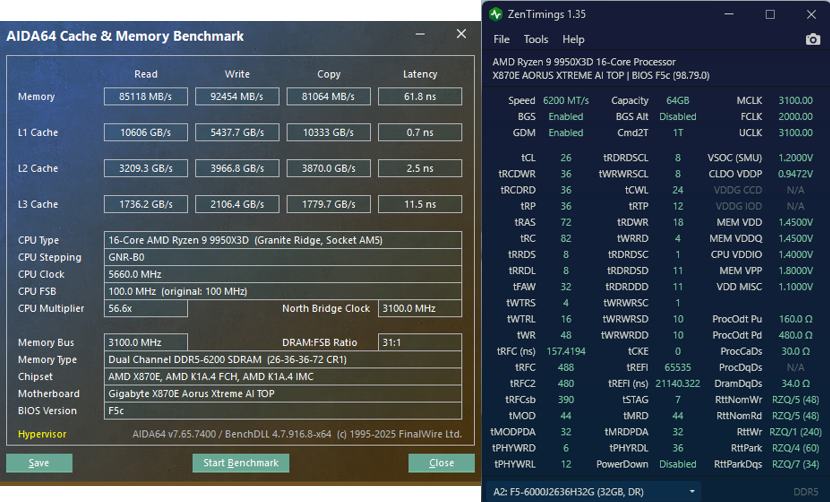
Looks like your RAM is doing really well too, you're on less voltage than me and running same CL at slightly higher clock, and a decently low lower latency. I'm not sure TRAS would make such a big difference so not quite sure why your ltency is so much lower than mine, albeit maybe a better IMC/dual CCD quirk?
Did you change anything latency wise on the board to get such a low latency read?

It's getting much higher read and writes, which I'd heard was a thing between the single and dual CCD chips too, so maybe thats all related to that; as your stats seem decently better despite our timings being fundamentally rather similar.
You're running the more expensive C26 kit, whereas I've tuned up the C28 kit, so I can't complain too much given the relative price difference just curious to see your latency so much lower at broadly comparable timings.
 
Last edited:
Yep think I found it a little while earlier (Core Tuning Config) - Gigabyte seems to default to Level 2, whilst Legacy/Level 1 seem slightly more performant to me, albeit Level 1 shows the same higher latency as Auto/Level 2.
I'm trying Legacy right now, and my Aida best latency reading dropped to 63.5, although its more typically 64, which is more in line considering you're running your memory at 6200 instead of 6000 :)
 
Last edited:
Your latency is still beating mine; I've managed to get within around 1.5ns of you now though with continued tweaking. My memory controller doesnt seem to want to play that nice with 6200/6400, but I've got 6060 (1% Bclk bump) fairly stable :)
 
My day to day is essentially tuned 6060C26, with the 9800X3D boosting to 5.5GHz (+200PBO, +1% BCLK), and IF at ~2150. I'm seeing 62-63.x NS on average using AIDAs test.

It's taken quite a bit of tuning and testing to get to what I'd consider stable, and the extra 1% BCLK threw me a red herring by making it look like my 9800X3D undervolt was unstable, but now its appearing more like the 1% bclk memory speed increase COMBINED with the undervolt was causing a slight deficiency in the RAM subsystem and causing an occasional memory error. Bumped RAM from 1.55v to 1.6V (which I wouldn't have done without a cooler), and I'm now error free and dialing my undervolt back in (as I'd dropped as low as -5 curve optimiser), with with a good 12hr+ AIDA stress stability test each time I up the undervolt to ensure I've not incurred another issue. It's now looking like I might be able to get back up to -15 to 25, which had failed the 12hr AIDA before seemingly due to the RAM voltage.

I did have a bit of a play with the Core Tuning Config setting, Gigabyte seems to default to Level 2, Aida64 latency test prefers legacy, and Level 1 or Legacy seem to produce the best gaming results, although the difference isn't huge; so I left it to Legacy for now to help me dial the memory in using AIDA more easily.

I'd rather take the time to aggressively stress test (24hrs Karhu passed at these new RAM settings, along with multiple hours YCruncher VT3, OCCT AVX2 and TM5 Absolut all passed) and now just using AIDA64 Stress Stability 12hr test runs to validate and dial in the CPU undervolt configuration.
It's kinda funny, the more aggressive curve optimiser settings were generating quick fails (increasingly so when the optimiser was more agggressive), leading me to think it was the CPU UV when my RAM was still set to 1.55v, but multiple failed values have all passed 12 hours so far now the RAM has been bumped to 1.6, so it really does seem my bclk 1% JUST pushed the RAM/CPU/IMC subsystem to the edge on the voltage it had, and now that the RAM has been given an extra voltage threshold, the bottleneck has been resolved I should be able to pull a decent UV back. -15 has already passed again, and I'm validating -20 now. I might even be able to test -25/30 again if this continues to go well.
Either way happy to be dialing it in, as if stable that'll help bring heat and power consumption down a bit, and allow it to boost that bit harder and longer (oy vey!)

Minimimum framerates in CPU bottlenecked situations are easily pushing another 5% over stock in many cases (for example if I run it through Shadow of the Tomb Raider 1080p low), and Total Warhammer 3 average FPS in the heaviest included benchmark went from 131 to mid 140s (145-147), so there is definately some real world benefits being pulled out of this. Kinda shows up the *******s the mainstream tech youtube world pushes that boost does it all these days, and that CPU and RAM tuning/speed is pointless; yes don't get me wrong it doesn't come with the 25+% gains it used to, and it's time consuming, but a load of rot to suggest there's nothing left, and I have severe doubts about some of the videos I've seen showing that RAM speed does nothing, as I think there'll be a point where the additional bandwidth will offset the 2:1 divider, but as MY particular memory controller doesnt really seem to like much above 6000, I'll leave it until later platforms to push that further.

Anyone with a brain or who's just been in this space long enough knows there are still extra levers and knobs to tune, as there's always something left on the table in the name of ensuring there's somewhat of an overhead at stock. Expo/my motherboard actually seems to set somewhat reasonable timings for my settings too, but even they were able to be tuned further.

My 9070XT unfortunately isnt as blessed, the VRAM seems very temperamental in regards to triggering black screens once moved from stock, but there's still a bit in the tank in regards to undervolting and allowing more power to the core as well.

Honestly, once I've finished dialing in my undervolt, I'll be able to finally take some time to actually properly tweak the fan profiles to reduce the noise, as that's all been left on auto, and at the very least I want the AIO pump and RAM cooler to run at a static RPM; and tune down the fans a little as they have a definitive drone at load and even idle; I just can't remember what's plugged into exactly which header so I'll likely need to take the back panel off to check.

This all being said though, much as I AM taking some serious time to do it, this is all for gaming and day-to-day performance. I want stability, and I'm not interested in extreme OC/benchmark chasing, just want my day to day to be as snappy as possible, and get my minimum FPS as high as I can, and frametimes as stable as possible.
I still see a lot of people chasing synthetic benchmarks, or pushing unstable overclocks, which'll error out randomly; and that just doesn't interest me.

With great power comes great stability :D
 
Last edited:
Honestly thats the one area where my Nitro does surprisingly well - yesterday I was throwing maximum settings 1440p Oblivion Remastered, with full RT effects out the wazoo, gpu running 100% for a while, and the card remained considerably quieter than my system fans (which admittedly even tuned arent quiet - I need to break away the front fans and set them to static), but main GPU temp was hitting around 58, with the hotspot at 85. Considering the old 3080 ran at ~85 core average, and the memory ran very hot 90+ easily; this seems very cool and collected; just unfortunately my VRAM doesnt seem to have much headroom in the tank.

Going back to the original topic though, I'm extremely glad I picked up this cooler for £20. Its allowed me to keep my ram below the 60 degree safety threshold, and its usually considerably below that unless I'm hard stressing the machine; and it's allowed me to push the voltage I needed to stabilise my settings, without risking long term damage or degredation.

At 80% static its hitting a little over 3000RPM, but I cannot hear them at all over the rest of the system fans, where the front P14 Pros are by far and away the loudest fans in the system.
 
Last edited:
Back
Top Bottom