

-
Competitor rules
Please remember that any mention of competitors, hinting at competitors or offering to provide details of competitors will result in an account suspension. The full rules can be found under the 'Terms and Rules' link in the bottom right corner of your screen. Just don't mention competitors in any way, shape or form and you'll be OK.
You are using an out of date browser. It may not display this or other websites correctly.
You should upgrade or use an alternative browser.
You should upgrade or use an alternative browser.
Recording GPU temps
- Thread starter Kronos
- Start date
More options
View all posts
RTSS Riva tuner?You can look along the timeline in RTSS if you use MSI AB, reset it before you open game then look at it after you close game.
MSI AB Afterburner? Can you explain what you mean by reset it and how to do it?
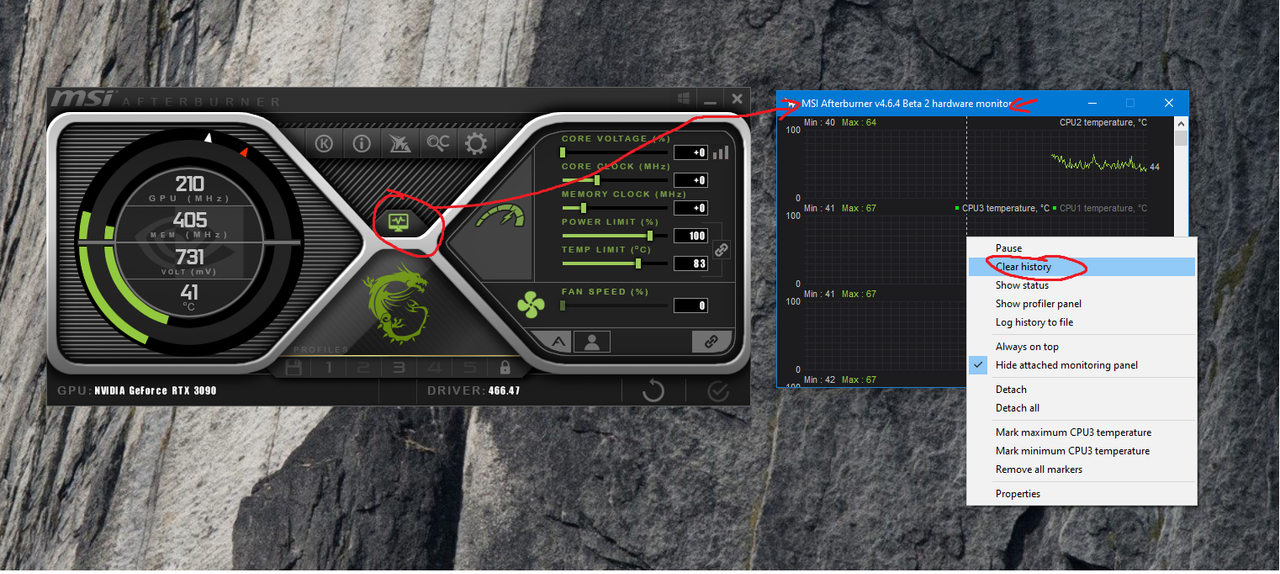
Big help mate thanks again.Ok I had a look (been a while since I used and different Skin made it harder to find) :
Scroll the graph till you see your GPU Temp in view and then Clear History so it starts fresh and run your game then after you close or minimise the game go back and look at the curved line and drag mouse along it to see the temp hisory while you were in the game.
I have been prompted to look into the temp issue as my card seems noisy even with games that I feel should not really be pushing the card.Afterburner is good because once you know your temps, if you want to actually make any changes like adjust the fan speeds or the clocks to maintain a specific temperature or overclock then you can use the same tool. Creating a custom fan curve to spin up the fans and keep temps down is well worth it, especially for either overclocks if you're going for performance, or for low fan speed if you're sensitive to fan noise.
But after a Google it seems that the EVGA GeForce RTX 2080 Ti Black Edition is a noisy GPU.