Recording TV (Freeview)?

Soldato
Joined
9 Nov 2008
Posts
7,149
Is there anyway I can record TV via my PC?

This is my graphics card and I have a HDMI cable and a VGA cable that I could use to connect my TV to the graphics card?

I've had the TV acting as a monitor on occasions but want to start recording stuff onto my HDD as I don't have a DVD recorder or Sky+.

Thanks

 
I think you'd have to have a dedicated Freeview TV Tuner for your computer. You can get USB Freeview tuners from companies such as Win TV, Freecom and Hauppauge. There's another better manufacturer but I can't remember it's name at the moment.

At the moment your graphics card can provide output to your TV, but the computer itself isn't receiving the TV signal, which I think means it can't record it.

Rgds
 
Radderfire is correct ... you need a TV Card (or USB device) for your computer so it can receive the TV Signal. At the moment you are only outputing video and you need something to receive it.

Hauppauge make them as do other manufacturers ... I have a Nova-T 500 in my HTPC which is a dual tuner freeview card which I can use to record off of freeview.
 
Last edited:
I only have one aerial point in my room, which is currently being used by my freeview box.

Will I need another cable to plug into a USB stick/TV Tuner card?

I won't ever watch the TV on my PC, but would like to be able to schedule it to record shows when I'm out so I can watch them later.
 
I only have one aerial point in my room, which is currently being used by my freeview box.

Will I need another cable to plug into a USB stick/TV Tuner card?

I won't ever watch the TV on my PC, but would like to be able to schedule it to record shows when I'm out so I can watch them later.

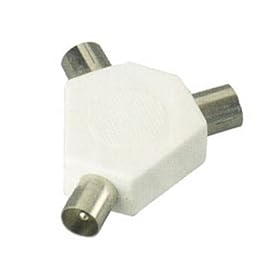
You can do what I do and split the freeview signal that goes to the box with one of these.

You attach an additonal RF lead from the splitter to the USB TV device. This allows you to use your Freeview box that is connected to the TV. You can then record to your computer's hard disk and you can also watch whats being broadcast Live on TV on your computer. If you have Vista Premium/ Win 7 Primium then you can take advantage of Windows Media Center which will probably be better than the supplied software that will come with your USB TV stick :)

31sIGCW3t9L._SL500_AA280_.jpg
 
Last edited:
As ScottMC7000 says just split the aerial feed so it is connected to both devices, although be aware that this will drop the signal strength so if you already have a week signal then this may cause issues (which a splitter with a built in booster may address).

I don't know about other makes but the Hauppauge software is pretty rubbish hence I just use Media Centre (in Vista before, now Windows 7) to do the recording ... this is part of Home Premium and above. You can get other, free, software which will do this sort of thing like GBPVR and Media Portal but they can be more complicated to set up.
 
get win tv made by hauppauge there is a record button and it saves strait to your hard drive

But WinTV is one of the most flaky pieces of **** that you could ever install on your computer (in my experience across ~6 Hauppauge cards across ~8 machines) hence the recommendation to use other software ...
 
the Hauppauge software is pretty rubbish hence I just use Media Centre (in Vista before, now Windows 7) to do the recording ...

Very true. The Hauppage stuff has an annoying habit of crashing or hanging every half hour or so, but the Win7 media centre is quick, easy and reliable to use. You'll save yourself a lot of hassle by not bothering with WinTV if you get one Peerzy.
 
Terratec Cingery 2400i DT (dual tuner), works with Win 7 MediaCenter without any problems, or with other suitable softwares, Terratec Home Cinema etc...
 
i wud recommend a PCI-express free-view card ...... duel tv card with time shift and div-x recordings or what ever u want to set the recording format to ..... or just download what u wanted to record
 
I have a hauppage usb tuner card, and it really good? just plug it in and use windows media centre IMHO is the best software for using a tuner, just use the drivers for the device not their software. I also left it in my pc the other day while I moved it. it bent the usb over a bit with a lot of pressure by mistake I bent it back its fine didnt suffer at all.
 
Does anyone know if you can get any other card which views more channels than freeview?

? you can get a dual tunner so you can record 2 channels at the same time?? but your not gonna get anymore channels with the same signal if thats what u ment. try using a booster before the splitter it may improve signal. I get about 97 channels atm I used to get 109 before the switchover :/
 
Back
Top Bottom