Reset iMac

Soldato
Joined
20 Apr 2008
Posts
3,854
Location
West Midlands
this has probably been asked 1000 times before but I am stumped on this one.

The MIL has an iMac and she has moved away due to retirement. She has given this to our eldest daughter but unfortunately doesn't have access to the phone it was registered too (company phone) and has no access to her Apple ID ( I think it's an age thing). She has no idea of username etc etc and the email address her Apple ID was linked too (company email) has been removed due to retirement etc.

We are unable to boot into recovery mode as this keep sending us to Internet Recovery. Which then asks for Apple ID etc. Which as said we can't access.

Is there a work around. We're stummped
 
You can try creating a bootable USB OS on another mac following the guides online and restoring from that. you should also be able to format the drive from there.
If it turns out that its just a login password you can remove that in the recovery screen using the resetpassword command in terminal.
If you have access to another Mac of the same generation you could clone its HDD and pop that in to replace the current one, assuming that the drive is removable.
Strange that its pushing you into internet only recovery, older macs should have the option to do a offline recovery (high sierra onward)
I can't even access the utility screen in recovery mode as it sends me straight to Internet Recovery so the terminal password reset I'm unable to do.

I shall try the USB method and hope that works.
 
What iMac model/year is it and how are you booting to USB? As it seems a little odd that it's booting to Recovery rather than the USB installer or displaying the Boot Manager.

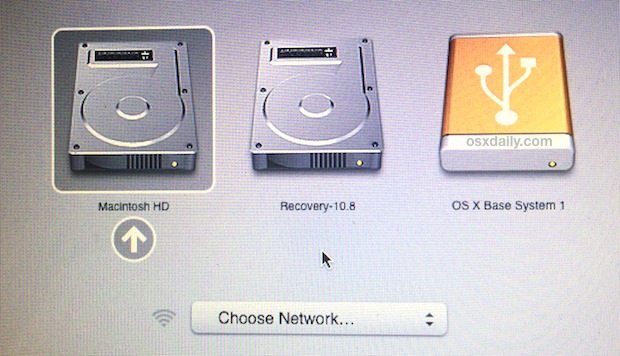
For reference, follow this guide here and boot up pressing the 'Option' key when powering on the iMac which should present you with the Boot Manager (looks similar to this), select the USB installer - USB installer/drive will show if it's bootable/created correctly.
Once you have booted to the installer, i would personally use Disk Utility to 'nuke' the drive prior to reinstalling OSX/MacOS.

Edit - If it still isn't playing ball and you have verified the USB installer works, then you could try a NVRAM/PRAM reset (better in depth blog post here) before trying to boot to the USB installer.

Gone through everything. Still nothing :(

Just keeps kicking me into Internet Recovery.

iMac is an A2115. Unsure of internal specs
 
Last edited:
Did you try a NVRAM reset of the iMac? (And perhaps a SMC reset?)
Do any volumes appear when you try and boot to the Boot Manager?

For the Boot Manager - power off Mac, power on Mac, very quickly press and hold the Option key until the Boot Manager displays, which looks a little like (screenshot is from a older version of MacOS) -
boot-mac-external-drive.jpg


If you're using a Magic Keyboard (wireless) then i would try plugging it into the Mac or alternatively use a USB keyboard (and switching off the Magic Keyboard) just to rule out an issue there like Bluetooth etc.

Other key combos (again power off/on, quickly press and hold key combo) -

Option + Command + R - for Internet Recovery (to latest supported MacOS version)
Option + Shift + Command + R - for Internet Recovery (to original factory MacOS version)
Command + R - for the built-in Recovery (uses the recovery 'partition')

Edit - Apple guide on Recovery options here - https://support.apple.com/en-gb/guide/mac-help/mchl338cf9a8/mac.

Edit 2 - I would also look at running the built-in diagnostics, just to rule out a hardware issue - https://support.apple.com/en-gb/102550

I've attempted to reset both NVRAM and SMC. I will run though this again though.

When I try and enter boot manager nothing happens. It always goes to Internet Recovery.
I cannot enter anything for the Mac other than Internet Recovery.

This thing will go on the skip at this rate :cry:
 
What happened when you tried to do either a NVRAM/PRAM or SMC reset? Did it boot straight in to Internet Recovery? Did you get an audible chime/sound (the typical Mac bootup sound) at all?

I would try a NVRAM/PRAM and a SMC reset again; iirc, you can hold down the key combos for either reset longer than the recommended 20 seconds or so and the Mac will do the reset multiple times.


So you power on the iMac, quickly press and hold the Option ⌥ key and it just boots to Internet Recovery rather than the Boot Manager (technically Apple actually call this 'Storage Manager' rather than Boot Manager, just in case you're Google'ing)? :confused:

Were you able to boot to the built-in diagnostics at all? If so, did it show any issues with the iMac?

Assuming the default boot behaviour is now Internet Recovery rather than MacOS/desktop and a NVRAM/PRAM/SMC reset did nothing, then to me this sounds like either a hardware fault with the Mac or, especially if you can't boot to diagnostics, the iMac isn't registering the held combo keys, and/or is registering another held key(s), and just continuing with the default boot behaviour (similar to this video - MacBook Pro 16" 2019 Stuck At Internet Recovery).

Definitely try a known working USB/wired keyboard if you can or, if you already using a wired keyboard, try another known working keyboard to rule it out.

Lastly, have you tried booting into Safe Mode (guide here - https://support.apple.com/en-gb/guide/mac-help/mh21245/mac)?
Unlikely this will work but you never know.


It'll be something simple, it usually is, but it'll just take a bit of hair pulling to get there :cry:
Thanks mate for your patience and assistance. I will source another keyboard and tried this. I'm currently using the Apple wireless one although I have tried it wired and still didn't work.

As for the chime. I get no chime on startup at all. I get no diagnostics support either. It's like a constant circle of restart, internet recovery, hair pull and repeat :cry:

I am coming to the conclusion that the problem is either me or the keyboard. 75% me though I'd say :D
 
@magicroundabout - Does the iMac boot to Internet Recovery and give you the option to use 'Disk Utility' (you will get a list of options similar to this screenshot here)? Or does it ask for an account password prior to displaying those options?


Isn't that for Apple Silicon, that has the 'Erase Mac' option within it's Recovery, rather than Intel?
And iirc, i'm sure if the AS/M* Mac has be linked to an Apple ID, it'll ask you for those credentials once it has erased the Mac.
asks for account password before I get to those
 
Back
Top Bottom