Safe 2500k 24/7 Voltages

Associate
Joined
16 Dec 2009
Posts
723
Location
Bolton
Salutations,

So for the past two days I've been overclocking my 2500k and I just don't understand which is a safe voltage. A guide I was following Here which pretty much encourages that 1.41v or just a little over should be safe for a 24/7 overclock. However I've read on the OCUK sticky that 1.38v is the maximum you want to be hitting for a safe overclock. And finally Intel say that anything under 1.5v is fine however I doubt that's true for a 24/7.

So I was wondering anyone with a 2500k what are your thoughts and overclocks for 24/7.

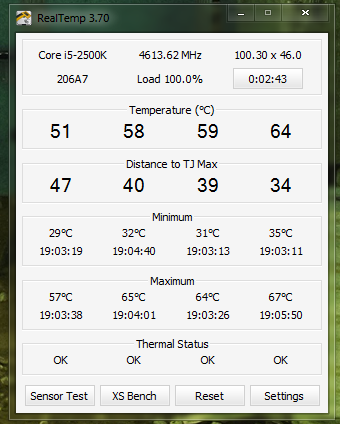
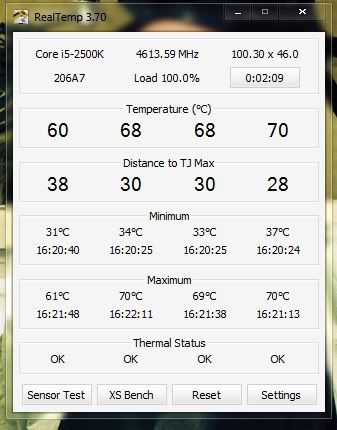
Also here is mine and the temperatures I am getting.
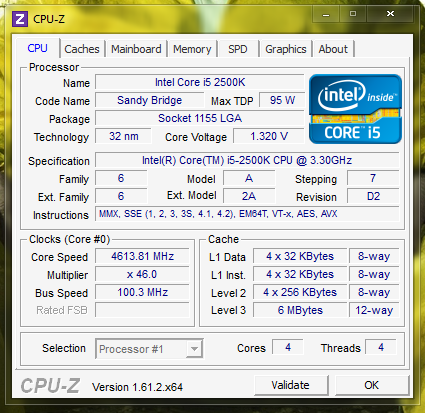
CPU.png

Idle: 1.320v
Load: 1.308v - 1.320v

Idle Temps
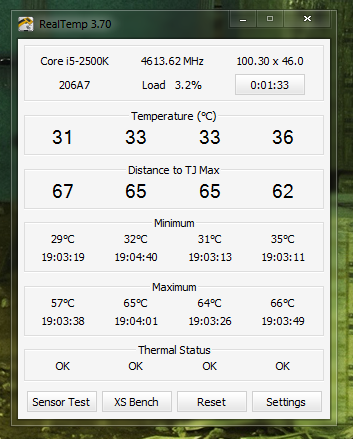
Idle.png


100% Load Temps
Load.png


I've also had a 4.8Ghz overclock with a Idle of 1.380v and load of 1.356v - 1.364v. Just wondering if it's worth clocking up to that depending on what people are saying is safe.

 
***OVERCLOCKING GUIDELINES***

- Do not exceed 1.425v core voltage, doing so could limit lifespan of the CPU
- Aim to keep temperatures below 70c underload if at all possible
- Do not overclock with BCLK, again doing so could limit lifespan of the CPU
- Recommended memory voltage is 1.50v, so make sure to run your memory at 1.50v, higher than 1.60v could limit lifespan of the CPU
- These recommendations come from OcUK and Intel, your warranty is un-affected but we highly recommend you adhere to the above to make sure your CPU lifespan is un-affected
- All Sandybridge CPU's worldwide should be run at the above or lower voltages, no higher!

from ocuk
 
I would leave it to be honest. You wont get more then another 100mhz its not worth it for the hastle when using it everyday.
 
I would leave it to be honest. You wont get more then another 100mhz its not worth it for the hastle when using it everyday.

Turns out it wasn't stable after all, took about 8 hours but it started to BSOD. Got it running about 1.356v now and it seems fine. However I'll probably try to tweak it some more later tonight or tomorrow.
 
Turns out it wasn't stable after all, took about 8 hours but it started to BSOD. Got it running about 1.356v now and it seems fine. However I'll probably try to tweak it some more later tonight or tomorrow.

am running 2500k at 4.9 @ 1.42v 24/7 for months now no problems.i have also ran it at 5.0 @ 1.44v 24/7 for a few weeks and no problems i only had to jump up 2.0v to run it stable but some 2500k need more or less voltage,as long you got good temps thats all you need
 
depends how long it was under load. But you need to deside what 24/7 voltage you want to go up to. i wont take my 2700k passed 1.4v
 
I would be more concerned about the 13C temp difference (between Core 1 and 4) @100% load!
Didn't any one notice that?

Notice what? its fairly common. With some cpus you can spread and respread with all methods and the cores are uneven in temp. Also if you look at the maxmium temps its a 10C delta not 13C.
 
Notice what? its fairly common. With some cpus you can spread and respread with all methods and the cores are uneven in temp. Also if you look at the maxmium temps its a 10C delta not 13C.

Well I did a quick intel burn test and this is the highest they go to which has the most spread between core 1 and 4 but usually they jump between 50s - 65s for the most part. With a 4c difference between core 1 and 4 this 10c - 13c is just in the off chance every few seconds when it jumps.

Hoping it's alright :P

Test-2.jpg
 
Also something a little off topic but I didn't want to make a new thread just for this. I'm having to use a LLC level 6 just to maintain my overclock if I disable or drop it to level 4 or below it will require me to ramp of the voltages very high just to keep it stable.

Just wondering if it's fine that I'm using it as Level 6. I would use the SVID but it just seems to BSOD for anything above a 4.4 overclock.
 
Back
Top Bottom