Scar 16 memory speed reduced.

Soldato
Joined
30 Jan 2005
Posts
3,670
Location
Inverness
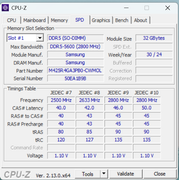
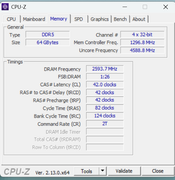
Just opened up cpu-z on my Scar 16 laptop (13980HX and RTX 4080) and noticed the RAM speed is now at 4800. It did ship with 4800 speed RAM but I changed it for some 5600 stuff which would run at 5200 (chipset limitation or something like that which I was ok with) I went into the bios to set it back up to speed but there is now no option for any sort of memory tuning at all.

I bought this laptop a year ago which was after all the microcode stuff had already came to light so I updated the bios immediately and have run undervolted from day one.

I understand locking it down a little to protect the CPU but gimping the memory is ridiculous.

 
Just opened up cpu-z on my Scar 16 laptop (13980HX and RTX 4080) and noticed the RAM speed is now at 4800. It did ship with 4800 speed RAM but I changed it for some 5600 stuff which would run at 5200 (chipset limitation or something like that which I was ok with) I went into the bios to set it back up to speed but there is now no option for any sort of memory tuning at all.

I bought this laptop a year ago which was after all the microcode stuff had already came to light so I updated the bios immediately and have run undervolted from day one.

I understand locking it down a little to protect the CPU but gimping the memory is ridiculous.


That CPU with DDR5 should do 5600 . As you can see here :- https://www.intel.com/content/www/u...-36m-cache-up-to-5-60-ghz/specifications.html

What RAM sticks did it come with and what did you update to ? Are the sticks on their allowed memory sticks ? I know the Intel issues with the 13th/14th gen and the question is was that done as you said to protect the CPU or was that a mistake/bug in the newer BIOS, have you also checked what was updated in the BIOS on their support download pages ? I know most times it says just "latest security blaa blaa and general stability fixes".
 
Not something silly like you have not entered the advanced BIOS, on some of my devices I have to do some random key presses to open this up?

For example on my SuperX I have to hit ctrl-s then save and reset in the BIOS and then I can access the memory menu etc. on next entry.

Perhaps you can do it in software with XTU.
 
Last edited:
Not something silly like you have not entered the advanced BIOS, on some of my devices I have to do some random key presses to open this up?

For example on my SuperX I have to hit ctrl-s then save and reset in the BIOS and then I can access the memory menu etc. on next entry.

Perhaps you can do it in software with XTU.

Yes I was wondering if there is some hidden Advanced settings menu too like some laptops and prebuilt desktops have.

I also can't see anything stating any changes for the latest BIOS updates and the typical BIOS descriptions stating "improving or optimising the BIOS" but not telling you what changes they have done. :rolleyes:
 
Last edited:
Have a read of this reddit thread where someone there mentions a GitHub project that unlocks the BIOS to show all settings and any hidden settings. Works for Intel and AMD systems. The GitHub talks about AMD but works for Intel too.


Other forums talking about these bad BIOS updates for your 16" & 18" models with 13th/14th gen intel too here :-


Last edited:
@sgoaty

Also just found out these laptops from ASUS and other brands with intel CPUs are only able to use 6400/5600 if you install CSODIMM memory modules. As there is no XMP setting in the BIOS and will default to 4800.


As DDR5 standard speeds get faster and faster for next-generation desktop and laptop computers, stability and data integrity become critical issues to mitigate. Increasing speeds means electronic noise and jitter become problematic, potentially resulting in errors, lost data or system freezes. To address this challenge, the body for maintaining industry standards in memory, JEDEC, specified a new requirement in late 2023 for DDR5 Unbuffered DIMMs (Dual Inline Memory Module) and DDR5 SODIMMs (Small Outline Dual Inline Memory Module). Beginning with the introduction of 6400MT/s DDR5, a Client Clock Driver (CKD) component must be added to the memory module to redrive the clock signal, which minimises noise and jitter and improves overall signal integrity.

Clock signals, traditionally generated by the processor, are voltage and current signals that flow at a constant frequency, oscillating between high and low states. These signals allow components to synchronise across the motherboard, so data is sent and arrives on time. With the clock driver on the module, it will generate its own clock signal to ensure precise timing synchronisation on the module.

New memory classification​

To differentiate from legacy DDR5 modules that don’t feature a clock driver, JEDEC requires the addition of a “C” for “Clocked” to indicate the inclusion of this component, hence the new module types CUDIMM and CSODIMM. This is an important distinction, since CUDIMMs and CSODIMMs use the same sockets as existing DDR5 UDIMMs and SODIMMs. To prevent compatibility issues, the chipset and motherboard manufacturers will roll out BIOS updates to legacy motherboards that disable the clock driver if a CUDIMM/CSODIMM is installed. When a CUDIMM or CSODIMM is installed on a legacy system, it will automatically operate at the supported speed of that chipset and processor.

This improvement benefits a wide range of applications, from gaming and creative projects to scientific research and financial computations, where data accuracy is critical. The addition of the clock driver also opens new frontiers for overclock speeds. The improved signal integrity means faster speeds can be attained that will remain stable under stress.

Clocked Unbuffered DIMMs (CUDIMMs) and Clocked Small Outline DIMMs (CSODIMMs) represent a significant advancement in memory technology, catering to the escalating need for high-performance computer hardware. Adding the clock driver to the module is just one example of how memory requirements are always evolving and play a significant role in achieving optimal system performance.

Crucial also make these CSODIMMs too.


EDIT !


Seems more information here :- https://www.kingston.com/unitedking...ory-modules-cudimm-csodimm-camm2-mrdimm-video

CUDIMM and CSODIMM​

CUDIMM, short for Clocked Unbuffered Dual In-Line Memory Module, is an enhanced DDR5 industry-standard memory module design introduced at 6400MT/s for desktops and workstations. Similarly, CSODIMM (Clocked Small Outline DIMM) is a compact version tailored for smaller-form-factor systems like laptops and mini PCs.


With increasing demands on performance, CUDIMM and CSODIMM modules feature client clock drivers (CKD) to ensure that data integrity and performance remain stable. As speeds increase, signal integrity becomes even more critical. This is because electrical noise and jitter can occur at higher speeds, which could potentially cause errors, lost data or system crashes. Key characteristics include:


  • Enhanced reliability: Unlike Registered DIMMs (RDIMMs), UDIMMs and SODIMMs lack a register or buffer between the memory controller and DRAM chips. However, the inclusion of a clock driver on CUDIMMs/COSDIMMs to re-drive the clock signal enhances signal integrity and reduces jitter, safeguarding data bits from potential corruption.
  • High performance: These modules are ideal for systems where speed is a priority, such as gaming rigs, high-performance workstations, laptops and compact devices.

To distinguish them from 4800MT/s – 5600MT/s DDR5 UDIMM/SODIMM modules that lack a clock driver, the standards body JEDEC mandates adding a "C" for "Clocked" to signify this feature. This resulted in the new module types CUDIMM and CSODIMM, which fit into the same sockets as existing DDR5 UDIMMs and SODIMMs.


CUDIMMs and CSODIMMs are first supported and intended for use on Intel “Arrow Lake” processors and the 800-series chipset. Legacy chipsets and AMD platforms do not support the clock drivers featured on these new modules and may not work or may reduce their operating speed significantly.
 
Last edited:
@sgoaty

What memory sticks are you using right now that are the updated 5600 speed ? Can you list the full model number please. Interesting to see how they are setup and how they report to the BIOS their speeds.
 
The laptop came with 2 x 16gb 4800 sticks originally I replaced them with 2 x 5600 32gb sticks maybe 8 months ago and I remember at the time getting them up to 5200. I generally keep the bios up to date because of the microcode issues so I'm currently on 331 I just noticed there's a newer one available now though.

I'm away from the laptop at the moment but I'll get the info asap.
Thanks
 
Back
Top Bottom