

You are using an out of date browser. It may not display this or other websites correctly.
You should upgrade or use an alternative browser.
You should upgrade or use an alternative browser.
Spot Coolers Antec.
- Thread starter Cavallino
- Start date
More options
Thread starter's posts

Man of Honour
- Joined
- 23 Mar 2011
- Posts
- 19,191
- Location
- West Side
What case do you have ?
Man of Honour
- Joined
- 23 Mar 2011
- Posts
- 19,191
- Location
- West Side
Usually in dual gpu set up one of the cards runs hotter, was thinking if you could remove one of the hard drive bays and add a fan there.
Well there are two fans already on the front of the case and one at the rear + the two fans at the top of the case for my H100.
But because its such a big case I am just wondering if the cool air thats being dragged in by the front of the case is making it to the GPUS.
By adding the spot cooler I thought it would help with the circulationto get that cooler air over.
Thoughts?
But because its such a big case I am just wondering if the cool air thats being dragged in by the front of the case is making it to the GPUS.
By adding the spot cooler I thought it would help with the circulationto get that cooler air over.
Thoughts?
Man of Honour
- Joined
- 23 Mar 2011
- Posts
- 19,191
- Location
- West Side
Spot cooler Should help as its a dead spot there with no side panel fan.
Man of Honour
- Joined
- 23 Mar 2011
- Posts
- 19,191
- Location
- West Side
Go for the 100 as you can control the fan speed threw the motherboard.

I'm assuming you have 2x front intakes with top and back exhaust?
Sounds like you need more intakes.
What GPUs do you have?
Yes 2 front intakes, two top exhausts (the fans from the H100) and an exhaust at the back.
Where else can I intake from... Bottom of the case? Would it really make much difference?
Go for the 100 as you can control the fan speed threw the motherboard.
Hmm 100 you say, but it doesnt seem to cool as well as the 80 according to this?
(lower CFM etc?)
http://www.antec.com/pdf/flyers/Spotcool80 100_flyer_EN.pdf
What do you think?
The problem is most all the air coming in is going directly to top and out thru radiator and back vent.
Not knowing what GPUs you have I can only guess they each have a couple of 90-100mm fans on them.. let's say 4x 92mm fans cooling GPUs each moving 30-40cfm is 140cfm of air moving around.. about the same as both front intakes.. and front of case is quite restrictive with airflow being the slot around center panel.. So yeah, a couple more intake fans in the bottom would probably help. You could try moving the back exhaust to the bottom as an intake and also remove all unused PCI slot covers so they can function as exhaust vents.
A picture of your system from the side and a list of your components would help.
Not knowing what GPUs you have I can only guess they each have a couple of 90-100mm fans on them.. let's say 4x 92mm fans cooling GPUs each moving 30-40cfm is 140cfm of air moving around.. about the same as both front intakes.. and front of case is quite restrictive with airflow being the slot around center panel.. So yeah, a couple more intake fans in the bottom would probably help. You could try moving the back exhaust to the bottom as an intake and also remove all unused PCI slot covers so they can function as exhaust vents.
A picture of your system from the side and a list of your components would help.
Ok will sort something out but as a stop gap measure I want to try these spot coolers:
Looking at the specs of the SpotCool 80 it has a higher CFM rating thant the 100.
Does that indicate that the 80 is better than the 100?
Doesnt make sense to me.... the 100 is bigger than the 80 in size.
Looking at the specs of the SpotCool 80 it has a higher CFM rating thant the 100.
Does that indicate that the 80 is better than the 100?
Doesnt make sense to me.... the 100 is bigger than the 80 in size.
I don't believe any fan specs unless they are commercial fans.
I'm guessing your exhaust fans are sucking air in the bottom even now. Corsair claim the stock H100 fans are 46 - 92 CFM: 1.6 - 7.7mm/H20. At a guess they are moving half again as much air out as front is moving in.
Taking the front panel off might help.
Corair AF140 are rated 67cfm and 0.80mm H2O... you will be lucky to get 50-60cfm total from the front with the way it's designed. Looking at reviews it appears the area around the solid front panel is all the air there is going in.. subtract the stand-offs to hold it out.. and the 90 degree turn the air has to make and grill.. than HDD cages behind the fans...
I'm guessing your exhaust fans are sucking air in the bottom even now. Corsair claim the stock H100 fans are 46 - 92 CFM: 1.6 - 7.7mm/H20. At a guess they are moving half again as much air out as front is moving in.
Taking the front panel off might help.
Corair AF140 are rated 67cfm and 0.80mm H2O... you will be lucky to get 50-60cfm total from the front with the way it's designed. Looking at reviews it appears the area around the solid front panel is all the air there is going in.. subtract the stand-offs to hold it out.. and the 90 degree turn the air has to make and grill.. than HDD cages behind the fans...
Exhaust fans at the top of the case are sucking air from the case out the top.
The front of the case I usually open (the drop down front panel), does help a little )a few C.
I have to say the inside of the case is fairly cool. Mobo temperatures reporting around 35 to 40C or so.
Ive ordered a couple of Spotcool 80s for now, just to mess around with and see if it could make a difference.
The front of the case I usually open (the drop down front panel), does help a little )a few C.
I have to say the inside of the case is fairly cool. Mobo temperatures reporting around 35 to 40C or so.
Ive ordered a couple of Spotcool 80s for now, just to mess around with and see if it could make a difference.
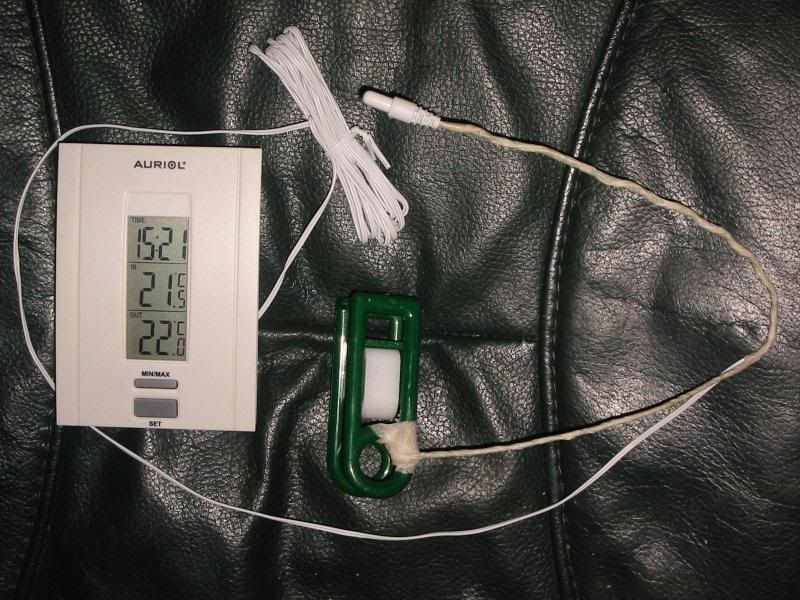
I use a cheap indoor/outdoor thermometer with a piece of insulated wire and a plastic clothspin. Clip and position sensor where I want to check the temp. Make it easy to see what the air temp going into components actually is relative to room temp. 
Last edited:

for the record I'm on a 600t which is very similar in size/layout to the 750D. The spot cool would definitely work. Personally I'm going to use http://www.overclockers.co.uk/showproduct.php?prodid=HS-031-AL with 2x 120mm. Drilling holes in the bottom of the case to mount it blowing between and over both GPU's should work out nicely  just an option to consider
Also ghetto SLI/Xfire cooling mod: Fan attached to back of pc blowing between cards
just an option to considerAlso ghetto SLI/Xfire cooling mod: Fan attached to back of pc blowing between cards