Stock AMD Cooler replacement

Associate
Joined
20 May 2012
Posts
47
I am looking for a good option to replace my Stock AMD Cooler. I find that when it gets its RPM up, i can get quite loud and it seems to reverberate through the entire house nearly!

CPU is a FX6350 not overclocked. My budget would be around £20-£30, Just looking for something that would be quieter when its going at a high speed.

 
What case?

I know you said you dont overclock but a budget like that could net you a good enough cooler to give you a decent boost in the future if you wanted to. Unfortunately some of the bigger coolers which require less fan speed to keep cool, wont fit in many cases.
 
I did a rough measurement with a tape mesure, measuring rougly from where i think the back of the cpu was (i didn't remove the stock cooler for this as i don't have spare paste right now) and it looks like there is about 130mm maybe squeeze up to 140mm clearence from cpu to case side. From what i've searched, it seems that a 120mm vertical fan is outta the question, what with the heatsink being generally 30mm-40mm addition to the fan size.

As long as the cooling is as good as or better than the stock amd cooler, it'll fine, its the noise level i want to get reduced.
 
Plenty of low profile coolers. OCUK has a dedicated section for them, under Components, Cooling, Heatsinks.
Noctua are pretty good and often very quiet, so if you can stretch to £35, the Noctua NH-L9i is one option. The Noctua NH-L12 is even better, but £45.

There's a number of other low profile ones in that price bracket, some with decent ratings, but I don't know about those.
 
The Raijintek 92mm is one i was looking at. Would it be ok if i drilled holes in my case IF the ends of the heatpipes need the holes to fit?

edit: I've had a look and i can't seem to find a 92mm Raijintek fan to add onto it so its push-pull airflow.. do they do a 92mm seperate? or will i just have to buy 2 other 92mm fans and a mounting kit?
 
Last edited:
I suppose you could. Measure from surface of motherboard to inside of side cover. Subtract 8mm from that and you have the CPU to side cover measurement.

Also if fan will overhand RAM you will need 92mm or more from top of RAM to side cover. Again, measure the motherboard to top of ram and subtract that from the total motherboard to side cover measurement.. or if you have a 92mm fan handy set it on the RAM and try putting the side cover on. :D
 
Thanks so far, one more question though... (sorry lol)

Would going to a larger diameter fan be better.. 92mm vertical or a 120mm low-profile/topdown blowing whats it called. ?
 
Not really up on downflow / pancake coolers but I suspect for equal cooling ability to above coolers they are more expensive.

Generally speaking with tower coolers it's easier to exhaust their heated air out of case without it mixing into cool air going to components. They draw air from front and exhaust out back

Here is a very basic guide to case cooling:

Setting up the case for optimum cooling is often the hardest and most time consuming part of a build... And often the most neglected.

  • There is much more to cooling than good cases and good CPU / GPU coolers. Add the fact that many GPU's make more heat than CPU means getting that heat out of the case and keeping a cool airflow to components can be a challenge.
  • Cases, especially those with filters, usually benefit from fans with higher static pressure ratings than stock fans... "cooler" fans instead of "case" fans.
    Intakes are typically have more restricted than exhaust because of air filters, more restrictive grills, HDD cages, etc.
  • I prefer more intake than exhaust. And don't confuse number of fans with amount of airflow... or airflow with airblow
  • airflow is flowing cool air from intake to component and flowing hot air from component out of case without the hot air mixing with the cool air.
  • airblow is lots of fans blowing air with some of hot air from components mixing with cool air making it warmer resulting in warm air not cooling components as well as the cool air will.
  • Putting fans in case as intake and/or exhaust is only the first step. These fans only move air in and out of case.
  • This does not mean heated air is not mixing with cool air.
  • Nor does it mean cool air is going to where it is needed.
  • Getting the air to flow inside of case properly is even more important. We still need to manage where the air flows inside the case. We can do this several ways; deflectors, more intake fans.. & exhaust fans, removing vent grills, removing HDD cage, using fans with higher pressure/airflow, building ducts to or from CPU/GPU cooler, etc.
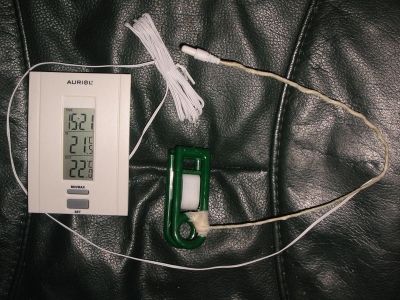
  • Using a remote temperature sensor to monitor what air temps are is the key to finding out where the cool air is flowing and knowing heated air is not mixing into it. By monitoring this we can than make changes to get airflow the way we want it.

How to monitor air temperature different places inside of case:
  • A cheap indoor/outdoor thermometer with a piece of insulated wire and a plastic clothspin works great.
  • Made up with floral wire and tape. We don't want anything to short out with metal. ;)
    e65759c3-fbf9-414f-9f1f-f5941d540397_zps2fe90c77.jpg
  • Clip and position sensor where I want to check the temp. Make it easy to see what the air temp going into components actually is relative to room temp. ;)
  • When system is working air temps going into coolers will be 2-3c warmer than room.. up to about 5c is okay.
 
Last edited:
I measured again... 159mm from Motherboard to case side - 8mm as said above so that is 151mm clearence. Not found a 120mm fan that fits yet, a few that are just a few mm to big. Can't sort the list in the shop by size or compatibilty, only by manufacture :(

edit1: found a thermalright True Spirit 120 M BW Rev.A on a different website height is stated as 145mm. OC don't do the 120 :(
edit2: i see thermalright do a Macho120, max height stated as 150mm.. tight but would fit, not on OC either.
 
Last edited:
I think i'm going to go for;

x1 http://www.overclockers.co.uk/showproduct.php?prodid=HS-002-RT
&
x2 http://www.overclockers.co.uk/showproduct.php?prodid=FG-036-NB

The Raijintek fan will go into the spare space i have in the back of my case as an exhaust fan (don't have one right now, and temps are still below 50c under load with the stock cooler.. its just flipping noisy at 5700rpm) And the 2 blacksilents will go onto the heatsink in a push-pull format, pushing toward the exhast fan. Thoughts?

edit:23/03/14 - ordered the parts above, hope to get them mon or tues, i will post a pic or two when installed.:)
 
Last edited:
Back
Top Bottom