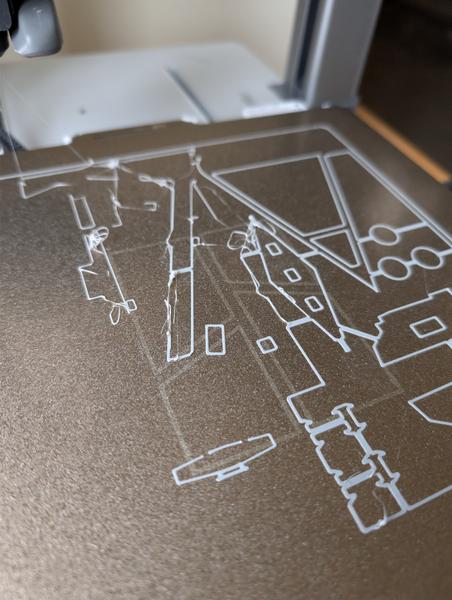
Sudden printing issues on A1

Soldato
Joined
23 Mar 2011
Posts
11,614
I'm a complete beginner so definitely missing something

Havent had a single issue since getting the printer earlier this year. Printed various different items direct from the app.

Had a break from it for a few weeks and now I'm getting this issue, it's getting stringy and causing issues

Cleaned the bed, ran the calibration again etc.

This is just generic bambu pla basic filament

Any tips appreciated

:)

PXL-20260503-083612268.jpg
 
Probably worth doing a couple of cold pulls on the nozzle, lubricating all the axis, and depending on how your filament has been stored might even be worth drying it (even just in the printer bed) for a few hours
 
I would guess that it is most likely your filament, have you tried different filament to rule that out?
Other thing could be the bedplate, I cleaned mine last year and had some issues with it. I then went back and gave it a proper soak and clean and it has been fine since.
 
All great advice but this is definitely the hotend screws, this frustrated me for so long and I've now added it to my regular maintenance.

  • Pull off the front cover
  • Pull off the heat sock and take off the nozzle.
  • Just above the magnet you'll see 3 screws, undo these with large allen key.
  • Pop out the hot end carefully taking care on the cables.
  • On the back you'll see 4 small screws, use the small allen key to tighten these up.
  • Put back together.
 
@kinger8938 interested to see if you sorted this issue?
Thanks so much for the posts above. I haven't had a chance to try anything unfortunately.

Will give the above a shot.

I did try different filament and it was the same.

I kind of felt like maybe the nozzle had a bit of a clog meaning it wasn't coming out as expected
 
All great advice but this is definitely the hotend screws, this frustrated me for so long and I've now added it to my regular maintenance.

  • Pull off the front cover
  • Pull off the heat sock and take off the nozzle.
  • Just above the magnet you'll see 3 screws, undo these with large allen key.
  • Pop out the hot end carefully taking care on the cables.
  • On the back you'll see 4 small screws, use the small allen key to tighten these up.
  • Put back together.
I had that exact same problem with my A1 where it started having problems with the first couple of layers and I was trying to figure out what it was. I only found out when I had printed a model and one of those screws was sitting on the build plate :D

Printed perfectly again after tightening them all (the other 3 were loose too) and I also did a bed tramming too.
 
First port if call check screws, then try new filament, - looks like extrusion issues but as others have reported issues with screws check that First.
 
  • Like
Reactions: JRJ
Back
Top Bottom