Associate
- Joined
- 4 Oct 2005
- Posts
- 2,096
- Location
- Herefordshire
The trouble with white builds is the "white tax." Some components are a decent chunk of money compared to black components. But once you start, you cannot stop, lol. After having many, many black builds, I just find white builds more pleasing. And especially with how expensive components are these days, I want to see where my money went lol.Just spent £1500 on black components, now I’m coming to choose a case and checking this sub forum, I now want white
It looks like your stuck an old mobile phone on the block.?
(Sorry)
How are you finding your CPU temps? Are they all ok with the PA120?Built myself a steam machine for the Tv using the NZXT H3 Flow. No RGB just old school dark inside. Lol.
NZXT Flow H3 Matx
4 x 120mm PWM Phanteks M25 fans
Asus Tuf B850m WiFi motherboard
AMD Ryzen 7 9850X3D
Thermalright Peerless Assassin Black edition 120
32GB DDR5 CL30 6000mhz Kingston Fury Beast Ram
Asus Prime OC 9070xt 16gb
2 x 2TB WD Black SN7100 M.2 SSD 7250mb/s
Corsair RM850e Gold rated modular power supply
Windows 11 Pro

Do you use it for anything in particular? I’ve got the Corsair 280mm AIO and theNo need to be sorry, I agree it's the first thing I said when I first saw it at CES 2026.
But it does grow on you, and I think, personally, it looks better than the standard LCD.
No need to be sorry, I agree it's the first thing I said when I first saw it at CES 2026.
But it does grow on you, and I think, personally, it looks better than the standard LCD.
Atm i am just playing around with it. When I had the round one, I just used it for coolant temps. So atm it's playing mp4`s.Do you use it for anything in particular? I’ve got the Corsair 280mm AIO and the
LCD screen that goes on the pump block, useful for seeing CPU temps and coolant temp but honestly I think I look at it twice a day max!
I am lucky the pic I put up here is the view i have 24/7. And yes, you can use the display I have beside my GPU. comes with a great bracket you can use in a few different places. And you can use it outside the case also.I have a LCD screen on my AIO, changing images and info displayed using iCUE software. The AIO is a Corsair Nautilus 360. I changed it a few times when I first got it, just to test, and decided to leave it on the CPU temp. I doubt that I look at it, not really helped as the case is not positioned for me to see it that easily. In fact because of this post I have just checked and it is still working, lol. First impressions are that the round fitting ones to the CPU block seem more appealing.
I like the LCD vertical screen that you have on the inside, having noted some being available to be used out of the case.

Nice build, reminds me of an Asus mATX case I had a while back, tight squeeze but nice to have a smaller build on the deskFirst time building in an mATX, turns out need to plan a bit more when space is such a premium! Many occurrences of removing things I had already put in
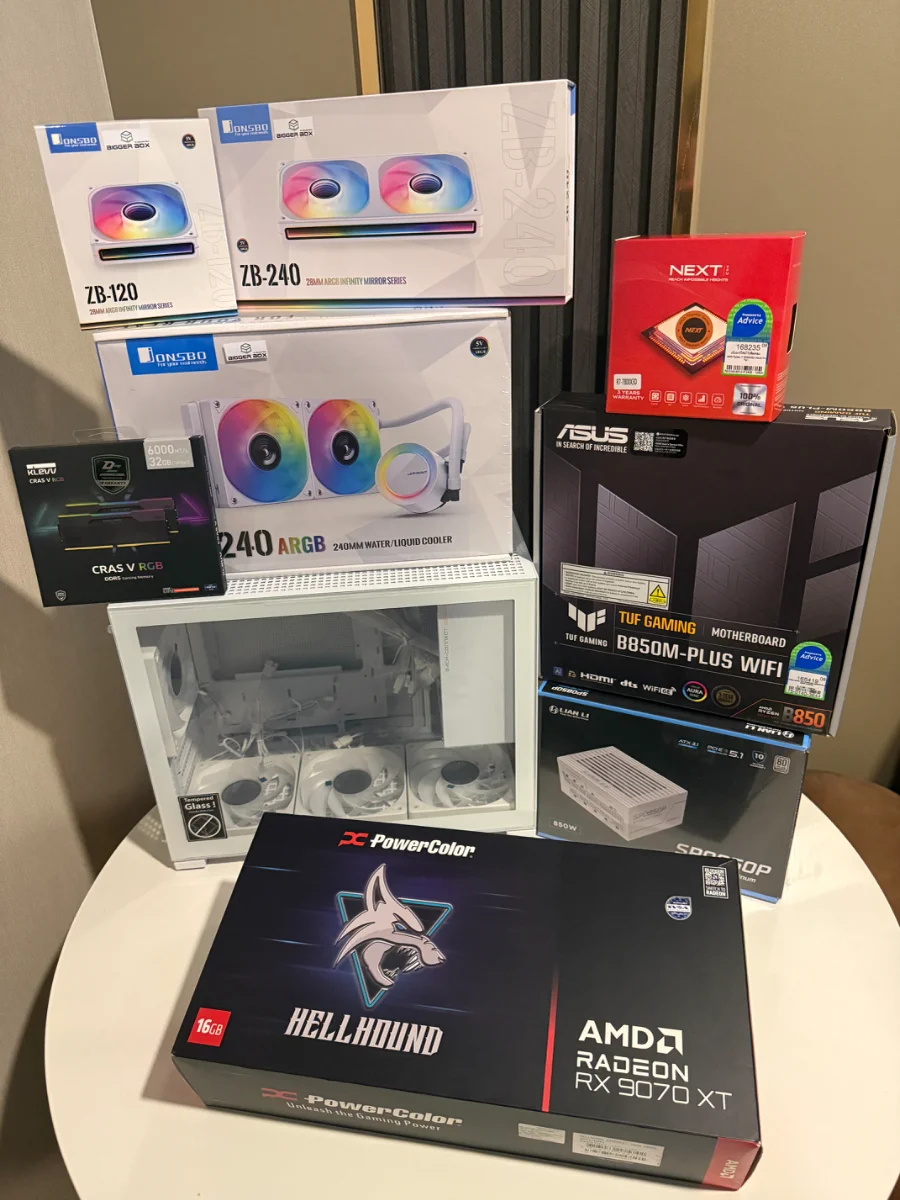
Case - Jonsbo D32 Pro
Fans - Jonsbo ZB-120&240 (managed to order a reverse 120, so that’s intake atm. Will keep an eye on temps and swap if needed)
AIO - Jonsbo TG-240
Rest - 7800x3d / 32gb KLEVV 6000 CL28 / PowerColor 9070 XT Hellhound / ASUS TUF Gaming B850M-Plus WiFi. Thai websites really weren’t much fun trying to get the parts together! About £1,530 without an SSD. Feels okay given where we are with tech these days.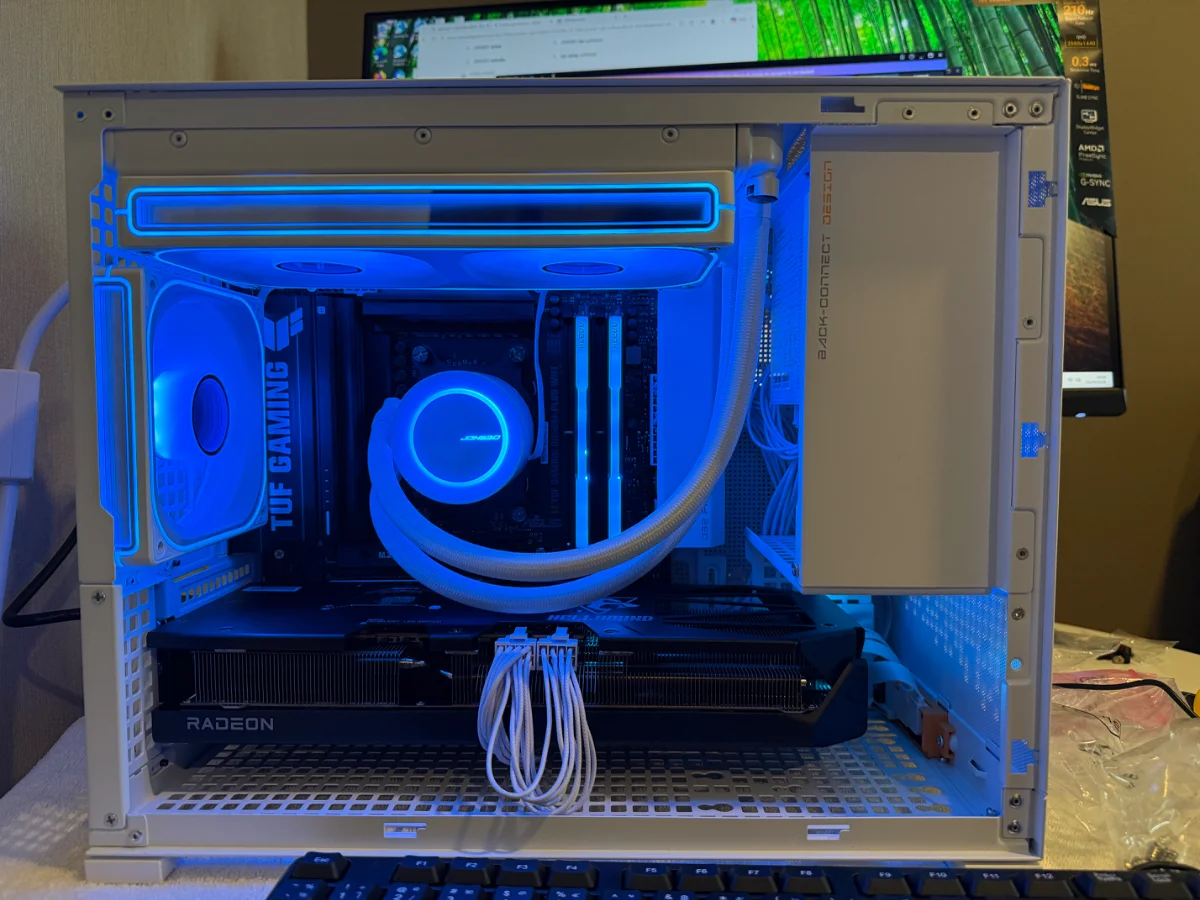


Upgraded my case and fans this time last week, finally got the build as I want it now.I enjoyed every minute of building this PC. Shame I can’t take good pictures of it!!