The rise of AMD

Associate
Joined
14 May 2012
Posts
1,288
So, this is my first AMD build in more than 15 years.
I'm reusing my case, GPU etc. but I'll list out all the existing components for posterity.
What's new:
IMG-0419.jpg

CPU: AMD Ryzen 7 9800x3D
Motherboard: MSI MEG x870e Godlike
RAM: 96Gb Corsair Dominator Titanium 6600 DDR5 (2x48Gb)
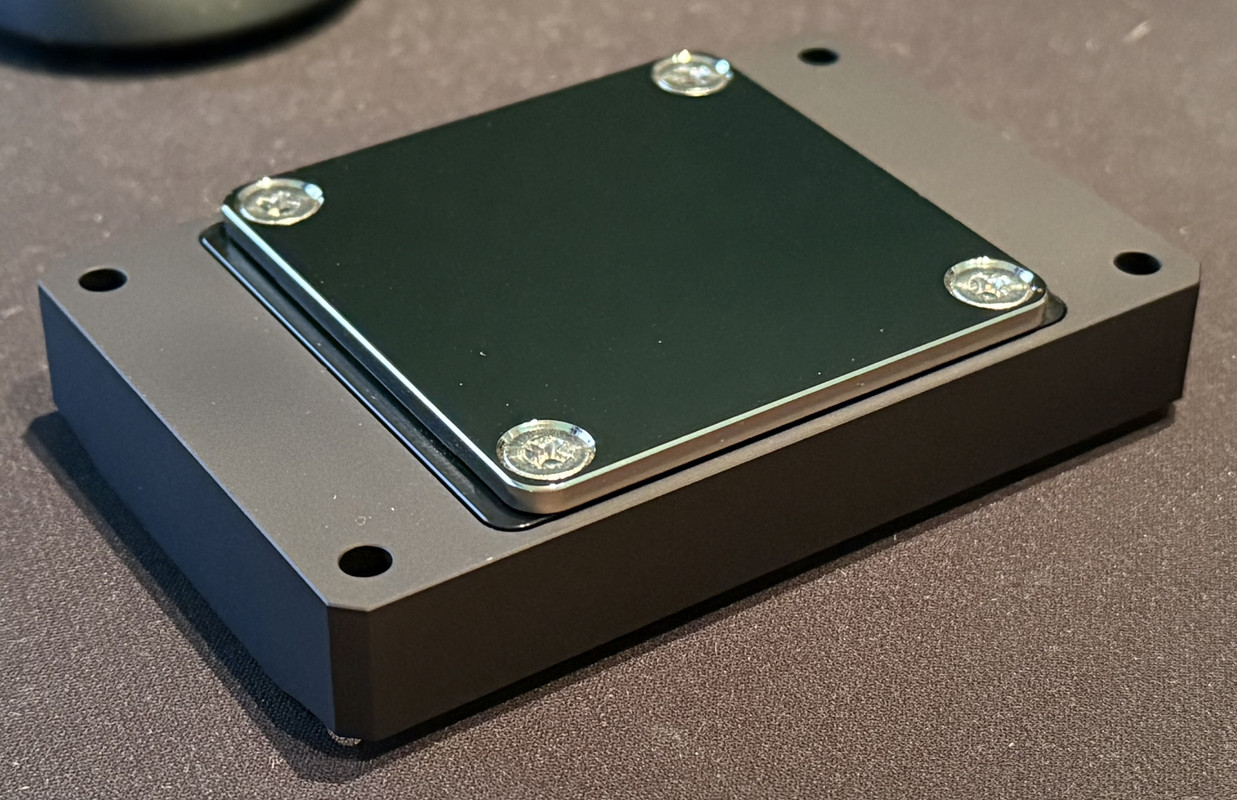
Cooler: OPTIMUS Signature V3 Pro - AMD (Black)

Existing:
PSU: Corsair AXi 1600
GPU: EVGA 3080 Ti FTW - EK Acetal & Nickle waterblock + Active backplate

Storage: Samsung 980 Pro 2Tb
WD Black 770 2Tb
WD Black 850 4Tb

Case
CaseLabs STH10

Watercooling:
1x 560mm EK Radiator
1x 280mm EK Radiator
1x 360mm EK Radiator
1x 480mm EK Radiator
2x AquaComputer D5 Next
1x AquaComputer Aquaero 5LT
1x AquaComputer Aquaero 6
3x Noctua Fan Controller NA_FH1

Bitspower Black Sparkle fittings
Bitspower Carbon black 12mm copper tubing
Singularity Computers SMA8 Distribution plates
Singularity Computers Powerboard

6x Noctua NF-A14x25 Chromax Fans
10x Noctua NF-A12x25 Chromax Fans


IMG-0420.jpg


IMG-0421.jpg


IMG-0422.jpg


I am aware I forgot to take the stickers off the power / reset / PCIe Release buttons; and the block is not installed yet, which is why you can't see the screws.

I don't THINK I've missed anything, but I will add anything if I've missed it. There might not be a huge amount of updates over the Christmas period, as I'm not sure how my wife will feel with me taking up valuable space in the house rebuilding my PC with her family here...
I'm currently posting this on my old PC, so I can't really post pictures of anything other than the new stuff.
 
nice looking waterblock, it suits very well ;)

yeah that's a really good looking block

Honestly, it looks even more incredible in person. The coldplate is a mirror finish on the bottom and the engineering looks so good.
I couldn't get hold of the full metal block they had previously; so that's the brand new one with the acetal core, to bring down the costs (slightly).

IMG-0424.jpg
 
Last edited:
Build looks fabtastic but be careful with that Godlike. Just had to return mine. The Dynamic Dashboard kept connecting and disconneting (making the sound you get when plugging in and removing USB device). Seems on average it takes 2 weeks for problem to materialise, there is a software fix but only lasts a couple weeks. Some over on teh MSI forums have had multiple replacements with the same problem . Mine went back to the shop for a full refund, RMA's to MSI seem to be taking a while due to "lack of availability"
I won’t rush to offload my current parts then!
 
Just been looking through the MSI forums about the board; there seem to be quite a few people with this issue.
I'll make sure I update everything (BIOS / Firmware etc) and don't install MSI Centre; we'll see what happens.

It looks like it's an issue either with the connector on the EZ-Bridge or the EZ-Bridge firmware itself as swapping the bridge without swapping the board apparently resolves the issue.


Anyway; the new tubing arrived on Christmas eve; another nice early Christmas present! So as soon as my family starts leaving early next week I can start the rebuild process.


EDIT: Given the risk of errors I have decided to order a Crucial T705 2Tb drive for an OS drive, this way I don't have to do a full wipe and re-install on the new board to ensure that I can quickly swap in the old system and be back up and running in the event of any issues.
 
Last edited:
So, I’m just in the process of stripping down my old build (pictures to be added to this post) and I made a discovery that proves am an idiot.
I spent hours when I rebuilt into case originally planning tubing routes and working in the tiniest space imaginable in the bottom section of the case trying to attach fitting and line everything up.
I had completely forgotten that you can flip this case on its head and remove the bottom from the outside…
 
Ok, here’s what we’re stripping down…

IMG-0497.jpg


And this was it when it was powered on.
IMG-9886.jpg

If you can’t quite see it the i9 10920 temp was 25c, but it generally idled around 32c


I had noticed that there was some deposit building up in the distroplate where there are some "calm" areas:
IMG-0498.jpg

IMG-0499.jpg


So, I'm now flushing out each of the components from the lower loop before re-assembly.

Hard disks are going in: M2_2 is empty as it shares lanes with the rear 40GB/s USB C ports.
IMG-0502.jpg


There are a couple of irritating "features" on the Godlike; the 24 Pin ATX Power cable is flipped; so my short cable from my Powerboard needs adjusting, and due to the STH10s slide out motherboard tray it's a LITTLE tight getting to the connector, so I'm going to have to trim the back lip off it so that it sits correctly when it's installed.

Nothing that isn't resolvable; just minor things which I hadn't considered.
IMG-0504.jpg
 
Last edited:
So I had noticed this before, but I didn't realize the extent of it.
There are some areas where it looks like the reflective coating has come away from the edges of the acrylic sheet on my distro board

IMG-0507.jpg
IMG-0508.jpg


It's not too noticeable when it's got the acrylic over it, but I've got no idea if there's anything I can do about it without getting a new sheet of acrylic. Any ideas?

(I've also dropped an email to Singularity Computers for some advice, since it's their distroplate.)


Having thought this through over the last hour or two, I've decided to go ahead with the build and look at resolving this when I do a GPU replacement in a month or two. I only need to drain the GPU loop to remove it and replace it anyway, and I'd need to wait for a replacement from Australia which will take significant time.


EDIT: So Daniel got back to me (outstanding customer service considering it's 6:30AM on New Year’s Day for him). Apparently it's due to a twist in the acrylic at some stage and it's separated from the coating and as I expected... I need a new one.

I ordered some other stuff, (custom made cables and a few other bits) and he was kind enough to send me the new acrylic for free!
 
Last edited:
I've ordered custom (black) sleeved cables from the PSU to the Powerboard.

However I'm now looking at the rest of the cables; most of the stuff is going to be black. However for the ATX / EPX / 12v-2x6 I'm looking at the following:
IMG-0534.jpg


I've used offset colourways in the past, and I really like how it looks in the final build, these are pretty east to make because they are just 1-1 pinouts from the Powerboard to the Motherboard / GPU.

I just need to figure out if I'm going to dye my coolant or leave it clear (turquoise is a really hard colour to mix).
 
godlike motherboard for that money im not sure is worth it!

Does look great though
We'll see what happens.
I'm keeping an eye on what's going on with the forums.

So, I'll post some photos shortly, but it's currently back together in a temporary arrangement, including (but not limited to) an external power supply, no working argb, cable management is an absolute mess: random cable extensions etc.)
I didn't want to be in a situation where I was running down the warranty without having the board up and running to begin any potential degradation of the EZ Bridge.
I'm currently waiting on;
  • Wire, sleeving & cable connectors for my fans (Germany)
  • Replacement acrylic for my distro plate (Australia)
  • Replacement PSU cables (Australia)
  • Wire, sleeving & connectors for my Powerboard to other components (Germany)
  • A new internal USB hub (OCUK - Hopefully Monday)
And since the argb controller for the Godlike is an external dongle with a fan hub as well, I could do with an alternative which I haven't yet chosen.
I don't want to us MSI center, so I can't control the ARGB from the motherboard anyway. (Although this could just be shooting myself in the foot). This remains to be seen.

In the mean time, here's the powerboard:
IMG-0546.jpg


You can see the stock cables at the bottom and there's about 30cm of spare cable in each of them, that I currently need to "lose", hence the PSU hanging out of the side of the case for the moment. You can also see that I'm using extensions in the EPS slots as the STH10 doesn't have a cut out in the motherboard tray for EPS in the top right of the board (will be fixed with custom cables), as will all the random fan cables.
 
Technically it does very little other than (eventually) tidy up cable management, as it allows for short runs from the board to the motherboard / GPU.
It also converts PCIE to 12VHPWR if / when I change my GPU.

It also has a fan splitter and ARGB splitter built in, and if I had any it has 2 SATA mounts behind it for SSDs or 2.5" drives.
 
Last edited:
Still waiting on stuff arriving.
It's been 7 days and I still haven't seen any sign of the issues with the EZ-Bridge (not to say that they won't happen) but that's not to say that it won't happen in the future.
MSI have said it will be resolved in the next BIOS update coming this month sometime (by all accounts).

Obviously I'm also still waiting on the 50xx series GPU, I'm not sure if I should wait for the waterblocks to start coming out; or if I should get the Aorus GeForce 5090 Xtreme Waterforce WB. I'm not sure if it fits with my build or not since it has a few gold accents.

Alternatively I could wait for the Optimus blocks.
 
Ok, so I thought I'd check that everything seems to be running ok...
Screenshot-2025-01-08-165330.png


Full load under Prime95 and we're seeing a max temp of 66c so I think we're looking pretty good. That's with a pretty low flow rate (Pump running around 25%, and fans at 413RPM). So still silent for all intents and purposes. Which is pretty good results.

I won't bother posting my GPU, since I've currently just got Mayhem's Ultra Pure H20 in there, rather than X1, as I'll be (hopefully) draining the loop in less than a month.

Royal Mail apparently attempted to deliver all my sleeving supplies today; however failed due to being unable to find an address that my regular postman comes to daily... Hopefully it's just because my drive looks really icy and he didn't want to risk it.
 
Sigh, just looked under my desk before I went to power down for the evening and I see this:
IMG-0597.jpg


So this is the exact issue being logged on the MSI forums, which seems to affect all of the 870 Godlike EZ-Bridges. I guess I'm installing MSI Center and running the update in the hope that it doesn't brick it.

lets have a look at it then. now its in the case
Will do, I've just been running it to see if the above (obviously inevitable) issue would occur.
 
I'd send it back whilst you can.

Why do I say that?

Well, many moons ago I spent 3500 quid on a PC. I was using a 3970x IIRC. Sandybridge E. I bought an MSI Big Bang Xpower II which at the time was the equivalent of the Godlike. IE their most expensive overbuilt mobo. It lasted 10 months. At which point the VRM died and it would only run at 1.1ghz.

By this time X99 had launched. I first contacted the store I got it from and they said they could not replace it. Obviously with a PC like that (much like this one of yours) that wasn't good enough so I contacted MSI in Holland and they issued me an RMA.

Cool. However when they got it back they then tell me they don't stock any replacement boards. "OK well what X79 board CAN you send me?" Their answer was "none. We don't have any ".

So I paid all that for a board, spent 3500 pounds on an 11 month old PC and they can't send me a board to get it working again.

Their offer was pathetic. In the end IIRC I got back about 200 quid after constant arguing with them.

In other words? Get it backed now. I would bet they DO NOT stock RMA boards for something so expensive and I wouldn't trust them as far as I could throw them.

Not bought an MSI board since.
Yeah, I'm tempted.

There's a new update out today, so I'm going to try that and see how it goes.
The Asus Crosshair x870 Extreme was announced the other day; so if I do end up returning it then I'll switch it out for that assuming it looks good.
 
Well Royal Mail finally remembered where my house was today (my parcels had been stuck "Unable to find address" since Wednesday).
IMG-0615.jpg

So that means my evenings are now pretty much dedicated to doing wiring... yay!
Genuinely the worst part of any build, but they do elevate the look significantly.

Roll at the back is wire & sleeving for fans.
Right hand side is the sleeving for the EPS & ATX cables, and the left is the wire and sleeving for the 12VHPWR connector.
 
I don't mind it. Sometimes it's a nice change of pace really.
True, normally it's the delay to my build that frustrates me. However with everything already back together it's much easier.

Ok, so I have a question:

Do I:
1. Run full length wires for each pump individually
2. solder them as a "Y" and run them from behind the motherboard tray
3. Daisy chain one into another one

They are currently daisy chained here:
IMG-0617.jpg
 
Personally I'd run them individually or the tidiest way.
True, I'm not sure I'd be able to do heatshrinkless into the SATA connectors if there were 2 cables running into it (unless I used a lower gauge of wire.

In other news I was looking at the 5090 waterblocks and found this one:
IMG-0618.jpg


Which is the Watercool Heatkiller block which I think would look great in my build (I'd probably have to switch out all of the port blockers for nicer looking ones, but that's pretty easy). I'm pretty sure this is for the Pallit cards.
 
I updated teh firmaware on mine and installed the MSI centre, everything worked great for 10 days then the screen would not power on, next day teh board stopped powering on also. These things just should not happenon a board of this price, a one off can always happen buit this seems very widespread
Slightly derailing; but I have seen people have some success resolving this (if you haven't RMAed it) using the newest firmware and hotswapping the EZ-Bridge back onto the motherboard.
Check the related thread about the Dynamic Dashboard III on the MSI forums.

Update:
Had to order a few more bits and pieces, which should arrive before the weekend. New Firmware on the motherboard is looking promising, but we'll see.
Replacement acrylic from Singularity Computers is enroute and is due Friday.
But then we're only 13 or so days from 5090 release day.
So while I will be working on my cabling (as soon as my heatshrink arrives, because I'm an idiot and forgot to include it in my order) I will put some updates on with some pictures of the cabling as it goes in. Probably piece by piece.

Hopefully we're not too far off draining and re-assembly with a 5090, which is exciting.

Since I knew I would need an aRGB Controller I went ahead and ordered a Razer Chroma aRBG Controller, since it fit my requirements the best. Will post pictures once it arrives.
 
Back
Top Bottom