


Thermalright Silver Arrow Orientation

Associate
Joined
26 Feb 2004
Posts
971
Location
China (Qinhuangdao)
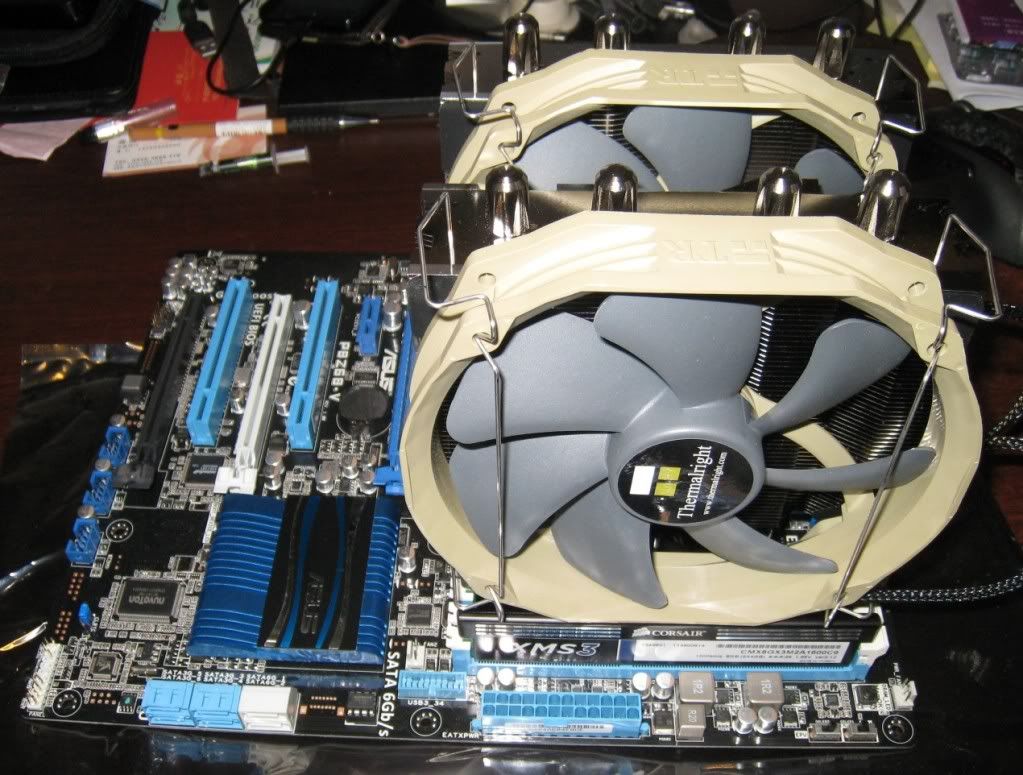
I have a feeling I've mounted my Silver Arrow the wrong way round (i.e. air flow wrong direction).

I have heard there is supposed to be an arrow indicating the direction of air flow, but I can't see it.

This is how I orientated it :
ThermalrightSilverArrow.jpg


Is it the wrong way round?
 
Thanks for the quick reply! I had put my hand in the case a little earlier, and it felt like there was some air flow in the other direction, so I started to get a little paranoid!
 
Thanks for the quick reply! I had put my hand in the case a little earlier, and it felt like there was some air flow in the other direction, so I started to get a little paranoid!

I sometimes get a small piece of paper and put it near the fan (not near enough to get stuck in it :p) and see if the airflow pushes it away or pulls it towards the fan.


 
That thing is huge do's your graphics card hit it? looked at a couple of YouTube vids they all had it the same way so spot on :cool:

It's close, but it does fit. Had to get the low profile RAM or I would have had to put the fans the other side of the heatsink. Everything's a "near miss" inside my case!
 
That's the same way mine is orientated. The arrows on the thermalright fans are tiny, took me a while to find them too! It look bigger every time I see it!:p
 
Looks fine to me. The arrows indicating airflow are on the beige outer frame. They're the same colour as the frame which is why they're hard to see.
 
those fans are mounted correctly. The arrows can be seen on the opposite (bottom) of the "TR" sign.

edit:
they are near the memory modules.
 
Reminds me of my Noctua NH-D14, has arrows on the fans to show direction of blow.
(I have the same board too)

I had the same issue with the RAM too :)
 
those fans are mounted correctly. The arrows can be seen on the opposite (bottom) of the "TR" sign.

edit:
they are near the memory modules.

Amazing eyesight or I'm just too tired!:p

I own 2 of these coolers and the arrows are on the outside of the frame where it's sitting on top of the RAM in the OP's picture.

Now that's exceptional eyesight if pc_monkey can see them.
 
I own 2 of these coolers and the arrows are on the outside of the frame where it's sitting on top of the RAM in the OP's picture.

Now that's exceptional eyesight if pc_monkey can see them.

LOL, that is what I meant, that is why it can't be seen in op's pics as its above the ram.... perhaps I did not express myself properly....:D

If you look at the top of the OP's pic, there is a "TR" sign, now I said the arrows are at the opposite, and bottom, and near the memory modules.
 
Last edited:
Whats the Silver arrow like without fans. Anyone here tried it? Seen good reviews about its passive cooling. Tempteing to look at, just not sure it would fit in my case!

I used to use this cooler, fantastic cooling. Because of the RAM being blocked I used just one fan and it was fine. The heatsink itself is so awesome you can just use the one fan and for me at least I didn't notice a change in temps. I think running it passive would be fine provided you got decent case fans.

Only reason I don't use it now is because I switched to water. Now it's just lying around at home...bit of a shame, might sell mine on mm :/
 
I'd happily buy off you if the price is right.

I have a Fractal 3000 case.

XMS3 RAM, Guessing it shouldnt get in the way!?

I've also got 2 intakes at the front 140mm and 120mm, a 40 outake at the top and a 120mm outake at the back.
 
Back
Top Bottom





