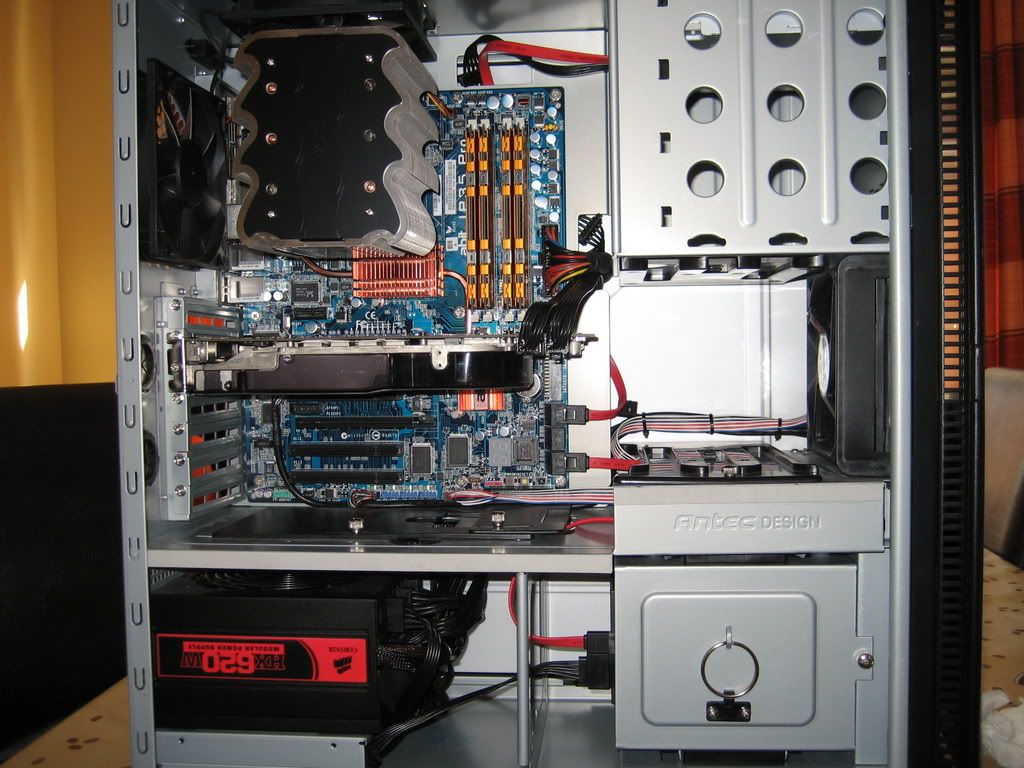
Tuniq Tower installation.

Soldato
Joined
23 Apr 2006
Posts
6,500
Location
Nottingham
I got my Akaska Zen case, P35C DS3R motherboard, and the Tuniq Tower. I read the bit on which way the Tuniq Tower goes onto the motherboard, but I was wondering which way would the fan need to be facing to get adequate temps, as it faces the fan on the case. I dunno which way it blows, im guessing the fan on the case is an exaust fan to get out hot air. Would I have to take the heatsink to get an idea of which way the TT fan is blowing? :eek:. I do get around 40c idle @ 3Ghz.

Also, should I screw it down tight?

Should there be a certain way i should put it, or an easier way to find out which way the fan does indeed blow or doesnt it matter.
 
Last edited:

The black fins on where the fan goes should be pointing downwards to go towards the rear of the case.
Yes screw it until it becomes hard to turn the screws any more.
 
The black fins on where the fan goes should be pointing downwards to go towards the rear of the case.
Yes screw it until it becomes hard to turn the screws any more.

Thumb tight or do you use pliers? If you screw too tight, is there a danger of the screws touching the case and shorting the mobo? In my recent disasterous build, my mobo blew, and I couldn't think why - I thought this might be a reason.

Thanks
 
I have the same board same HS!

I did it thumb tight, but I was able to see the pins coming through and maybe getting too close to the case, I was happy that thumb tight was ok
 
I have the same board same HS!

I did it thumb tight, but I was able to see the pins coming through and maybe getting too close to the case, I was happy that thumb tight was ok

The problem is for me is that "thumb tight" doesn't seem tight enough. You can still physically move the heatsink, which doesn't seem right. On the other hand, I'm terrified of blowing my replacement mobo.
 
I have the same mobo / cooler combination on my G0 Quad.. FANTASTIC cooler temps are very good.

If you look on the thumb screws you can see the threading i just tightened untill i couldnt see the threading at the bottom any more. Sometimes it was quite stiff so i used pliers as navigating behind the NB heatsink can be difficult.

I have mine as shown in this picture...

P1050620.JPG
 
Thumb tight or do you use pliers? If you screw too tight, is there a danger of the screws touching the case and shorting the mobo? In my recent disasterous build, my mobo blew, and I couldn't think why - I thought this might be a reason.

Thanks

there shouldn't be any signal/voltage on the screws so it won't matter if they do touch the case. I did mine thumb tight and have checked it again last weekend and tightened a little more. Not sure, but you could potentially damage the mobo by overtightening.

mines facing this way which I hope is blowing out!

IMG_1986.jpg
 
yipyipboo nice case.

Sorry to hijack a bit, but i notice 4GB of RAM, i currently have 2gb 8500 ballistix sitting outside my box, because windows vista will not boot with it in, i get a blue screen..

How did you get it to play nice? I'm running Vista HP 64bit..
 
Thumb tight or do you use pliers? If you screw too tight, is there a danger of the screws touching the case and shorting the mobo? In my recent disasterous build, my mobo blew, and I couldn't think why - I thought this might be a reason.

Thanks
Don't use much force at all as the motherboard will warp if it's too tight. I've fitted the Tuniq Tower a lot recently due to testing various CPUs and I progressively tightened it less and less each time as I found having it very tight made little difference. Now my motherboard doesn't warp at all and temps are still good. :cool:
 
yipyipboo, that's a really neat cable arrangement of your P180, anymore pics would be most welcome.

I have that case and a TT, and my cables look like cooked spaghetti in a wind tunnel :D
 
If you look on the thumb screws you can see the threading i just tightened untill i couldnt see the threading at the bottom any more. Sometimes it was quite stiff so i used pliers as navigating behind the NB heatsink can be difficult.

Don't use much force at all as the motherboard will warp if it's too tight. I've fitted the Tuniq Tower a lot recently due to testing various CPUs and I progressively tightened it less and less each time as I found having it very tight made little difference. Now my motherboard doesn't warp at all and temps are still good.

Thanks for the tips, guys, I've been screwing them in far too hard :eek:
 
there shouldn't be any signal/voltage on the screws so it won't matter if they do touch the case. I did mine thumb tight and have checked it again last weekend and tightened a little more. Not sure, but you could potentially damage the mobo by overtightening.

mines facing this way which I hope is blowing out!

I did mine the same so the hot air from it blows out past the fins then is sucked straight out the back of my case by the rear case fan.

I had it facing the other way before but turning it around dropped my ambient case temp by A LOT and also helped cpu cooling
 
yipyipboo nice case.

Sorry to hijack a bit, but i notice 4GB of RAM, i currently have 2gb 8500 ballistix sitting outside my box, because windows vista will not boot with it in, i get a blue screen..

How did you get it to play nice? I'm running Vista HP 64bit..

i have 6400 all on auto (I assume), haven't had time to play with timings etc but i am using vista 64 and haven't had any problems.
 
yipyipboo, that's a really neat cable arrangement of your P180, anymore pics would be most welcome.

I have that case and a TT, and my cables look like cooked spaghetti in a wind tunnel :D

lol, check out the Case section, i think i must have posted all my pics in there today!
 
Back
Top Bottom