


Hey Guys,
Had my new system for 3 weeks now.
Ever since I've set the wireless up on it, it's been a real nightmare, very very inconsistent and also very frustrating.
Often when I boot the machine, it will just not connect despite the router downstairs being powered and on, as well as the broadband modem being on and ready.
I've reinstalled the drivers from the Belkin CD many times, so presumably not that unless there's some very unlikely updates on their wsite.
Whenever I try to repair my connection, I receive the following message:
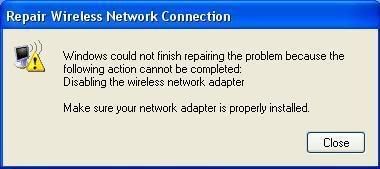
Also when trying to disable the connection in Network Conn's by right clicking, I get the following warning:

When I had the connection on my Athlon shuttle machine, I was able to do both of these functions without error, so clearly in my desperation to get net upstairs I've fluffed it somewhere, so any fixes are much appreicated.
Thanks,
Pete.
Had my new system for 3 weeks now.
Ever since I've set the wireless up on it, it's been a real nightmare, very very inconsistent and also very frustrating.
Often when I boot the machine, it will just not connect despite the router downstairs being powered and on, as well as the broadband modem being on and ready.
I've reinstalled the drivers from the Belkin CD many times, so presumably not that unless there's some very unlikely updates on their wsite.
Whenever I try to repair my connection, I receive the following message:
Also when trying to disable the connection in Network Conn's by right clicking, I get the following warning:
When I had the connection on my Athlon shuttle machine, I was able to do both of these functions without error, so clearly in my desperation to get net upstairs I've fluffed it somewhere, so any fixes are much appreicated.
Thanks,
Pete.


