• Competitor rules

    Please remember that any mention of competitors, hinting at competitors or offering to provide details of competitors will result in an account suspension. The full rules can be found under the 'Terms and Rules' link in the bottom right corner of your screen. Just don't mention competitors in any way, shape or form and you'll be OK.

Video from PC to TV

Associate
Joined
3 Dec 2007
Posts
264
Location
Essex
Hi All,

I use a video sender to send images and sound to my tv. Well, at least i did when i had my old pc.

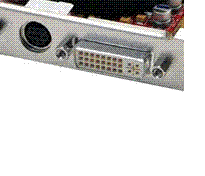
Now i have a new pc and the graphics card is modern and not old like my last. On my old card i had this port:

vidonpc.jpg

A

Now i have this:

newcardport.gif

B

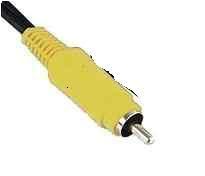
My sender box doesnt have a compatable cable. The cable ends like this:
Vidadapter.jpg

C

Obviously pic C goes into pic A.

I need Pic C go into Pic B.

I need some form of adapter to fit picture C, so that it can fit the port in Picture A.

My graphics card is OCUK 8800GT.

Any ideas?

 
You should have got a set of leads with your card, probably component HD ones. But they might have a yellow one too (which is composite)

If not, then you can probably get the right lead from ebay.
 
Checked the cables with the card and not compatable.

I should have said the yellow cable isnt actually yellow at home its black. All it is is video, the sound cable is plugged into the sound jack. Two different cables.

So the cables with card are not related to this as they dont fit the sender.

I'll check ebay, thanks for letting me know.

Any one else?
 
search for "9-PIN S-VIDEO To RCA TV Converter Adapter IN-and OUT!"

I think thats what you need :)

(maybe)
 
With my BFG 8800GT I got a breakout cable that goes into the port on the back. Its only the 7 pin version, not the 9.

It has a Red, Blue and Green component output. Connect your yellow Composite to the Blue as this acts as both a Component and Composte.
 
get a small lead that starts as s video and converts into composite(edit*)
you sometimes get them free with graphics cards
 
Last edited:
Back
Top Bottom