

Vista defrag

GTO

GTO

Associate
Joined
18 Aug 2006
Posts
87
Location
Staffordshire
After days of making sure Vista would run properly on my machine I finally did a fresh install. Everything went as expected and I have most of my software installed now.

but!
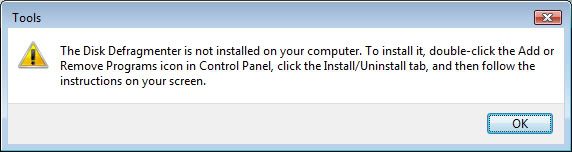
Defrag.jpg


I know what the message says but does anyone fancy trying to explain how I get Defrag installed because I can't see it.
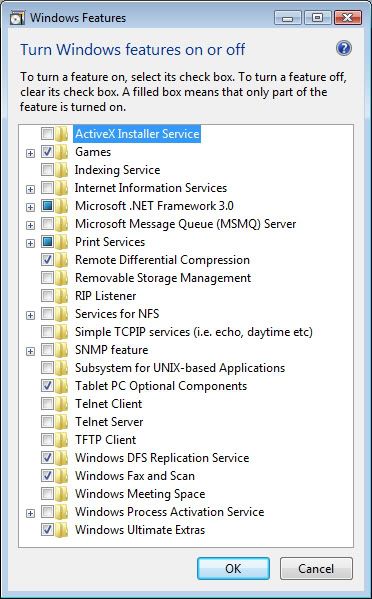

AddRemove.jpg
 
No one has any ideas? :confused:

How about a 3rd party defrag? Is there one which will work with RC2?

I've tried Diskeeper 10 (supposed to be compatible) but it won't install.
 
GTO said:
I've searched but can't find Defrag.exe.

Even tried it in command line but still nothing.

This is really weird.

i've got a command line defrag.exe on my vista install.....

clipboard01pg1.png


and i can also access a dialog like on that wikipedia image by right clicking my drive and going to the tools tab. :)
 
marc2003 said:
i've got a command line defrag.exe on my vista install.....

clipboard01pg1.png


and i can also access a dialog like on that wikipedia image by right clicking my drive and going to the tools tab. :)

When I try command line the window opens for a fraction of a second then it's gone. :eek:

I thought my Vista install went OK.

Obviously not! :rolleyes:
 
i couldnt fidn it either, I did however notice that its on the 'One Care Live Beta' along with a few other utils, maybe microsoft have decided to charge for it now :(
 
GTO said:
When I try command line the window opens for a fraction of a second then it's gone. :eek:

I thought my Vista install went OK.

Obviously not! :rolleyes:

well no.... you either have to run defrag.exe from an already open command prompt windows or from start, run,

cmd /k defrag

that will stop the window instantly closing.... ;)
 
Thanks for all the replies but I'm going back to XP.

I've tried Vista and on the whole it was fine even though it's still beta but I need to know that my pc is going to work properly every time I turn it on.
 
GTO said:
When I try command line the window opens for a fraction of a second then it's gone. :eek:

I thought my Vista install went OK.

Obviously not! :rolleyes:

You need to run MSDOS as an administrator, else it won't function correctly. The wonders of UAC.
 
Back
Top Bottom



